







Select your Mousetrapper
Table of Contents
Mousetrapper is not sitting stillDifferences between models
Selection guide
In summary
Trial package for businesses
Mousetrapper never stands still
The Mousetrapper was, in its early years, actually a Mousetrapper (mouse trap). A cleverly designed product in which you could clamp your mouse on the side. A rolling/sliding bar was connected to the ball at the bottom of the mouse; pressing two hinged buttons activated hooks that allowed you to operate the left and right mouse buttons.
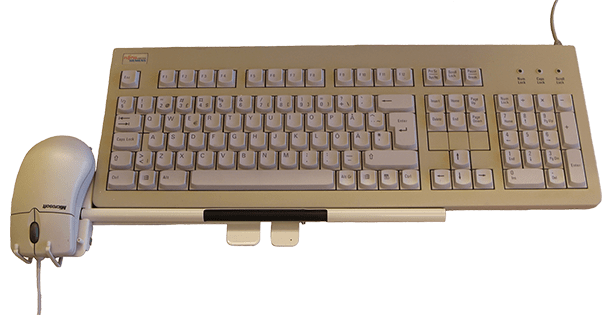 The very first Mousetrapper in 1994
It clearly shows where the Mousetrapper comes from and how rapidly the product has developed. Mousetrapper has now even developed models for different tasks and target groups. At the time of writing, you can choose from as many as four different versions. Because these versions actually differ from one another, it has become somewhat more difficult to make a choice.
For example, there is an entry-level model with a limited number of buttons and functions for general mouse use, but also a wireless mobile Mousetrapper with as many as 9 programmable buttons.
Differences between models
The main differences between the models lie primarily in four areas:
- Wired and wireless
- Type of workstation
- Programmable buttons or not (MTkeys, yeah)
- Number of buttons
If you compare these features side by side, you’ll soon realise that there are actually three models that differ significantly from one another. In particular, the Mousetrapper Prime and Advance are indistinguishable from one another apart from the presence or absence of a cable and two extra buttons. What are they? The top-of-the-range models with plenty of programmable buttons and comfortable palm rests. The wireless Prime is just that bit more suitable for commuting between workstations.
The other models are much easier to identify based on their features. You’ll recognise the Flexible straight away by its super-compact size and feather-light weight of just 300 grams. The perfect partner for flexible working, then. With the Lite, you get all the best features of Mousetrapper without the fuss. Not cheap, but certainly the cheapest. No excess of buttons, just exactly what you need to use the mouse comfortably.
Selection guide
Using the table below, you can see the differences between the models even more easily and make an informed choice.
| Lite | Advance | Flexible | Prime | |
| Operating system | / | / | / | / |
| Buttons | 4 | 6 | 9 | 8 |
| Maximum DPI | 1500 | 2000 | 2000 | 2000 |
| Workstation | Permanent | Fixed | Mobile | Fixed/Mobile |
| Wireless | ||||
| MT Keys | ||||
| Dimensions | 500 x 115 x 22 mm | 480 x 110 x 20 mm | 300 x 95 x 19 mm | 480 x 110 x 20 mm |
| Weight | 650 grams | 670 grams | 300 grams | 720 grams |
| Material | ABS plastic sleeve, textile/silicone mat and neoprene supports | ABS plastic sleeve, textile/silicone mat and polyester supports | ABS plastic sleeve, textile/silicone mat | ABS plastic sleeve, textile/silicone mat and faux leather supports |
| Unique feature | Step-in | Complete and most popular model | Most compact trackpad | Wireless flagship |
| Ergonomics favourite |
In summary
Right, the summary. It was useful back in secondary school and still comes in handy. See below for a 5–7-line guide on which Mousetrapper to choose
Lite | Entry-level model

The entry-level model for when you want the benefits of a compact working position, but consider extra buttons and programmable functions unnecessary frills.
Advance | Most popular choice
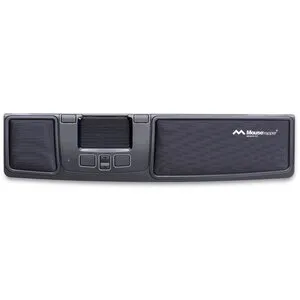
The best choice for the office environment. It features additional buttons that you can assign other functions to using MT Keys. It is wired, making it the best choice when it comes to reliability and durability.
Prime | Wireless flagship

Wireless – we’re big fans. It’s neat, a bit easier to carry round, and looks professional. Are you a demanding user? Then we’re sure you’ve got two more functions in mind that would suit the two extra buttons compared to the Advance.
Call Tim and choose the best Mousetrapper for you