









Hide cables with the top 5 products from 2026
Table of Contents
The must-have products for neatly concealing your cables
1. Extend cable duct
2. Round metal cable grommet, 2-piece
3. Ergopro Basic cable duct
4. Textie Velcro cable tie
5. Cable Snake cable guide
Let us help you tidy away your cables
The must-have products for neatly hiding your cables
A quick refresh for the little cable wizard
I expect that by the time you’ve read this top 5, you’ll already be somewhat convinced of the benefits of tidying away your cables and wires. Still in doubt? No problem! I’ll just list the main advantages for you once more.
- Safety! Preventing falls and trips is reason enough to get those annoying cables and power strips off the floor
- Checking and maintaining your cabling! By tidying away your cabling, you can immediately check whether everything is still free from cracks and kinks. By tidying away the cables, you ensure they actually stay in good condition. In many cases, you’ll also come across metres of cables that haven’t been used for years
- Cleaning is so much easier. Just try giving the floor a thorough hoover with metres of cable strewn across it, power strips in between, and adapters or Wi-Fi boosters lying about
- A happy IT department! You’re less likely to knock cables loose, so the IT support staff on duty receive fewer messages saying ‘Network is down’
- Tidy is nice! It feels good to get things sorted. Whether that’s your living room, garden or workplace
Our top 5 products to help you tidy away your cables – how did we come up with this list? It’s actually a combination of three key factors that we take into account in all our selections of top products.
What do our customers say?
The number one factor is you, the customer. Specifically, customers who have gone before you. We learn a great deal from our customers. Does something work really well (few returns), is the quality up to standard (returns/reviews), and do the expectations match the actual product (feedback via chat, email and reviews)?
What do we think?
Factor number 2 is us. We have quite a few years’ experience in the field of cable management. We test products, write about them and regularly use them ourselves in projects. You get to know your products well and know when and where best to use them.
What new developments are there?
The third factor we always take into account is product development. We add new products every year. These may be products we have high expectations of or are very enthusiastic about. I can already tell you that the newest product on this list is one from 2019, but it received a nice upgrade in 2024!
1. Extend cable tray – Updated in 2024!
The Extend cable trays have already made many desks cleaner, safer and tidier. Since it went online in November 2019, thousands of people have used it to organise their workspace. If you frequently change your setup or aren’t yet sure how much space you’ll need, the Extend cable tray is the ideal solution. You can adjust it to suit the space available. The advantage of a cable tray is that you can neatly conceal your cables whilst keeping them easily accessible. This means your workspace looks tidy again and you can get back to working comfortably.

Main advantages of the Extend cable tray
- Adjustable in length from 96–166 cm
- Three height settings available
- Mounting hardware included
- Suitable for almost any desk
- Plenty of space for cables
- Choice of 3 colours
- Sleek design
Installation and convenience
As the cable tray is extendable (96–166 cm wide | 5.8–8–10 cm high), you can adapt it to fit almost any desk. We do, of course, recommend that you measure your desk before ordering.
The Extend is, of course, unique because it can be extended, but that’s not all. Once it’s mounted on your desk, you can essentially fold it open. This allows you to neatly tuck away cables and power strips inside the channel. Once everything is in place, simply slide the channel closed again. It’s child’s play! In the video below, you can see how our cable ninja installs the Extend.
In my humble opinion
Ah, the Extend *takes a sip of coffee and gazes into the distance*. Now that’s what I call a well-designed cable tray. Easy to adjust, fits just about any desk length, it’s simple to install and affordable. You can mount it very well out of sight, especially if you hang the tray in the top slots of the brackets and slightly lower under the desk. Then it’s a real stealthy ninja.
The holes in the tray are ideal for threading plugs and cables through, and because the tray hinges, adding or removing items is incredibly simple. Does this cable tray have any downsides at all? Yes, it does. The tray isn’t particularly tall, so you’ll have to lay thick power strips on their sides to make room for the plugs. Is this a deal-breaker? Absolutely not; pick up the Extend in your preferred colour and you’re sure to be happy with it.
What do you think?
Just like us, many customers are convinced that the Extend is a top-quality product. 60 out of a total of 81 reviews give the Extend 5 stars. Most say they are very pleased with the adjustable length and height.
Jochem keeps it short and sweet. He says: ‘This cable tray is absolutely brilliant’. Martijn uses the Extend as a sort of storage unit: ‘I’ve got an 8-way power strip in there, 2 laptop chargers, a USB hub and all the accompanying cables, neatly out of sight’. Livai is very impressed with the quality of the Extend : ‘The quality is perfect and it’s a simple system; four screws to secure the tray at the right length – works perfectly’. Thanks for the kind words, gentlemen!
You can read through all the product reviews at your leisure on the product page.
Customers who already have the Extend installed!
The Extend is now installed in thousands of customers’ homes. See below for a small selection of the places where it is already in use.
2. Round 2-piece metal cable grommet
Cable grommets are a common sight in businesses. They are often supplied as standard with a new desk, with the hole pre-drilled either by the manufacturer of the worktops or the team assembling the desks. It is precisely this need to drill into the worktop that acts as a barrier to installing a cable grommet. It’s a shame, really, because you can buy a hole saw for relatively little money at a DIY store and then get to work yourself.

Main advantages of cable grommets
- No cables running behind the desktop
- Cables run away neatly bundled
- Place it wherever you like
- Attractive, professional finish
- Removable lid for feeding through thick plugs
Installation and convenience
If you don’t want to drill the holes yourself and are lucky, there may already be a hole in your worktop; you’ll just need to check the diameter of this hole. All you then need to do is fit the grommet and pull your cables through it. Are you planning to order a new desk? If so, ask about the option of having holes drilled upon delivery. Most suppliers offer this service, and so do we.
Please don’t be put off if your desk doesn’t have a hole. In fact, it’s a great opportunity to route your cables in the way that suits you best. You can even choose to drill several holes. For example, because your phone and desk lamp are on the left-hand side of the desk and your monitor, keyboard and mouse cables run down the middle.
My humble opinion
As far as I’m concerned, a cable grommet isn’t an essential item for tidying away your cables. However, it is becoming increasingly relevant, especially with the growing number of sit-stand desks. Because desks are being placed further apart and there are greater differences in working height due to adjustability, cables at the back have more slack and stand out.
When you route your cables down through the desk top, you instantly get rid of that ‘messy tangle’ and your workspace looks a lot tidier and more professional.
If you’re going for this, go straight for the metal two-part cable grommet and choose one of the six colours. The metal and the brush finish are very stylish. The removable cover is handy, as it allows cables with thick connectors to pass through. The cover can be screwed tight, so you don’t need to worry that a thick bundle of cables will push the cover out of the grommet.
What do you think?
I keep talking about offices and desks, but Kees proves that you can also use a cable grommet to great effect in other places. As you can see below, he has used two cable grommets to neatly route the cables from his kettle and coffee machine in the kitchen. He says: ‘A neat, sleek cable grommet looks very sturdy’.
 The cable from Kees’s coffee machine
 The cable from Kees’s kettle
David finds the grommet ‘very handy’. He’s very pleased with it, because ‘this allows me to neatly hide all my cables’.
You can read through all the product reviews at your leisure on the product page.
Customers whose metal cable grommets are already swallowing up cables!
This little metal grommet isn’t a one-trick pony. It’s found in tables, furniture, kitchens, cupboards – anywhere cables need to be hidden away as quickly as possible. See below for a brief overview of the places where it’s already in use.
3. Ergopro Basic cable tray
The latest addition to my list is the Ergopro Basic from 2019. A cable tray that has rapidly gained popularity thanks to its simplicity. It has a very ‘basic’ design, is easy to install and competitively priced. With three colours and three sizes available, it can be fitted under virtually any desk.
It is an open design, which is handy when adding or removing cables. If you find that some cables are slipping out, use a cable tie or a bit of Velcro to keep them in the duct.
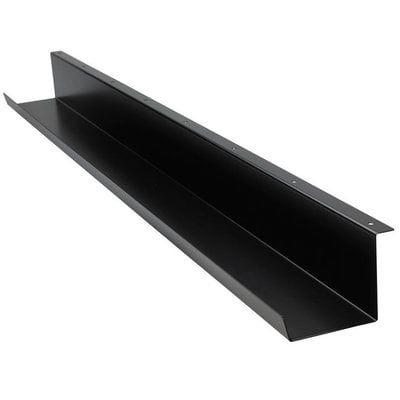
Main advantages of the Ergopro Basic cable tray
- Suitable for cables, power strips and adapters, among other things
- Available in silver, black and white
- Choose from lengths of 500, 1100 or 1470 mm
- Quick installation
- Open design, making it easy to add or remove items
Installation and convenience
The Ergopro Basic comes with sufficient mounting hardware to secure it firmly to the desk. You’ll only need a small electric screwdriver to drive the screws into the desktop. A manual screwdriver is possible, but you’ll need quite a bit of force to get the screw into the desktop.
I recommend using all four screws with the 500 mm version. With the 1100 and 1470 versions, it depends on how full you plan to load it. It takes about five minutes to fit the tray. Measuring and centring the position will probably take up most of your time. We always fit the tray as follows:
- Carefully check the depth at which you want to mount the cable tray. Too far towards the centre can cause problems with cable length or result in a struggle with your knees. Too far towards the edge and it might be a bit too visible
- Make sure the cable tray is positioned in the centre of your desk. Subtract the length of the cable tray from the length of your desk and divide the result by 2. This is the distance you need to maintain from the edge of your desk to the end of the cable tray.
- You can start screwing straight away, but it’s easier to first place a pencil or marker in the holes and mark them out. This is particularly handy if you prefer to pre-drill. Then you can start screwing!
- The cable tray is in place! Now you can start tidying away cables, power strips, adapters, etc.
In my humble opinion
Personally, I’m actually a bigger fan of the easily removable Liftpipe cable tray, but that’s in a different price bracket. The Ergopro Basic isn’t particularly exciting, and that’s not a bad thing at all. You can tidy up your workspace affordably, and it’s suitable for use anywhere. Whether in the office or in your daughter’s study, its function remains the same.
There is a chance that a cable might fall out of the open side, but the advantage is that you can easily reach everything. And if that cable won’t stay in place, you can tuck it under a power strip or wrap a cable tie around it.
What do you think?
Ingrid’s photo shows how this duct can be perfectly combined with a cable grommet. She has positioned the closed end towards the office, which means her cabling is brilliantly concealed.
 Ingrid’s brilliant result with the Ergopro Basic cable duct
Wil is also very happy with the cable duct; his kind words – ‘Sturdy cable duct with fixing materials. Delivered quickly and easy to install’ – say it all!
Arie got straight to work with it too. He says of the Basic cable duct : ‘A lovely, sturdy product that comes complete with fixing materials. Plenty of space for sockets and adapters’.
Ramona convinced us earlier this year to include a screw for every mounting hole. After all, it’s up to you to decide whether you want to use them all during installation. She said at the time , ‘Unfortunately, not all the screws needed to secure the product were included, but we solved this by securing them alternately’.
You can take your time reading through all the product reviews on the product page.
Customers who have installed the Ergopro Basic cable tray
Easy to install, available in 3 colours and various lengths. Yes, it really is very easy to get started with. See below for a brief overview of the places where it’s already in use.
4. Velcro Textie cable tie
Velcro, the duct tape of cable management. Cheap, easy to use and suitable for any application. In certain situations, it can be a neater and cleaner solution than, for example, the Cable Snake. And this product can also be cut to any desired length and is reusable.
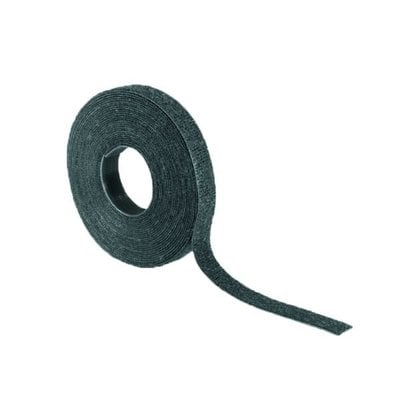
Main advantages of Textie Velcro
- Can be cut to size
- Bundles cables quickly and neatly
- Easy to open and reattach
- Most cost-effective way to conceal cables
- Durable (reusable up to 400 times)
Installation and convenience
Velcro is very easy to use. You cut it to size and wrap it around your cables. If it doesn’t fit properly or you need to add or remove a cable, simply unstick it and reattach it. Suppose you’ve cut a few pieces that are too short; you can combine them to make a longer piece. It’s great to see the difference a roll of Velcro makes to your workspace.
My humble opinion
I can’t make it any more exciting than that. Armed with a roll of Velcro and a pair of scissors, you can really let your imagination run wild.
We mainly use Velcro above the desk for a small number of cables and underneath the desk, out of sight. For example, at the back of a computer or in a cable duct to bundle a few items together. Above the desk, we do this mainly because a strip of Velcro keeps the ‘bundle’ of cables small and inconspicuous.
What do you think?
We don’t actually have any reviews for our Velcro. And to be honest: I completely agree with every customer of ours who has bought Velcro! It’s so simple, so obvious. We’ve had one review from Arend and that says it all, because it’s not even about Velcro. He says, ‘Great service and delivery. Nothing to complain about’.
You can read through all the product reviews at your leisure on the product page.
5. Cable Snake cable eater
The Cable Snake is by far our most popular product for tidying away cables. Not only via our webshop, but we also never set off on cable management projects without a large number of boxes of Cable Snake. The simplicity of the Cable Snake is what makes it so effective. You can bundle and protect all your cables above the desk, under the desk, across the floor, behind the television, in your kitchen – wherever you like.
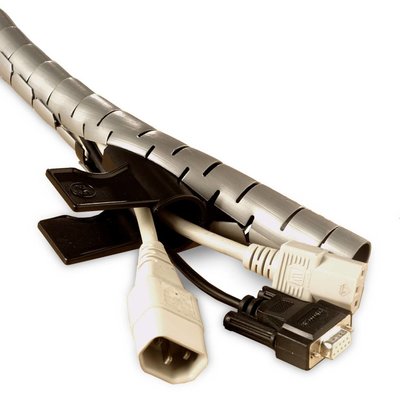
Key benefits of the Cable Snake
- Easy to use with the included tool
- Available in various diameters
- Easy to cut to size
- Can be used in conjunction with free pause software
- Attractive price
- Choice of 3 colours
Installation and convenience
How on earth do I get 6 cables into that bit of plastic, Tim? Well, with the super handy tool, of course! You cut the Cable Snake to the desired length, grab the tool supplied as standard, and you’re ready to go. In this case, I’d rather let a clear video do the talking; below you can see how to put your cables into the Cable Snake in a flash and take them out again.
That’s the beauty of the Cable Snake – you’re done in no time. You’ll also be amazed at how much better the result looks when all those different coloured cables disappear into a white, silver or black Snake. With the Cable Snake, it literally takes just a few minutes.
In my humble opinion
The Cable Snake must have been one of the first products in our webshop; at the time, it was only available in a 25 mm diameter and in 20-metre rolls. Its success has allowed us to become increasingly flexible in our online range. These days, we offer 8, 16, 20, 25 and 30 mm sizes and supply lengths from 1 to 25 metres.
Incidentally, the most common sizes are 16 and 20 mm; with these, you can almost always conceal your cables. Still unsure? We’ve included a handy table on the product page so you can see which diameter we recommend for how many cables.
As I mentioned, this is our number one product for projects. The protection and tidiness that the Cable Snake provides for your cables makes it virtually indispensable. You can always match it to the colour of your desk frame or blend it into the wall. Especially with a white wall, it looks great to bundle black cables in a white Snake.
What do you think?
Almost 100 reviews of the Cable Snake show that this product is indeed popular. Everyone who has rated its ease of use so far (1 to 5) has given it the full 5 points.
Daniel has managed to neatly hide his TV cables using the Cable Snake. He says: ‘Very handy to use and my cables are completely hidden away (both TVs)’. Mr De Nie is a true Cable Snake ambassador, as evidenced by his comment : ‘The Snake is brilliant – easy to install and looks great. I already have three of them at home’. Mr Rugebregt echoes my comments on the Snake’s ease of use with his ‘It’s child’s play’ review.
You can read through all the product reviews at your leisure on the product page.
Let us help you with the installation
If you don’t have the time, don’t feel like it, or have any other good reason not to want to deal with tidying up your cables, please do think of us. Get in touch and ask for a quote. Is it a small job? Then we can give you a cost estimate based on clear photos of your situation. Does it involve multiple workstations? Then we’d be happy to pop round for an assessment.
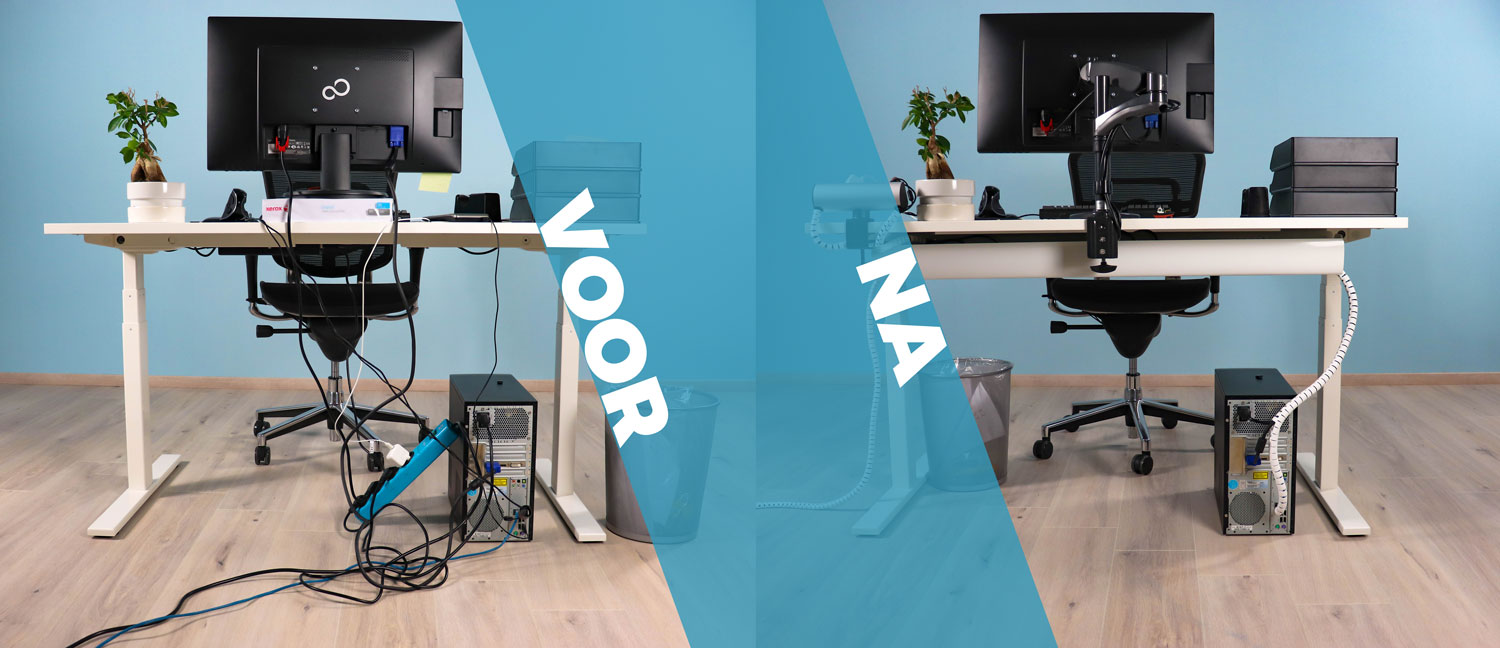 Let our experience help you tackle those loose cables