










Top 3 mice for pain in fingers, hand, wrist, forearm and shoulder
Table of contents
Shoulder pain from using a mouse
Hand pain caused by mouse use
Wrist pain due to mouse use
First, get your basics in order
Let Ergowerken advise you on how to prevent pain from mouse use
Our best mice for your complaints
Did you know that as many as 42% of people experience complaints due to mouse use? The most common physical complaints are in the wrist, forearm, hand and shoulder. Are they all entirely due to computer work? No, not at all. Overuse can also be caused (in part) by gardening, sports or playing with children. Nevertheless, in many cases, there are enough adjustments you can make in the workplace to reduce or overcome the pain.
Shoulder pain from using a mouse
A painful shoulder due to mouse use can have a number of causes. It may be partly due to your posture, but also to the type of mouse you use or the settings of that mouse. Below you can find the complete list:
- Your mouse is too far away from you – beyond shoulder width
- You have to make too large movements to move the cursor
- You shrug your shoulders when operating the mouse
- You leave your hand on the mouse when you are not using it
- You regularly lift the mouse to move it closer
Hand discomfort due to mouse use
Your hand has a tough time with all that computer work. It spends the whole day squeezing, clicking and scrolling. And just when you think it's getting a break, it's back on the keyboard to do more work. What can cause hand pain from using a mouse?
- You have a mouse that is too small and you grip it tightly
- You have a mouse that is too big and you can't get a good grip on it
- You have too firm a grip on your mouse
- You use too much force when clicking
- You let your fingers hover above the buttons
- You have to lift your index and middle fingers to scroll
Wrist pain from using a mouse
Have you ever looked at your wrist while using the mouse? Try it. Is it any wonder that this is the area where most people develop complaints? These little things perform acrobatic stunts all day long that would make The Crocksons shudder. We have listed the most common causes:
- Your forearm is fixed and all movement comes from your wrist
- You make a lot of small movements
- You have adopted a twisted wrist position
- You use a flat mouse (pronation)
- Your hand is pulled back slightly when holding the mouse (dorsiflexion)
- You grip the mouse tightly, causing tension in your arm
First, get your basics in order
There are plenty of things you can do yourself to prevent and combat your complaints. Some obvious things that contribute to fewer complaints are a fit body, sufficient rest, no stress, a well-adjusted workplace and correct posture. I would like to highlight the last two and pick out a few important points that you can start working on right away.
Sit and stand properly
We have already written extensively about good sitting posture. A few years ago, I wrote about sitting and standing comfortably when working at a computer screen. Here, you can find your ideal sitting and standing posture in a few simple steps to make long days at your desk more comfortable. Even if you think you are sitting correctly, it can't hurt to review it again.
Would you like to tackle specific aches and pains? We have developed a handy and clear page on pain caused by office work for this purpose. We have clearly written out tips and some additional explanations for your shoulder, wrist and hand, among other things.
Make optimal use of your tools
The type of mouse you use is not enough on its own to ensure comfortable mouse use. It's all about HOW you use it. That's why we've put together 10 tips (including a downloadable cheat sheet) that we're convinced work. What's more, when you buy an ergonomic mouse from us, you always get these 10 tips as standard.
Let Ergowerken advise you on how to prevent pain from mouse use
We've already done most of that for you, and after about 10 years, we can give you the right advice based on experience. Every day, we talk to people who experience pain as a result of working with a mouse a lot. You can contact us in all sorts of ways, often faster than you think.
- The Chat
- By telephone - 076 2600 207
- Via WhatsApp - 076 2600 207
- At our showroom - please let us know you are coming
Our best mice for your complaints
Is your mouse due for replacement and/or an upgrade to tackle the pain in your hand, wrist or shoulder? Below you will find our top 3 mice that we have selected. This top 3 is based on our own experience, customer feedback and product reviews.
Tip: use our selection guide!
The best 3 mice for pain in the fingers and hand
Handshoemouse Original

Traditionally our number 1 mouse for painful hands. The Handshoemouse has the following features that will make your hand happy.
- The mouse has a large surface area and therefore supports the entire hand, from thumb to little finger.
- The special design of the mouse makes it virtually impossible to squeeze the Handshoemouse. Your hand remains relaxed while using the mouse.
- The mouse comes in different sizes, making it accessible to almost everyone. You will never have the problem of the mouse being too big or too small for you.
Is there a downside to the mouse? Yes. Due to its size, it is less precise to operate and therefore less suitable for precision work such as photo and video editing.
Contour Unimouse

Unique in its kind. The Unimouse is a continuously tiltable mouse that can be adjusted between 35 and 70 degrees. Add to that an adjustable thumb rest and you have a truly versatile mouse
- The flattest position at 35 degrees offers plenty of support for the hand.
- The adjustable thumb rest can be raised, allowing the thumb to rest in the cup.
- The long buttons on the mouse are very easy to click and require less force
Does the Unimouse have any drawbacks? Well, it may feel a bit large for small hands under 16 cm
Handshoe Mouse Shift - Topper
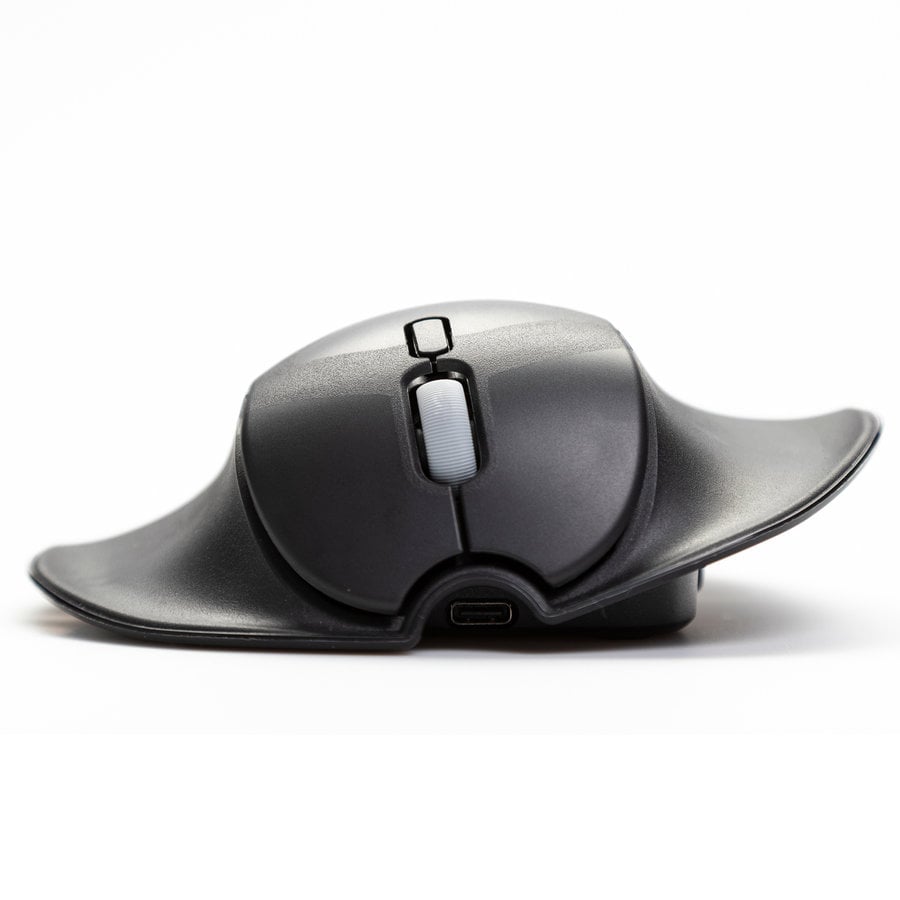
The Handshoemouse Shift is a new model with an important new feature. The mouse can now be operated with either the left or right hand. We love it for these reasons:
- It supports the entire hand, from thumb to little finger. The Shift is also available in multiple sizes, making it suitable for everyone
- You can switch between left and right. This allows you to distribute the strain of using the mouse between your left and right hands. Are you less dexterous with one hand? Then use that hand for simple tasks
- You cannot squeeze the Shift. It ensures that you can work with a relaxed hand all day long. The weight of your hand provides grip on the mouse.
Like the Original, the Shift has reduced precision compared to small mice. CAD designers, always keep your small mouse nearby.
The 3 best mice for wrist and forearm pain
Evoluent D - Topper
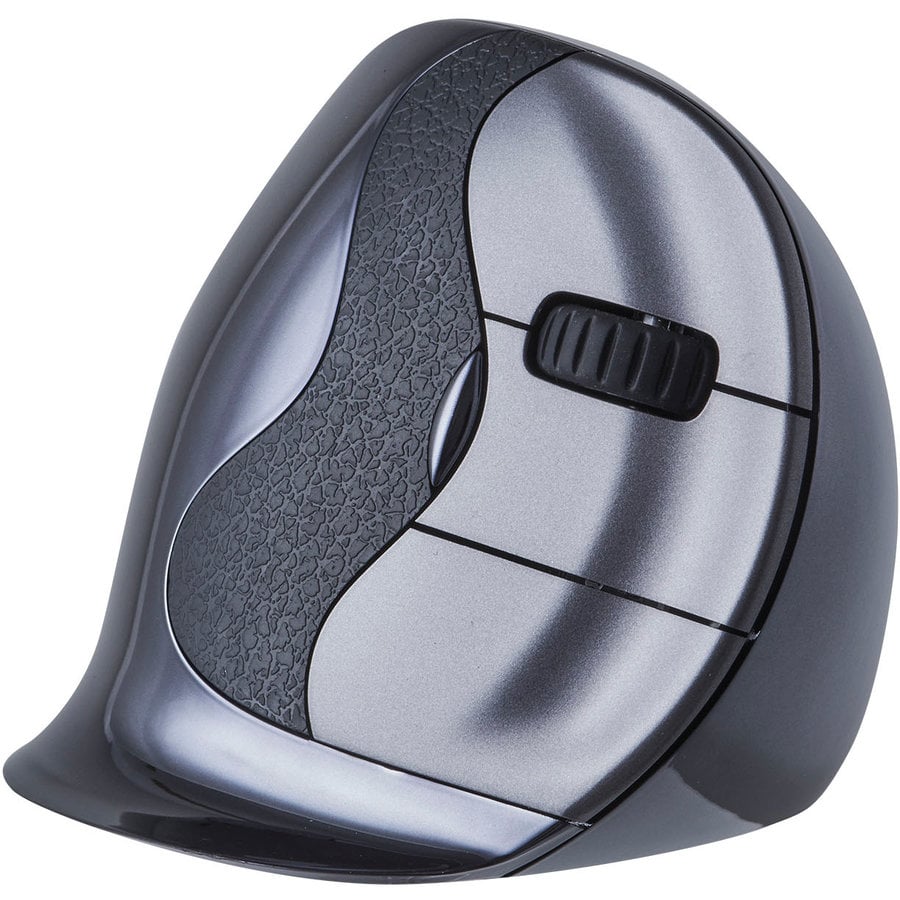
After models 1, 2, 3, 4 and C, the Evoluent D is a very worthy successor that cannot be ignored. In fact, we think it is the best mouse for wrist complaints. Why?
- It is the most vertical model and therefore comfortable for the natural position of the forearm. Fortunately, the design and notch for the thumb minimise the need to squeeze to operate it.
- The design also prevents wrist movements. You can still achieve precision, but you will quickly notice that it wants your arm to move with it.
- It remains surprisingly precise in use. The addition of an easily adjustable DPI and programmable buttons definitely contribute to your productivity.
What's not so great about the Evoluent D? It's not available for left-handed users!
Contour Unimouse
While the Unimouse is a great option for the hand at 35 degrees, at 70 degrees it suddenly becomes a serious contender for the wrist. With the thumb rest positioned crosswise, it's easy to grip.
- Tilted 70 degrees vertically, the Unimouse suddenly becomes a friend to the wrist. You can play around and find the best vertical position for you. 65, 67, 68, 9433434 degrees, there's plenty to choose from.
- The adjustable thumb rest is positioned slightly more sideways in the vertical position, allowing the hand to grip the mouse properly. As you become more accustomed to the mouse, the thumb rest can be raised slightly so that you squeeze the mouse less.
- Fortunately, wrist movements are still possible, but you can feel that the Unimouse wants your whole arm to work a little harder. This provides a nice change and puts less strain on the wrist and forearm.
Yes, that size. If we had to mention one downside, it would be that the mouse feels a bit large if you have smaller hands (around 16 cm).
Delux Seeker

The Seeker from Delux hasn't been on the market for very long, but it's a gem. Both in terms of use and design, you'll want this on your desk. The mouse has a good body, a nice vertical design and extra buttons that are easy to find.
- The mouse is nicely vertical and puts your arm in a natural position. It also offers enough grip to hold it comfortably.
- The included wrist rest is what Delux is known for. And this one is good! Put it on the mouse and your wrist will really be spared. Want a little more precision? Then take it off.
- The vertical scroll wheel near the thumb is great! In programmes such as Excel, it means you have to make fewer mouse movements. Nice!
The Seeker should be available to everyone, including left-handed users. Let's hope Delux reconsiders this.
The 3 best mice for shoulder pain
Penguin mouse

The Penguin mouse is perhaps the most popular mouse for shoulder complaints. It works well, is easy to get used to and is available for every hand (large, small, left and right).
- Easy switching between left and right makes this Penguin mouse very suitable for sharing the work. Its vertical design already gives the arm some relaxation, but you can also give it some rest. Tag!
- It comes in different sizes. Please note: the mouse is relatively large, so if you are on the borderline between two sizes, it is wise to choose the smaller one.
- The Penguin mouse takes very little time to get used to. Just turn it on, put it down and get started!
What's that? A downside? Uh, yes, there is one. The mouse has a plateau that virtually eliminates wrist movement. Good for the wrist, less good for the precision of the mouse. Keep that in mind if you work in Photoshop, for example.
Contour Rollermouse Red - Topper

The Red, the Rollermouse Red. There is so much to say about it. Let me be clear: if you are looking for the perfect mouse for shoulder problems, click on the orange button below.
- The Red centres your working posture and allows you to perform the most important actions (mousing + typing) within shoulder width. Because you no longer have to reach, there is much less strain on the shoulder.
- You can switch from mouse to keyboard in a flash. It's just a few centimetres forward and the same distance back to switch between mouse and keyboard. BEEP BEEP!
- Many extra (programmable) buttons contribute to your productivity. The Contour software allows you to set functions specifically for your work. That's nice.
What don't we like about the Rollermouse? The adjustment period for the purchase price. You have to let that sink in for a moment. But once you finally have it in front of you, you might just forget all about it.
Kensington Expert Mouse wireless trackball

The Expert Mouse from Kensington is a trackball that, fortunately, you don't have to operate with that sensitive and clumsy thumb. Just use your whole hand. Left or right, it doesn't matter.
- The Expert Mouse stays in place and doesn't need to be moved. This mouse makes it easier to keep your working posture centred (combined with a compact keyboard, it's perfect). Of course, you can put it down wherever you want; you have that freedom.
- And by placing it wherever you want, we also mean the option of left or right. Because that's possible with the Expert Mouse. Purely left or purely right is fine, but alternating is a real win.
- Kensington has developed KensingtonWorks, an intuitive driver that allows you to programme all the buttons.
The Expert Mouse is a sizeable device, so it probably won't fit in your laptop bag. Fortunately, it has a much smaller sibling.