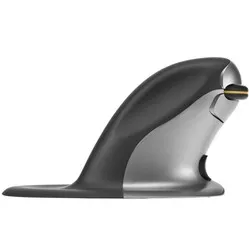
An ode to the Posturite Penguin
It does indeed resemble one
Although its name and appearance may be considered comical, the Penguin mouse is very serious when it comes to comfortable working and combating RSI complaints. 20 years of ergonomic experience has gone into this mouse, with a truly fantastic result.
Why the Penguin mouse?
The Penguin mouse is an ergonomic mouse that, thanks to its symmetrical shape, can be used by both left and right-handed users. The underlying idea is therefore that you work with both hands. In this way, you can distribute the workload and reduce the chance of complaints.
The Penguin is designed vertically, so that the arm is in a natural posture. Around the vertical part there is a plateau where the hand can rest. This prevents chafing and promotes the use of large muscles. Your large muscles can handle repetitive tasks longer and better, meaning you develop complaints less quickly.
Furthermore, the mouse has an antibacterial coating, which inhibits the growth of bacteria. In addition to preventing complaints, you are also doing well in terms of hygiene.
The buttons on the Penguin mouse are equipped with soft key touch, which means they can be pressed easily. This also prevents unnecessary muscle tension, thereby preventing and combating RSI complaints.
When choosing an ergonomic mouse, the size of the mouse is very important. That is why the Penguin is available in 3 different sizes. By measuring your hand length, you can determine which size mouse suits you.
This is what makes an ergonomic mouse so good
Of course, you can also get your work done with a traditional mouse. What makes the ergonomic mouse so popular is that these mice prevent and combat complaints such as RSI. The design is not flat, but tilted. This automatically puts you in a natural posture, which provides relaxation in the wrist, arm, and hand.
Get the most out of it
With the 'bow tie' button on the front, you can adjust the scroll wheel for left and right-handed use. The scroll wheel is nice and thick and made of very fine rubber, so you always have 100% control and scroll comfortably through pages.
Furthermore, you can also adjust the sensitivity of the mouse with a special DPI button. This allows you to set it to 400, 600, 800, and 1200 DPI. This benefits the versatility of the mouse. When you perform tasks with a lot of mouse action, you set the DPI higher. This allows you to easily fly across the screen with small movements. Or set the DPI low, and take it easy.