







Stel hier je vraag over dit product
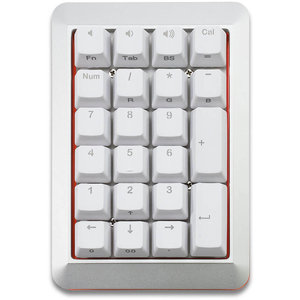
Mistel MD200 RGB silver/white (Cherry MX Brown) numeric keypad


Product description of Mistel MD200 RGB silver/white (Cherry MX Brown) numeric keypad
Description of the Mistel MD200 Freeboard RGB mechanical numeric keypad
Is this numeric keypad right for me?
| Width | 98 mm |
| Depth | 155 mm |
| Height | 30 (front) - 38 (rear) mm |
| Compatibility | Windows & Mac |
| Number of keys | 22 |
| Key type | Mechanical (Cherry MX) RGB |
| Connection | Wired (USB) 180 cm |
An ode to the Mistel Freeboard MD200 RGB
Mega(nical)
What an appearance, what a weight, what a powerhouse. One thing is for sure, with the MD200 you'll be stringing numbers together all day long without any problems.
Why the Mistel MD200 mechanical numeric keypad?
Mechanical = more feel
The Mistel Freeboard now also gives you the mechanical advantages on a numeric keypad. With the Cherry MX Brown switch in this numpad, you can enter numbers quickly and comfortably. The long 180 cm connection cable gives you the freedom to place it wherever you want. To the left of your keyboard, to the right of your keyboard, or perhaps even in between with a split keyboard.
RGB backlit
The MD200 is an RGB (Red/Green/Blue) backlit board. You can switch between 7 different modes. The included manual clearly explains how to switch between the different modes. Of course, it's also possible to turn off the LEDs.
Extra functions
Mistel has added extra functions under the keys of the MD200 when NumLock is off. These functions are clearly described in the manual with the help of images. Among others, Delete, End, Page Down, Page Up, and Home can be found.
Get the most out of your MD200 RGB
Programming with the MD600
The MD200 has programmable buttons. To use this, you need to combine it with the MD600 keyboard from Mistel. The functions and macros you assign to the MD200's buttons are stored in the right part of the MD600. Because the functions and macros are stored on the keyboard, you don't need any extra software.
Don't miss this either!
Is the numpad suitable for Mac?
The MD200 largely works on Mac too. Only the 'Cal' (calculator) button does not work, and the functions that operate when NumLock is off, including the arrow keys.
How beneficial is this for my body?
- Shoulders
- Hand
- Wrist
- Arm
Pros and Cons
- Extra functions with Numlock disabled
- Mechanical switch
- Ideal for compact keyboards
- Mechanical keys are noisy
Brief specifications
| Warranty | 2 years |
| Ergonomic design | |
| Weight | 390 gram |
| Plug & Play | |
| Key type | Mechanical MX switches |
| view all specifications |
Product features
- Aluminium casing
- Programming possible in combination with MD600 keyboard
- mechanical Cherry MX Brown switches
- RGB backlit with 7 modes
- Double shot keycaps
- Front height: 30 mm
- Rear height: 38 mm
- Keyboard width: 98 mm
- NKRO
- 22 keys
What's in the box?
- Silver/white numeric keypad
- Coiled cable Micro USB - Micro USB (for MD600)
- Braided connection cable USB mini - USB A
- Keycap puller
- Manual
Downloads
Frequently asked questions
Productbundels
Specifications
| Item number | ERGO-MD200SR |
| Manufacturer's item number | MD200 RGB Silver |
| Brand | Mistletoe |
| Warranty | 2 years |
| Type of guarantee | The Ergowerken free return guarantee service |
| Colour | White/silver |
| Keyboard type | Mechanical |
| Connection | Wired USB mini - USB A |
| Bluetooth | |
| USB port | |
| Number of keys | 22 |
| Type of keys | Cherry MX Brown |
| Minimum system requirements | Windows XP |
| Type of power supply | Cable 180 cm |
| Battery type | not applicable |
| Plug and play | |
| Dimensions length x width x height | 155 x 98 x 30–38 mm |
| Product weight | 390 grams |
Reviews Mistel MD200 RGB silver/white (Cherry MX Brown) numeric keypad
Customers who write a review enter a prize draw for a voucher. We pick one winner and publish all reviews, including critical ones.