Update mij als weer op voorraad is.
Vul hier je e-mailadres in en wij geven jou een update wanneer wij weer voorraad hebben.
Je ontvangt na het versturen van jouw e-mailadres een e-mail met daarin de bevestiging van jouw inschrijving.
Wij kunnen met deze notificatie geen garantie bieden dat je 100% zeker weten aanspraak maakt bij nieuwe voorraad. Wil je meer kans om het product te krijgen bij nieuwe voorraad? Kies er dan voor om het nu gelijk te bestellen en af te rekenen. Dan krijg je
Privacy Je e-mailadres wordt opgeslagen in een gesloten database. Wij kunnen die niet inzien. Je e-mailadres wordt na de voorraad update automatisch weer verwijderd.
Keychron K10 mechanical keyboard with plastic frame
0 beoordelingen
0,00

Jouw offerte op maat, binnen 24 uur in je mailbox. Voor als je interesse hebt in aantallen. Of goedkeuring nodig hebt voor je bestelling.

Keychron K10 mechanical keyboard with plastic frame

Je vraagt een offerte aan voor:

Keychron K10 mechanical keyboard with plastic frame
Tel je even mee? Zo simpel is het aanvragen van een offerte.
1
Je vult het korte formulier razendsnel in voor een razendsnelle offerte
2
"NEW MESSAGE" Zodra jij die oranje knop aanraakt zitten wij er bovenop
3
Binnen 24 uur heb jij een offerte op maat. En mochten we ietsje meer tijd nodig hebben, dan laten we dat weten. Lekker duidelijk!
Keychron K10 mechanical keyboard with plastic frame
Vraag offerte aan
Stel vraag

Keychron K10 mechanical keyboard with plastic frame

Configure your product
0,00
Incl. tax
0,00
Excl. tax
Delivery time: No longer available
The product is in stock and, if ordered before 17:00 on business days, will be delivered the next day.
Hierboven staat de verwachte levertijd. Zodra het pakket verstuurd is, ontvang je een berichtje.
  • Order 2 for 0,00 each (incl. VAT) and save 4%
  • Order 4 for 0,00 each (incl. VAT) and save 7%
  • Order 10 for 0,00 each (incl. VAT) and save 10%
  • Order 20 for 0,00 each (incl. VAT) and save 12%

Beschrijving Keychron K10 mechanical keyboard with plastic frame

Does this keyboard suit me?

keyboard dimensions
Width435 mm
Depth 120 mm
Height38 mm
VersionWindows and Mac
Key layoutQWERTY (ANSI US int.)
SwitchesGateron G Pro Mechanical red or brown
ConnectionBluetooth 5.1 and USB

An ode to the K10

Take a seat

Normally, we use this piece of text to write something fun and light-hearted about a product. However, I now want to use it to ensure you settle down with a cup of coffee or tea before you start reading, because there's quite a bit to tell about the K10. Are you seated? Perhaps a biscuit too? Let's go!

Why the K10?

Very complete

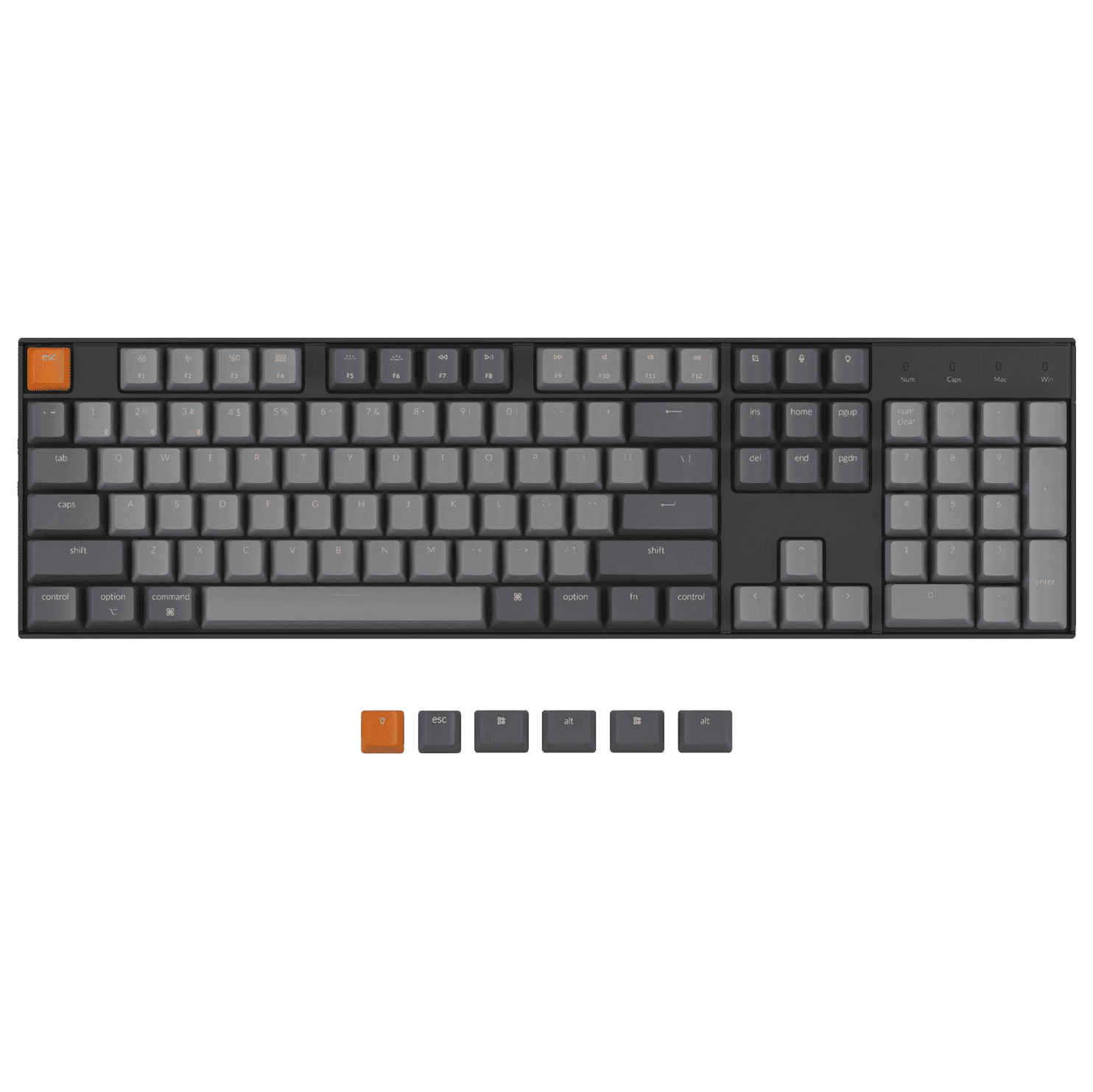
Where should we begin? The full-size K10 mechanical keyboard from Keychron is very complete. It is equipped with 104 keys, including 12 multimedia keys, meaning you'll switch less often between mouse and keyboard. The keys consist of hot-swappable Gateron G Pro switches (red or brown) with ABS keycaps. Extra keycaps have been added for both Microsoft and MAC. You can use shortcuts via key combinations.

The keyboard has a QWERTY (ANSI US int.) layout, which is the most common in the Netherlands. The keyboard's casing is made of ABS plastic, giving the keyboard a solid appearance and sturdiness. The RGB backlight has 15 different patterns and is easy to change with the key depicting a light.

Numeric section

Do you do a lot of administrative work and often use the numeric section? Then the K10 might be an option for you, as it is integrated on the right side of the keyboard. A small drawback; the num lock key unfortunately only works with Windows computers.

What makes the K10 so good?

The predecessor of the K10, the C2, could only be used wired. Fortunately, Keychron has made the K10 wireless, and you can use it wirelessly via Bluetooth 5.1. This can even be done on three devices simultaneously. Using the key combination fn1 + Q/W/E, you can easily switch between devices. You can read more about this on pages 11 and 12 of the user manual.

Get the most out of your K10

Central mouse

Because the K10 is so wide, you might experience discomfort in your arm or shoulder. The mouse (and thus also your hand, arm, and arm) is placed much further to the side than with a compact keyboard. This can lead to shoulder complaints. Should these complaints become unbearable, you could consider a central mouse (also known as a trackpad).

You place a central mouse under your keyboard. The advantage of this is that you no longer have to mouse with your hand next to the keyboard, which relieves the shoulder. In addition, a central mouse often also functions as a wrist rest, so the tension in your wrists will also be alleviated, allowing you to work longer without discomfort. The disadvantage of a central mouse is that they are very expensive. You can view our central mice here.

Don't miss this either

Time to switch

At Ergowerken, the K10 is available with red or brown Gateron G Pro Mechanical switches. Would you prefer something different? In that case, you can also take a look at our other mechanical switches. Each type and colour has its 'personal' characteristics. This way, you can truly make your K10 your own. Because the keyboard is Hot Swappable, you don't need to solder.

 

Pros and cons

  •  Wired and wireless use
  •  Hot swappable
  •  Strong battery
  •  Contains all possible keys
  •  Wide
  •  Num lock only works with Windows

Brief specifications

Casing materialPlastic
BrandKeychron
Weight895 grams
Dimensions435 x 120 x 38mm
SwitchesGateron G Pro mechanical switches
View specifications >

How happy will my body be with this?

Hand     
Wrist     
Arm     
Shoulder     

Product features

  •  Full size | 104 keys
  •  12 multimedia keys
  •  ANSI layout
  •  RGB Backlight
  •  Includes numeric section
  •  Hot swappable
  •  Gateron G Pro mechanical switches
  •  Plastic frame
  •  Includes keycaps for Windows and MAC
  •  Can be used wirelessly and wired
  •  Connect to 3 devices simultaneously
  •  Bluetooth 5.1
  •  15 backlight patterns with RGB version

Downloads

Manual

What's in the box?

  • 1 x K10 keyboard
  • 1 x USB-A to USB Type-C cable
  • 1 x Keycap puller
  • 1 x Switch Puller (for hot-swappable version)
  • 1 x User manual

Frequently asked questions

 "Do I really need a central mouse?"
Of course, you can try it without one for a while first. As long as you don't experience any discomfort, there's no need to purchase a central mouse. If you do experience discomfort and don't find it worth the investment, you could consider a narrower keyboard. At Ergowerken, you have the advantage of a 90-day trial period during which you can try it out.
 "How long does the battery last?"
Approximately 240 hours when the backlight is off. Approximately 72 hours when the backlight is on. Fully charging the K10 takes about 3 hours.
Item number ERGO-KCK10H1 | ERGO-KCK10H3 | ERGO-KCK10A1 | ERGO-KCK10A3
Manufacturer's item number K10-H1 | K10-H3 | K10-A1 | K10-A3
Brand Keychron
Warranty 1 year
Type of guarantee The Ergowerken free return guarantee service
Colour Black/grey
Keyboard type 104-key
Ergonomic design Yes
Keyboard layout QWERTY (ANSI US int.)
Connection Wired or wireless (Bluetooth 5.1)
Bluetooth 5.1
Type of keys Gateron G pro mechanical keys
Numeric keypad Yes
Shortcut keys Yes
Programmable buttons No
Trackball/touchpad No
Type of power supply Battery or wired
Battery type Rechargeable 4000mAh li-polymer battery
Rechargeable Yes
Minimum system requirements Mac OS X v10.5, Mac OS X v10.6, Mac OS X v10.7, Mac OS X v10.8, Mac OS X v10.9, Mac OS X v10.10, Mac OS X v10.11, Windows XP, Windows Vista, Windows 7, Windows 8, Windows 10
Plug and play Yes
Dimensions length x width x height 435 x 120 x 38 mm