







Stel hier je vraag over dit product
Mistel MD650L Barocco (Cherry ML) Low-Profile keyboard


Product description of Mistel MD650L Barocco (Cherry ML) Low-Profile keyboard
Description of the Mistel MD650L keyboard
Is this keyboard right for me?

| Width | 325 mm |
| Depth | 106 mm |
| Height | 16 mm front / 20 mm rear |
| Weight | 920 g |
| Compatibility | Windows |
| Key layout | QWERTY (ANSI US int.) |
| Switch type | Mechanical (Cherry ML) |
| Connection | Wired (USB) |
An ode to the MD650L
Flat and mechanical in the same sentence
And we don't mean: this keyboard is mechanical and therefore not flat. On the contrary, this board is mechanical and genuinely flat. Once you have climbed back onto your chair, you can read more about it below.
Why the MD650L?
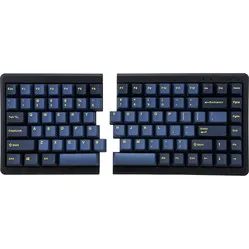
The split Mistel MD650L keyboard is a flat mechanical keyboard that lends itself to serious typing work. The mechanical keys actuate lightly, partly because they register a keystroke before the key is pressed all the way down. So you don't have to hammer your hands on it.
2 separate parts
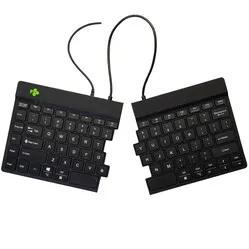
This Mistel keyboard consists of two separate parts connected by a cable. The big advantage of this is that you can position these separate parts in whatever way works best for you. For example, you can angle them slightly outwards so that your wrists are better aligned with your arms. You can also do it less drastically by simply pulling them a little apart. That alone gives you a better posture and takes the familiar 'kink' out of your wrist.
If you would rather attach the separate parts to each other, you can do so with the included connector piece. It lets you screw the left and right parts together.
ML switches
The board is fitted with Cherry ML switches (tactile, silent). These are considerably lower than the MX switches that many people know. Where standard mechanical keyboards are relatively tall, boards with ML switches are not. This makes it much more compact, more portable and friendlier to the wrists. Not only does the key have shorter travel (4 mm MX switch versus 3 mm ML switch), the specially designed low keycaps also contribute to this.
Kind to the body
The MD650L is all-round good for the body. Your shoulders are happy with it because it is compact, allowing the mouse to be used close to the body. The wrists stay neatly in line with the arms and hands, and the fingers don't have to search for the bottom of the key, because the board registers a keystroke earlier. The ML switches are known as silent, which makes it suitable for office environments.
For gamers too
Mistel has taken an enormous amount into account. For example, the left part of the keyboard can work actively without using the right part. You only need to plug the mini USB connector into the left side and remove the orange micro USB connectors. By removing the right part of the keyboard, your mouse sits closer to your body and you can play your favourite games with more precision. With the programmable FN key you can even call up a full keyboard in just the right part, but you can read more about that below.
Compact and portable
The Mistel keyboard is only 1.6 cm at the front, and slightly taller at 2 cm at the rear. Thanks to its dimensions, its split parts and its special keycaps and switches, it is very easy to take with you, making it ideal for the mobile workplace. You don't see that often: a mechanical keyboard that is also portable. When you go somewhere, you can either fold it double in your bag, or place the 2 separate parts wherever you have space.
Versatile thanks to the FN key
The 650L may look like a standard mechanical board, but it can do far more than you expect. For example, it incorporates all sorts of multimedia keys that you can activate with the 'FN' key. You can find these in the complete manual supplied with the board. Because the functions are not printed on the board, you will need to keep the manual close at hand in the beginning.
And the multimedia keys are far from the whole story. You can even switch keyboard layout to Colemak and the increasingly popular Dvorak. The keyboard is also programmable with up to 3 layers.
What makes a mechanical keyboard so good?
A mechanical keyboard registers a keystroke before the key is fully pressed. This makes it ideal for intensive typing. A mechanical keyboard also tends to be more durable. The keys and switches are easy to clean and last longer.
Get the most out of the MD650L
Programmable keys (macros!)
This is where the magic happens. The Mistel keyboard has its own memory in which all sorts of layers and macros can be stored. The keyboard has no fewer than 3 custom layers that you can fully customise. Adjusting the layers is so well thought out that you can hardly do anything wrong. There is always the 'default' layer, which is not programmable. You can also give the keyboard a full reset, returning it to its factory settings.
The macros can be practically anything. You can build in a shortcut (CTRL+C = copy), but it is also possible to store an entire sentence. The keyboard remembers your sequence of keys and saves it.
How to create a macro
The simplest example of a macro is adjusting the space bar. Because the keyboard has 2 separate space bars, you can customise 1 of them. We gave the right space bar the 'Enter' function. We faced 1 challenge there; the keyboard requires at least 2 or more keystrokes when creating a macro. We got around this with the following key combination --> A + Backspace + Enter. The first two don't appear in the final result, because Backspace cancels out 'A'. But this way the macro does meet the minimum of 2 keystrokes.
Creating macros is explained clearly and step by step in the manual that Mistel supplies with its keyboards. If you still can't figure it out, we are of course here to help. We have already done our share of tinkering to test all the possibilities.
Don't miss this either
Dip (toggle) switches
On the underside of the right part of the keyboard are 4 switches, so-called Dip Switches. With these switches you can swap the functions of important keys. These are the changes:
- Dip switch 1: 'Caps Lock' and 'FN' swap functions
- Dip switch 2: 'Caps Lock' and 'right CTRL' swap functions
- Dip switch 3: 'left Windows'and 'left ALT' swap functions (for MAC users)
- Dip switch 4: 'left space bar' becomes a second 'FN' key
How happy will my body be with this?
- Wrist
- Hand
- Shoulders
- Arm
Pros and cons
- Orange accent keys included
- Low-Profile ML mechanical switch
- Good for hand, wrist and shoulders
- Extremely flat for a mechanical keyboard
- No LED backlight
Brief specifications
| Warranty | 2 years |
| Ergonomic design | |
| Weight | 920 grams |
| Plug & Play | |
| Colour | Grey |
| view all specifications |
Product features
- Effective against RSI complaints
- 65% keyboard
- QWERTY (US Layout)
- Cherry ML switch (tactile, silent)
- Aluminium frame
- 4 LED indicators (including Caps Lock)
- 4 dip switches (switches on the underside of the board)
- Qwerty, Colemak and Dvorak layout possible
- Mechanical keyboard
- Dye sub keycaps
- Front height: 16 mm
- Rear height: 20 mm
- Keyboard width: 325 mm
What's in the box?
- MD 650L Barocco keyboard
- Connection cable (Mini-USB)
- Connecting cable (Micro-USB)
- Keycap removal tool
- Enter and Escape key in orange
- Metal connector pieces
- Extra ML switch
- Manual
Frequently asked questions
Specifications
| Item number | ERGO-MD650LG |
| Manufacturer's item number | MD650L Grey Low Profile Split |
| Brand | Mistletoe Keyboards |
| Warranty | 2 years |
| Type of guarantee | The Ergowerken free return guarantee service |
| Colour | Grey |
| Keyboard type | Mechanically Split |
| Ergonomic design | |
| Keyboard layout | QWERTY (ANSI US int.) |
| Connection | Wired USB |
| Bluetooth | |
| USB version | 2.0 |
| Type of keys | Mechanical |
| Numeric keypad | |
| Shortcut keys | |
| Programmable buttons | |
| Trackball/touchpad | |
| Type of power supply | Wired |
| Battery type | Not applicable |
| Rechargeable | Not applicable |
| Minimum system requirements | Windows XP |
| Plug and play | |
| Dimensions length x width x height | 325 x 106 x 16/20 |
| Product weight | 920 grams |