Offerte aanvragen
Jouw offerte op maat, binnen 24 uur in je mailbox. Voor als je interesse hebt in aantallen. Of goedkeuring nodig hebt voor je bestelling.

Je vraagt een offerte aan voor:
Stel hier je vraag over dit product
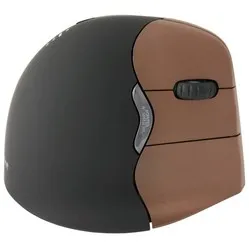
Contour Design Unimouse wireless right-handed ergonomic mouse


Beschrijving Contour Design Unimouse wireless right-handed ergonomic mouse
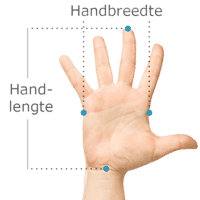
Does this mouse fit my hand?
Do you want to find the ideal mouse? Then be sure to measure your hand. The following image clarifies how to measure your hand. This mouse is suitable for hands with the following dimensions: Suitable for all hand sizes
An ode to the Unimouse
ATS!...?
"Acute Tendinitis?" Oh man, thankfully not. On the contrary, it's a very positive abbreviation that will make your thumb do a little "hallelujah". The Articulating Thumb Support will certainly put the term 'thumb yoga' in the Oxford English Dictionary.
This is what makes the Uni(que)mouse so good
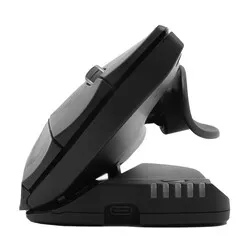
Every user is different, and with that in mind, the Unimouse was created. Not only is the angle of the mouse infinitely adjustable, but the thumb rest can also move in all directions. So you can adjust it completely to your preferences.
There are few mice that offer as much in terms of adjustment options. The Unimouse is quite unique in this respect. We know tilting from, for example, the Oyster mouse, but that does it in steps. For stepless adjustment between 35 and 70 degrees, you really need the wireless Unimouse.
Once you start using it, you'll quickly notice that there isn't just one favourite position. You'll find several. A bit flatter for more precision during accurate (drawing) work. Then back to its comfortable higher angle for dragging and clicking. Don't forget to use the thumb rest and the 10 DPI settings to truly give it your 'touch'.
The long buttons of the wireless Unimouse have a pleasant click and fairly even resistance, regardless of where you press them.
The rubber scroll wheel gives you control and precision. It scrolls smoothly and provides you with the right feedback with a light click.
Why the Unimouse wireless ergonomic mouse?
Dynamics in your workplace are very important. You've undoubtedly heard this more often, especially regarding sitting. Contour has now incorporated this philosophy into their Unimouse.
A stepless angle of 35 to 70 degrees and a thumb rest that can move 35 degrees in all directions. You can certainly call that dynamic. So you change the mouse not only for your tasks but also for your strain (This is not about the taxman).
Do you suffer from wrist pain? Open up that mouse. Your arm is in a better posture, and your hand rests relaxed on the mouse. Do you want a bit more support from the mouse? Then set the mouse a bit flatter and let the thumb rest point upwards. Your hand can now rest relaxed on the mouse, and you don't have to grip it tightly.
Because it's not tethered to your PC with a cable, you have complete freedom to move the mouse. Make sure you operate it within shoulder width, as your shoulder and neck muscles will appreciate that.
This is what makes the Unimouse ergonomic mouse so good
An ergonomic mouse like the wireless Unimouse is specially designed to relieve as much tension as possible from your muscles, thereby combating and preventing complaints. Due to its tilted design, your wrist, arm, and hand maintain a natural posture while working. This promotes relaxation and prevents RSI complaints.
The extensive adjustability reduces static load. This also makes it suitable for most hand sizes. The long buttons ensure that even if you have short fingers, you can still operate the mouse easily.
Get the most out of it
The Contour mouse features a Pixart PMW3330 sensor. Thanks to this sensor, the mouse works excellently on almost any surface. Furthermore, you have 10 different mouse sensitivities to experiment with. For reflective surfaces, based on our own tests, we advise using a mouse mat.
The 5 LEDs on the front of the mouse show the DPI setting. With the green LEDs, you'll see the DPI increase from 800 to 1600. The red lights are for serious high-speed work and show 2000 to 4000 DPI. The Unimouse has 6 buttons, including a forward and backward button. It can be used wirelessly up to 8 metres from your computer. This can be done using Bluetooth or the included USB receiver. The mouse weighs 140 grams.
The Contour mouse contains a rechargeable Lithium-ion polymer battery. It has a capacity of 500mAh. With average use, you can work for 2-3 months before it needs recharging. Charging during work is possible; with 2 hours of charging, you're good for another few months.
Contour has integrated a battery indicator into the mouse. When you press the DPI button once, it first shows the DPI setting (the DPI does not change then). After that, it displays the battery status. You can read more about this in the manual on this page.
Don't miss this either
The stepless adjustment of the mouse is possible thanks to 4 friction hinges. Some extra pressure is needed to adjust it, so you don't have to worry about the mouse collapsing during work. Just be careful not to accidentally press a button while adjusting the mouse.
With the help of the Contour driver for your Unimouse, you can assign other functions to the buttons. You can even change several buttons per program, allowing you to tick off your tasks even faster.
2024 update
In the spring of 2024, Contour gave a fresh update to a large part of their product range, including Unimouse. Several well-known advantages, such as the adjustable thumb rest, have naturally remained. The update concerns a number of changes within production and design;
| Old model | Model from spring 2024 | |
| Adjustable tilt angle | ||
| Unique thumb support | ||
| Programmable buttons | ||
| Left/right version | ||
| Relaxed grip and variation | ||
| Bluetooth connection (for wireless variant) | ||
| USB-C charging | ||
| 4000 DPI in 10 steps | ||
| New matte black colour | ||
| Lower ecological footprint* |
Pros and Cons
- Adjustable angle
- Adjustable thumb rest
- Long mouse buttons
- Wireless
- No storage compartment for USB receiver
Brief specifications
| Warranty | 2 years |
| Ergonomic design | |
| Usage | Right-handed |
| Number of buttons | 6 |
| Plug & play | Yes |
How happy will my body be with this?
| Wrist | |
| Arm | |
| Hand | |
| Shoulder |
Product features
- Prevents RSI complaints
- Ergonomic design
Specificaties
Item number ERGO-CUNIWL Manufacturer's item number UNIMOUSE-WL Brand Contour Warranty 2 years Type of guarantee Ergowerken free warranty return service Colour Matte black Ergonomic design Yes Management Pixart PMW3330 sensor Left- or right-handed Right-handed Hand length Suitable for any arm length Hand width Suitable for any hand size Operation Buttons and scroll wheel Connection Wireless USB or Bluetooth Included receiver Yes, 2.4 GHz USB nano receiver Bluetooth Yes USB port Yes USB version 2.0 Number of buttons 6 programmable buttons On/off button Yes Adjustable buttons Yes Scroll wheel Yes Trackball not applicable Adjustable sensitivity Yes Sensitivity 800/1000/1200/1400/1600/2000/2400/2800/3400/4000 dpi Type of power supply Rechargeable battery Battery type Rechargeable lithium-ion polymer battery, 500mAh Rechargeable Yes Minimum system requirements Mac OS / Windows Plug and play Yes Dimensions length x width x height 127 x 76 x 50 millimetres Product weight approximately 140 grams Reviews Contour Design Unimouse wireless right-handed ergonomic mouse
![R-Go HE Mouse Break Bluetooth Right-Handed]()
 0 reviews349,00 Incl. tax288,43 Excl. tax