Offerte aanvragen
Jouw offerte op maat, binnen 24 uur in je mailbox. Voor als je interesse hebt in aantallen. Of goedkeuring nodig hebt voor je bestelling.

Je vraagt een offerte aan voor:
Stel hier je vraag over dit product
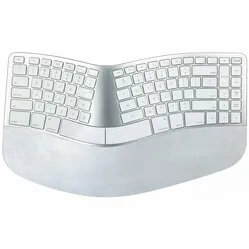
Matias Sculpted split keyboard for Mac


Beschrijving Matias Sculpted split keyboard for Mac
Is this keyboard right for me?

| Width | 388 mm |
| Depth | 231 mm |
| Height | 36 mm without | 51 mm with riser |
| Version | Windows or Mac |
| Key layout | QWERTY (ANSI US int.) |
| Mechanism | Scissor |
| Connection | Wireless via USB-A and C and wired |
An ode to the Micro... uhh Matias Sculpt(ed)
Hold on a minute! Am I reading this correctly? Good news for fans of the Microsoft Sculpt and its predecessors. Matias is breathing new life into this popular ergonomic keyboard. Naturally, with some subtle improvements.
Why the Matias Sculpted ergonomic keyboard?
For those unfamiliar with the Microsoft Sculpt, below is a brief summary of the benefits of working with this keyboard.
A pleasure to type on
With a straight keyboard, you might unconsciously bend your hands outwards relative to your forearms. This causes unnecessary tension in the hand and forearm, especially on the little finger side. By working with an ergonomic keyboard like the Matias Sculpt, you prevent this bend.
Even better
In addition to a better posture, a comfortable palm/wrist rest ensures you experience maximum support while typing. And it doesn't stop there; lifting the hands has also been considered. By using the magnetic riser, you can elevate the front of the keyboard. This causes it to slope towards the back, automatically placing your wrists in a more natural position.
What makes the Matias Sculpted so good?
Familiar layout
For those accustomed to working with Microsoft's old ergonomic keyboards, it will be a joyful recognition. Besides the familiar layout and pleasant ergonomic lines, a few minor changes have been implemented to bring it up-to-date with the latest technology.
Improved wrist rest
At Matias, they didn't find the support truly ‘comfortable’. So, they decided to provide it with thicker padding. It's made of natural rubber and is attached to the keyboard with magnets. This allows you to easily remove it for cleaning or replacement.
Rechargeable battery
While the old Microsoft Sculpt was equipped with a set of separate batteries, Matias has opted to build in a rechargeable one. And what a battery it is! The Sculpted features a battery with a capacity of 1600 mAh, which Matias claims provides a usage time of 3 years. We are always a bit cautious about such claims, but even if it achieves half of that, it's impressive at the very least.
Dual USB receiver
Matias also ensures ultimate user-friendliness when it comes to connecting the keyboard. In the box, you'll find two USB receivers, a USB-A and a USB-C receiver. Both are already paired with the keyboard and work on a plug & play basis. Fun fact, the USB-C receiver is the smallest in the world. This way, it won't get caught anywhere if you leave it in your laptop while travelling.
Cable
You'll also find a USB-C cable in the box, which you can, of course, use to charge the keyboard. But if you prefer to work wired, you can also use this cable for that. Something for everyone.
Don't miss this either
Windows OR Mac
While Microsoft developed the Sculpt for, you guessed it, Windows, Matias is taking a different approach. Matias has been known for developing keyboards for Mac for many years. As a result, the Matias Sculpt comes in two versions, namely with a Windows layout and with a Mac layout.
Super secure
Even the wireless connection has not been left untouched by Matias. They have ensured it is super secure by sending the signal encrypted according to the AES-128 bit protocol. To give you an idea of how secure this protocol is; to date (2024), it has not yet been cracked.
Pros and Cons
- Familiar layout
- Relaxed typing
- Multiple ways to connect
- Detachable wrist rest
- Wireless connection with AES-128 bit encryption
Brief specifications
| Keyboard type | Split |
| Ergonomic design | |
| Connection | Wired and wireless via USB |
| Dimensions with riser | 38.8 x 22.9 x 5.1 cm |
| Dimensions without riser | 38.8 x 23.1 x 3.6 cm |
How happy will my body be with this?
| Wrist | |
| Arm | |
| Hand | |
| Shoulder |
Product features
- True to the Microsoft Sculpt design
- 3-year battery life
- Rechargeable via USB-C
- Split design
- Detachable wrist rest
- Detachable riser
- Supplied with USB-A and USB-C receiver
- Wrist rest made of natural rubber
- Wireless connection with AES-128 bit encryption
What's in the box?
- 1 x Sculpted ergonomic keyboard
- 1 x USB-A receiver
- 1 x USB-C nano-receiver
- 1 x USB-C connection/charging cable
- 1 x manual
Frequently Asked Questions
Specificaties
| Item number | ERGO-MAFK413D-MAC |
| Manufacturer's item number | FK413D |
| Brand | Matias |
| Warranty | 2 years |
| Type of guarantee | The Ergowerken free return guarantee service |
| Colour | White |
| Keyboard type | Split |
| Ergonomic design | Yes |
| Keyboard layout | QWERTY (US international) |
| Connection | Wired and wireless |
| Bluetooth | No |
| USB version | USB-A and USB-C |
| Type of keys | Scissor mechanism |
| Numeric keypad | No |
| Shortcut keys | No |
| Programmable buttons | No |
| Trackball/touchpad | No |
| Type of power supply | Rechargeable battery |
| Battery type | 1600 mAh |
| Rechargeable | Yes |
| Minimum system requirements | Mac OS |
| Plug and play | Yes |
| Dimensions length x width x height | 38.8 x 22.9 x 5.1 cm with and 38.8 x 23.1 x 3.6 cm without keyboard riser |
| Product weight | to be determined |
Reviews Matias Sculpted split keyboard for Mac