Offerte aanvragen
Jouw offerte op maat, binnen 24 uur in je mailbox. Voor als je interesse hebt in aantallen. Of goedkeuring nodig hebt voor je bestelling.

Je vraagt een offerte aan voor:
Stel hier je vraag over dit product
Keychron K2 Pro Mechanical Keyboard for Windows & Mac - Aluminium Casing


Beschrijving Keychron K2 Pro Mechanical Keyboard for Windows & Mac - Aluminium Casing
Is this keyboard right for me?
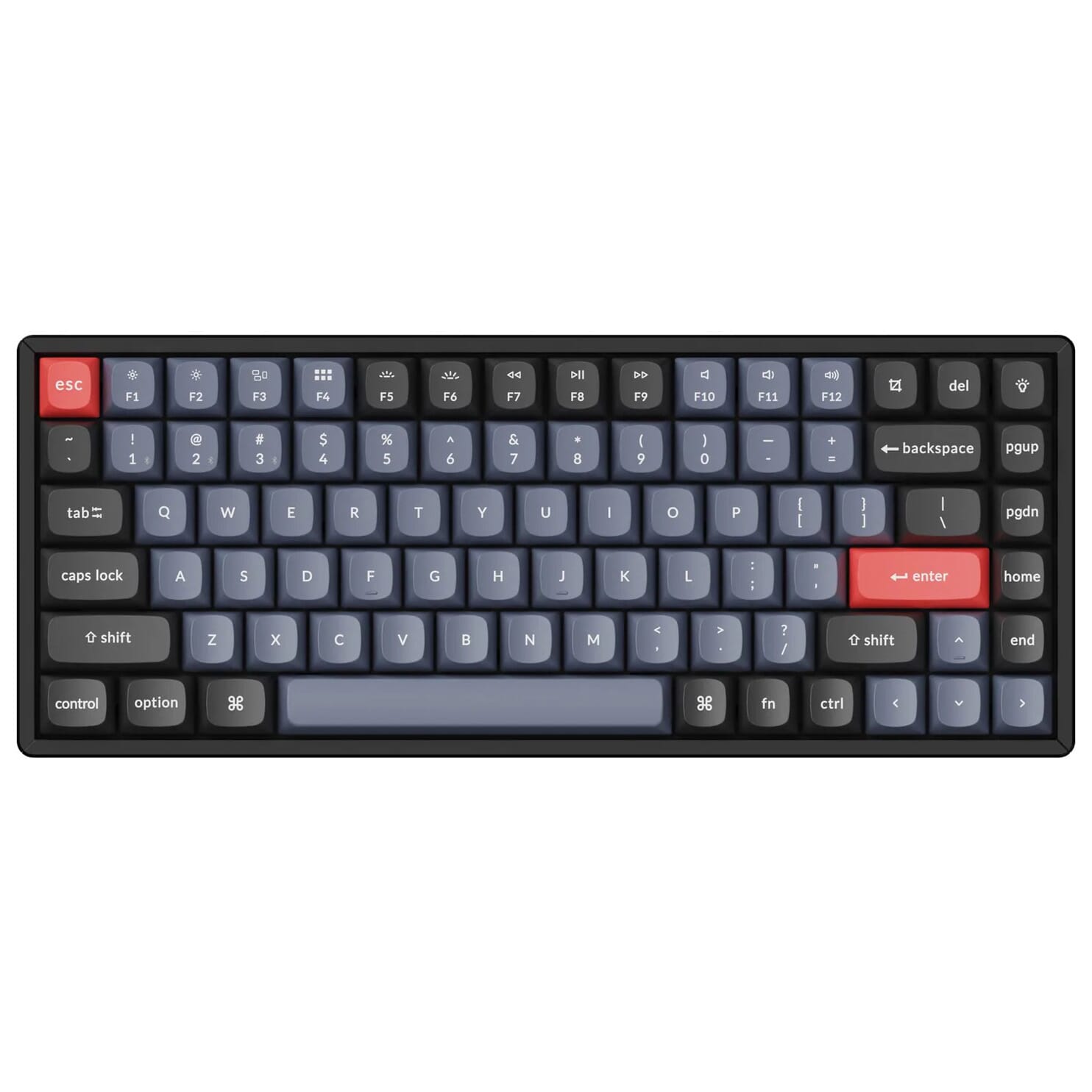
| Width | 316.6 mm |
| Depth | 126.91 mm |
| Height | 32 mm front | 42.07 mm rear |
| Version | Windows and Mac |
| Key layout | QWERTY (ANSI US int.) |
| Switches | Keychron K Pro (red or brown) |
| Connectivity | Bluetooth 5.1 and USB |
Please note! This is the product page for the aluminium variant.
An ode to the K2 Pro
Take a seat and relax
Normally, we use this section of text to write something fun and light-hearted about a product. However, I want to use it to make sure you grab a cup of coffee or tea before you start reading, because there's quite a bit to tell about the K2 Pro. Are you settled? Maybe a biscuit too? Let’s go!
Why the K2 Pro?
Attractive design
To start, the K2 Pro has a compact 75% size (84 keys). This means the numeric keypad on the right side of the keyboard is absent. This is very comfortable for your shoulders when you use your mouse right-handed, as you can now keep it nice and close to you. At the top of the keyboard are 12 multimedia keys, which allow you to easily adjust settings such as volume or screen brightness.
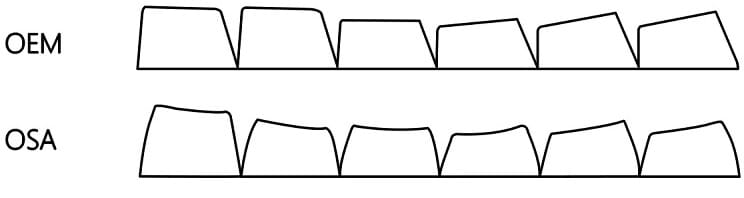
What you first notice when you look at this keyboard are, of course, the keycaps. Previously, keycaps were made of ABS, a type of plastic that often left fingerprints. The keycaps of the K2 Pro keyboard are made of a different type of plastic; double-shot PBT. These keycaps are wear-resistant and impervious to (grease) stains such as fingerprints. However, the keycaps are no longer shine-through, so the backlight illumination only comes from beneath the sides of the keys. Finally, the keycaps have an OSA profile, which is very similar to the OEM profile, but with rounded corners.
The K2 Pro is available with a plastic (ABS) casing and an aluminium casing.
Hot Swappable & mechanical switches
Beneath the redesigned keycaps are Keychron K Pro switches, with a choice between red and brown. Red switches are linear, providing continuous, consistent resistance throughout the key's travel. Brown switches are tactile, giving a noticeable 'bump' halfway through the travel. Which one you should choose depends on the user's preferences. Red switches are often used for all-round purposes, while enthusiastic typists opt for the brown variant.
The K2 Pro is fully hot-swappable, meaning you can easily remove switches from the keyboard and click new ones in. In this case, you don't need to solder. Almost all 3-pin and 5-pin MX-style switches can be used (including Cherry, Gateron, Kailh, Panda, etc.). The K Pro switches in the keyboard are pre-lubed, which ensures extra smooth typing. Finally, the stabilisers are screwed onto the plate (instead of being integrated under the plate), which provides better stability for the larger keys.
Wired or wireless
You can use the K2 Pro wired or wirelessly. You can easily charge the keyboard using the included USB-C cable. You can find the battery life in the table on the right side of the page. Wireless connection is simple with Bluetooth 5.1. You can connect to up to three devices simultaneously, which is handy when you're working on a desktop with a laptop or tablet alongside it. With a single press of a button, you can switch to the desired device.
Difference from the K2
The Keychron K2 Pro was launched at the end of 2022, more than two years after its last predecessor; the K2 (V2). Keychron chose to completely redesign the K2 Pro. The following improvements have been made:
- • Ability to set macros using VIA/QMK
- • Longer battery life
- • Downward-facing RGB (previously upward)
- • PBT instead of ABS keycaps
- • A layer of sound-absorbing foam and a layer of silicone have been added to the inside of the board to improve the typing experience. This provides extra weight and improved stability.
What makes the K2 Pro so good?
QMK/VIA programmable
The Keychron K2 Pro can be programmed using QMK/VIA software. With this software, you can assign any function you want to each key, such as combination keys and macros. By compressing several actions into a single button press, you will be able to work faster. You can read all about this software in the blog written by Keychron.
Please note: VIA is still awaiting approval from Github (Jan 2023) and is therefore not automatically recognised. You will need to manually download and import your K2 Pro keymap. You can download it on the Keychron website under the heading “Get the keymap working on VIA”.
Don't miss this either
For Windows, Mac and Linux
The Keychron K2 Pro can be used on Windows and Mac. At the top of the keyboard, there is a switch that allows you to easily change operating systems. Additionally, extra keycaps are included to replace keys such as command and option. The keyboard can also be used on Linux, but no extras are provided for this.
Matching wrist rest
The K2 Pro keyboard is equipped with adjustable feet on the underside, allowing you to use the keyboard flat at angles of 5º, 9.2º, and 12º. However, we advise against using these, as they can actually cause discomfort in the wrists. We do recommend using a matching wrist rest where your wrists can rest comfortably.
Pros and cons
Specificaties
| Item number | ERGO-KCK2PJ1 | ERGO-KCK2PJ3 |
| Manufacturer's item number | K2P-G1 | K2P-G3 |
| Brand | Keychron |
| Warranty | 1 year |
| Type of guarantee | The Ergowerken free return guarantee service |
| Colour | Black with blue and red |
| Keyboard type | Mechanical |
| Ergonomic design | Yes |
| Keyboard layout | QWERTY (ANSI US int.) |
| Connection | Wireless (Bluetooth) and USB-C to USB-A cable |
| Bluetooth | Yes, version 5.1 |
| Type of keys | Keychron K Pro mechanical switches (red or brown) |
| Numeric keypad | No |
| Shortcut keys | Yes |
| Programmable buttons | Yes |
| Trackball/touchpad | No |
| Type of power supply | Battery or cable |
| Battery type | 4000 mAh lithium polymer battery |
| Rechargeable | Yes |
| Minimum system requirements | Mac OS X v10.5, Mac OS X v10.6, Mac OS X v10.7, Mac OS X v10.8, Mac OS X v10.9, Mac OS X v10.10, Mac OS X v10.11, Windows XP, Windows Vista, Windows 7, Windows 8, Windows 10 |
| Plug and play | Yes |
| Dimensions length x width x height | 316.6 x 126.91 x 42.07 millimetres |
| Product weight | 1070 grams |