An ode to the Delux Seeker
The world's first vertical mouse with an OLED screen
Beware. Once you get used to this mouse, you won't want anything else. The Delux Seeker is so versatile that we can't really think of anything this mouse doesn't have. Starting with a display on top. But wait! There's so. Much. More.
Why the Delux Seeker?
For all tasks
With this gem, Delux has made a very good move in the market. The Seeker features a regular scroll wheel between the normal left and right mouse buttons and can be used for vertical scrolling as you are used to. What makes the Seeker unique is the scroll wheel above the thumb, which allows you to scroll horizontally in programs such as Excel or Photoshop.
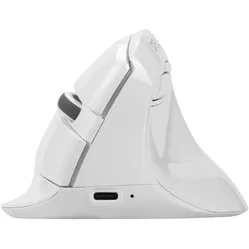
The Seeker has 6 buttons, including the regular left and right mouse buttons. These are also very quiet. The two buttons under the thumb allow you to easily go forward and back, for example when browsing the internet. A minor drawback is that the 'forward' button is placed a little too far, making it not equally accessible for everyone. On top of the mouse is a DPI button, which allows you to adjust the mouse's sensitivity (800, 1200, 1600, 2400 or 4000). On the underside of the mouse, there is a button that allows you to switch between the different modes (BT5.0, 2.4G wireless connection or wired connection).
Attractive
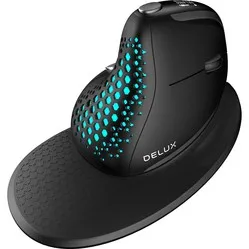
The packaging includes a wrist rest for the mouse. This can be easily attached to the mouse using a magnetic connection. The advantage of a wrist rest is that it can prevent wrist complaints because you are less inclined to move from your wrist. A disadvantage of the wrist rest is that precise tasks, such as editing photos, become a bit more difficult because you can move the mouse slightly less smoothly.
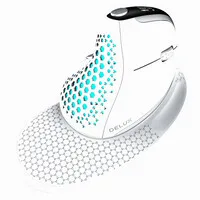
In addition to the wrist rest, the rear cover of the mouse is also easily interchangeable via a magnetic connection. By default, the cover has a honeycomb pattern, which creates a backlight effect from the lighting integrated into the mouse. To save battery, there is a sensor in the back of the mouse. This registers when a hand is placed on the mouse and thus switches off the backlight. If you don't want any backlight at all, you can choose to replace the honeycomb cover with a solid cover.
What makes the Delux Seeker so good?
Connect to 4 devices simultaneously
We've already written a lot, but we're not done yet! The Seeker features a Multiple Device Connection, which means the mouse can be used not only for PC, but also for tablet and even phone. You can easily switch between up to 4(!) devices using the button on the underside of the mouse. A possible distribution is shown below.
When you press the button on the underside, the box labelled 2.4G will light up red. This means the mouse is in 2.4G mode, and in this case, is active on the laptop. If you press it again, the mouse switches to BT1 mode and is active on the phone. If you press it again, the mouse is in BT2 mode, and after another press, no light will be on. The mouse can then be used with the cable, which is 160cm long. Finally, the current mode of the mouse can also be seen on the OLED screen on top.
Horizontal scrolling
What was the shortcut for horizontal scrolling again? Control + scroll? No, that's zooming. Command + scroll then, maybe? Nope, only works in Photoshop. Oh wait, this mouse has another scroll wheel!
Delux has placed a second scroll wheel on the left side of the Seeker, just above the thumb. By moving it upwards, your screen (e.g., in Excel) easily slides to the right. If you scroll the wheel downwards, the screen moves back to the left. The reason the scroll wheel moves up/down and not left/right is to prevent thumb complaints. Well done, Delux!
Get the most out of your Delux Seeker with the driver
Adjustments
As if all that wasn't enough, the Seeker also has various adjustable options. A driver can be downloaded from the Delux website, allowing you to customise all mouse settings. You can find the driver manual under the downloads section.
Delux has developed a surprisingly intuitive and clear driver