





Toetsenbord
"Goed"




| Width | 450 mm |
| Depth | 234 mm |
| Height | 48 mm |
| Compatibility | Windows, Mac and Android |
| Key layout | QWERTY (ANSI US int.) |
| Switches | Membrane |
| Connection | Bluetooth 5.0 and 2.4 GHz (USB receiver) |
How classic is a keyboard with Bluetooth? Shouldn't it have a PS/2 cable? Let's not complain, because with such a curve, one 2.4 GHz and two Bluetooth 5.0 connections, this board is already becoming a classic.
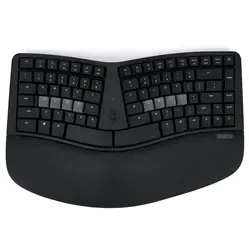
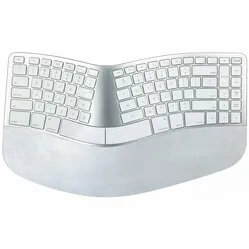
The full-size Ergonomic from Delux features both a split layout and a slight curve. This ensures that your arms, wrists, and hands can remain nicely aligned while typing. And that feels good. Additionally, the slight curve, the elevation in the middle, ensures that your thumbs point slightly upwards. The forearm, in particular, benefits from this.
And we're not done with the Split Classic yet. It comes standard with an integrated soft wrist/palm rest for extra comfort. The rest conforms nicely to the curve of the keyboard, guaranteeing you support. The wrist rest is not removable, so keep that in mind if you want to measure how deep the board will sit on your desk.
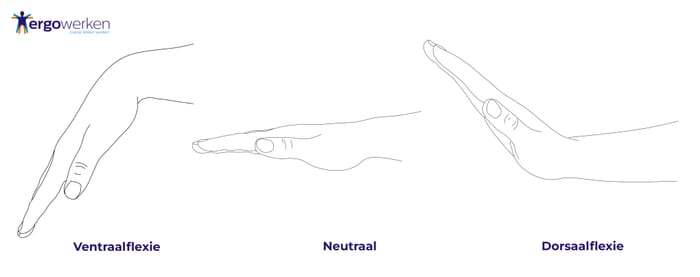
The split keyboard has not 2, but 4 feet underneath. These are also located at the front, allowing the keyboard to be negatively tilted. This gives you the option to point your palm downwards when typing (ventral flexion). This is much more comfortable to type than with the palm upwards (dorsal flexion).
Because this ergonomic keyboard is wireless, you need to connect it using the USB receiver or Bluetooth. The board has 2 Bluetooth 5.0 channels. This makes it possible to connect with up to 3 devices. In the middle of the board, there is a large button (BT) that allows you to quickly switch between the 3 connections. The receiver for the 2.4 GHz connection can be stored in your keyboard, which is handy if you want to take it with you.
The split keyboard takes 2 AAA batteries. These last for about 9-12 months. When the batteries need replacing, the keyboard indicates this with a flashing LED.
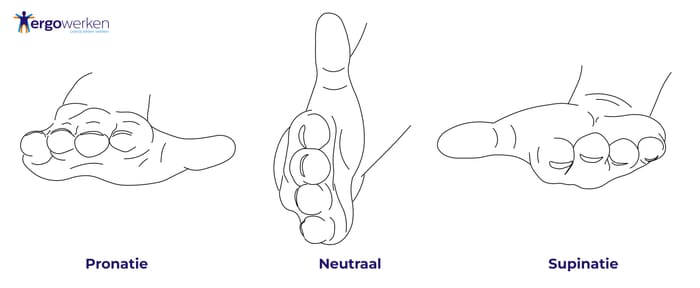
Its curve and split layout are ideal for a relaxed forearm posture. The arm is less twisted, and the thumbs point upwards. You can compare the posture to your hand on a vertical mouse. The arm is in a more neutral position.
You will find both Windows and iOS markings on the keyboard. Using key combinations, you can easily set the board to the correct mode. There is a choice between iOS, Android, and Windows.
The 'FN' button on the board allows you to access multiple multimedia keys. Think of controlling volume, cutting and pasting, or adjusting your screen's brightness.
It won't surprise you that a split layout and curve in the keyboard mean the keys are positioned slightly differently relative to each other. For example, the Backspace is a bit further away, and the Enter key is more compact. So, give yourself 3-5 days to get used to the keyboard. It's normal to make more mistakes in the first few days than with your old keyboard.
| Keyboard type | Split |
| Ergonomic design | |
| Connection | Wireless |
| Bluetooth | 5.0 |
| Weight | 850 grams |
| Wrist | |
| Arm | |
| Shoulder | |
| Hand |
| Item number | ERGO-GM901DW |
| Manufacturer's item number | GM901D-White |
| Brand | Deluxe |
| Warranty | 2 years |
| Type of guarantee | The Ergowerken free return guarantee service |
| Colour | White |
| Keyboard type | Split |
| Ergonomic design | |
| Keyboard layout | QWERTY (ANSI US int.) |
| Connection | Wireless Bluetooth and USB dongle |
| Bluetooth | Bluetooth 5.0 |
| Type of keys | Membrane |
| Numeric keypad | |
| Shortcut keys | Multimedia |
| Programmable buttons | |
| Trackball/touchpad | |
| Type of power supply | 2 * AAA battery |
| Battery type | AAA |
| Rechargeable | |
| Minimum system requirements | Mac OS X version 10.5, Windows 7 |
| Plug and play | |
| Dimensions length x width x height | 450 x 234 x 48 millimetres |
| Product weight | 850 grams |
Customers who write a review enter a prize draw for a voucher. We pick one winner and publish all reviews, including critical ones.