









The laptop: the dark side of our mobile friend
The unhealthy story of the laptop
The rise
Now fully established
Recently, the laptop has taken over from its big, bulky brother, the desktop. In 2013, figures from Statistics Netherlands (CBS) showed for the first time that households preferred laptops to desktops. 78 per cent of those surveyed had a laptop at home, compared to 69 per cent who had a desktop. In 2008, the figures were 62 and 83 per cent respectively. According to a 2014 Google study, the Netherlands actually has the highest percentage of laptop users in the world. A whopping 76 per cent, no less.
However, we are all paying a heavy price for the widespread use of our mobile companion. It does our health no favours. Studies show that working on a laptop increases our risk of physical ailments, sore muscles and even CTS (Carpal Tunnel Syndrome). So what makes a laptop such a torture device for the body? Let’s start at the beginning.
Development
From aid to indispensable tool
In the early 1970s, scientist Alan Kay came up with the idea for a portable computer, or the “Personal, portable information manipulator” as Kay called it. He saw the device primarily as a portable aid intended to be used mainly by children for educational purposes.
The first commercial laptop was released some three years later by IBM: the IBM 5100. Around ten years after the IBM 5100, the first laptop featuring the clamshell mechanism we still recognise today was released. Fast-forward another 10 years, and virtually all laptops came as standard with colour screens and ever-larger sizes, reaching a peak in 2003 with the arrival of the 17-inch screen.
The performance of the average laptop also improved in such leaps and bounds that it could increasingly be used as a viable alternative to the desktop computer. Heavy programmes and games could now be played on them too. And you could take it with you wherever you went! During the day it could be used for serious work, and in the evening you could play a quick game of Call of Duty on it. In roughly 40 years, the laptop has evolved from an educational aid into an all-round tool that we use for many more (everyday) tasks.
Drawbacks
Why does a laptop cause so many physical complaints?
A laptop is primarily designed for mobility. This has necessitated compromises in the device’s ergonomics. As we work with them more frequently and for longer periods, we are now increasingly aware of its shortcomings.
Actually, the problem is quite simple; if the keyboard is at the correct height, the screen is positioned too low, and if the screen is at the correct height, the keyboard is too high. So you’ll have to make a choice. Do you raise the laptop so that the screen is at the right height and work with your elbows at ear level? Or do you lower the laptop so that you can type comfortably, but put up with a cramped posture to be able to read everything properly?
Logically, option two is often chosen, because it is easier to simply place the laptop on the desk or table. However, the posture you adopt with this setup is very bad for you. Raised shoulders, head and back tilted forwards. This creates enormous strain on your body.
Consequences
The physical consequences of intensive laptop use
That cramped and static posture is, of course, not good for you. You very quickly develop all sorts of complaints: tense shoulders, back and neck pain, and even fatigue. American research shows that 75% of laptop users develop ‘visual fatigue’ after just 20 minutes. All of this is down to the poor readability of the screen, because it is positioned so low.
The physical complaints are also easily explained. A head weighs around 4–5 kilograms. The neck muscles can support this weight without much difficulty. However, when the head is tilted, the number of kilograms exerting pressure on it also increases. At 45°, the weight is already more than four times higher than in an upright position, at around 20 kilograms. Try working for a few hours with 20 kilos on your neck. This is also the cause of the inevitable back pain.
As the spine is connected to the neck, it too takes a beating. Research by the Harvard School of Public Health has shown that the resulting complaints are no laughing matter. Nerves, tendons, connective tissue and intervertebral discs are all affected and can suffer serious damage.
Measures
What can you do about it?
There are a number of things you can do to prevent or counteract these problems. For personal use, the advice is the same as for alcohol: go easy on it. It is recommended that you use your laptop for no more than 3.5 hours a day, in sessions of 20 minutes at a time. You should take a short break every 20 minutes. Stand up, get a drink, go to the loo, do some simple stretching exercises. At the very least, stand up for a moment, because once you’re in the ‘zone’, you quickly stop paying attention to things like your posture.
It’s also very important to keep your head as straight as possible, despite the low screen. This can drastically reduce the strain on your neck and back, allowing you to work in a more relaxed manner. Tilt the screen as far back as possible and position the laptop slightly further away from you. Not too far, though, as your arms and shoulders won’t be happy about that.
But is your laptop your lifeblood? Your oxygen? Your warm ray of sunshine that makes life possible? To put it less dramatically: are you dependent on it? For example, for work, school or other activities. If so, the above isn’t enough. You need to see your laptop as part of your workspace setup, not as your entire workspace.
The most important thing you need to do is raise the laptop to the right height. You can do this with a laptop stand, or even with a stack of books. The top of the screen should be roughly at eye level. Two problems now arise, however: the mouse and keyboard are no longer usable. To use them, you’d still have to sit in an awkward position. The best solution is to use an external keyboard and mouse.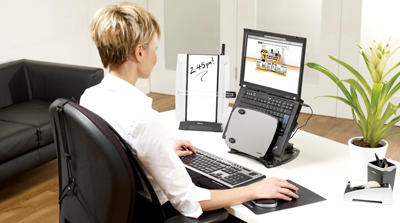
Actually, it’s strange that laptops don’t yet come with a laptop stand or even an integrated one as standard. It would be a brilliant move for a laptop manufacturer to launch a ‘healthy’ laptop. If it also had a solution for the keyboard and mouse, that would be absolutely brilliant. To name just one example: a keyboard and touchpad that folds towards you and sits in front of the laptop. That would also ensure a natural distance between you and the screen. In fact, you should only touch the current laptop keyboard once a month, when you dust the laptop.
DIY
DIY solutions: Do It Yourself
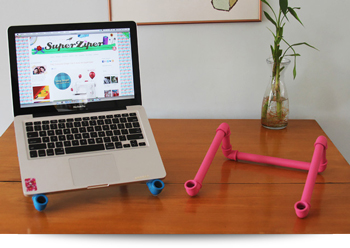
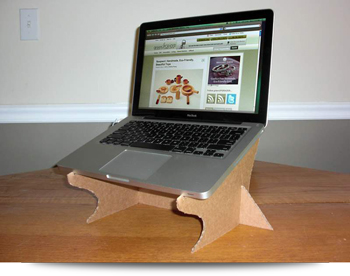
You can find plenty of solutions online for raising your laptop in a cost-effective way. A quick search for “Laptop Stand DIY” (DIY stands for Do It Yourself) yields plenty of results from creative minds coming up with the most ingenious ideas.
cbs.nl
tweakers.net
zdnet.com
spine-health.com
hse.gov.uk
cbsnews.com
health.harvard.edu
prehabexercises.com
diyroundup.com
Fit at the office: the dangers of sitting (16 April 2014)
Mouse arm: information and tips (24 April 2014)
RSI in the workplace (17 July 2014)
What is ergonomics (04-03-2014)