Request a quote
Your custom quote, within 24 hours in your inbox. For when you're interested in larger quantities or need approval for your order.

You are requesting a quote for:
Stel hier je vraag over dit product
Penclic B2 Bluetooth ergonomic wireless mouse


Product description of Penclic B2 Bluetooth ergonomic wireless mouse
Penclic B2 Bluetooth wireless ergonomic mouse
Does this mouse fit my hand?
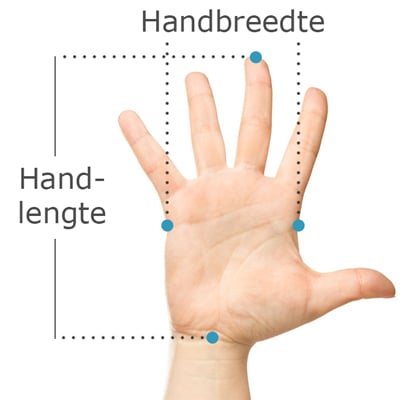
Do you want to find the ideal mouse? Then be sure to measure your hand. The following image clarifies how to measure your hand. This mouse is suitable for hands with the following dimensions:
Suitable for every hand size
Description
Bluetooth pens
You hold a pen from a young age. It is therefore one of the most familiar objects we hold daily. "We'll do something with that," they thought at Penclic. The result is impressive. This Bluetooth beauty does what you expect of it and works excellently.
Why the Bluetooth Penclic B2 mouse?
The design of this mouse didn't just appear out of nowhere. Precisely the familiar shape of the pen was the reason to develop a mouse that is close to the pen in terms of use. It therefore works familiarly, intuitively, and easily. The Penclic provides a lot of grip, making it easy to hold. Your arm is in a better posture, which prevents complaints.
The choice for the pen design goes even further. In our brain, a very large area controls the fine motor movements we make. This makes working with a pen so easy for us. It convinced the people at Penclic even more to choose this design.
The grip of this mouse is a big plus. It makes you work more comfortably. You control the mouse cursor in the same way as with any other mouse; you slide the Penclic across the desk. Thanks to the fine grip, you can hold the mouse loosely, which reduces muscle tension in the hand and arm.
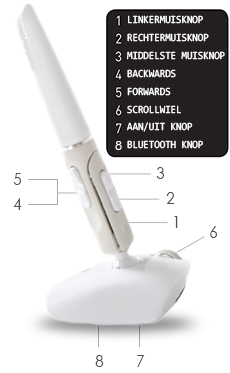
The Penclic has all the standard buttons you would expect on a mouse. It has 6 buttons. You have the left and right mouse buttons, the forward/backward button, the middle mouse button, and the scroll wheel. Underneath the mouse is a button to turn it on and off, and a button for the Bluetooth connection. The mouse sensitivity can be set to 800, 1200, 1600, and 2400 DPI. You can set it by pressing the left and right mouse buttons simultaneously for 3 seconds.
Before connecting the Penclic, check if your Bluetooth connection is on. Using the Bluetooth button under the mouse, you can connect the Penclic to your PC, laptop, tablet, or phone. The mouse has a wireless range of more than 5 metres. It works on almost any surface.
The operating systems for the Bluetooth version are Windows XP and newer, Mac OSX 10.1 and newer, and Linux. You can charge the battery via the included cable. With daily use, it lasts approximately one month.
This is what makes an ergonomic mouse so good
Ergonomic mice are developed to combat complaints such as RSI. The shape of the mouse ensures that your wrist remains in a natural posture. This reduces tension in the muscles of your wrist, arm, and shoulder.
Get the most out of it
Switching to an ergonomic mouse can sometimes feel a bit unfamiliar at first. However, the Penclic mouse requires little getting used to due to its similarities with the traditional pen. Instead of looking at paper, you follow the movements on your screen.
Like the traditional pen, the Penclic mouse is a precise working tool. Working in, for example, Photoshop or Illustrator, therefore, closely resembles penning creativity on paper.
Don't miss this either
This product is good for
wrist - arm - shoulder
With its design, the Penclic 2 provides relaxation in the wrist, arm, and shoulder. The shape forces the wrist into a natural posture.
Pros and Cons
- Familiar "pen grip"
- Works very precisely
- For right-handed use only
Brief specifications
| Warranty | 2 years |
| Ergonomic design | |
| Usage | Right-handed |
| Number of buttons | 6 |
| Plug & Play | Yes |
| view all specifications |
Specifications
Item number
ERGO-MI063BL
Brand
PenClic
Warranty
2 years
Type of guarantee
Ergowerken free warranty return service
Colour
White
Ergonomic design
Yes
Management
Optical
Left- or right-handed
Right-handed
Hand length
Suitable for any hand size
Hand width
Suitable for any hand size
Operation
Buttons and scroll wheel
Included receiver
not applicable
Bluetooth
Yes
USB port
not applicable
USB version
not applicable
Number of buttons
6
On/off button
Yes
Adjustable buttons
No
Scroll wheel
Yes
Trackball
No
Adjustable sensitivity
No
Sensitivity
1200 dots per inch
Type of power supply
Battery
Battery type
AAA 1.2V NiMH rechargeable battery
Rechargeable
Yes
Minimum system requirements
Mac OS X v10.5, Mac OS X v10.6, Mac OS X v10.7, Mac OS X v10.8, Mac OS X v10.9, Mac OS X v10.10, Mac OS X v10.11, Windows XP, Windows Vista, Windows 7, Windows 8, Windows 10
Plug and play
Yes
Dimensions length x width x height
Height: 140 mm, base: 44.1 x 20 mm.
Product weight
41 grams
Reviews Penclic B2 Bluetooth ergonomic wireless mouse
0 reviews46,95 39,95 Incl. tax33,02 Excl. tax![Posturite Penguin Mouse Wireless Left/Right]()
![Contour Design Rollermouse Red Plus wired trackpad]()
Specifications
| Item number | ERGO-MI063BL |
| Brand | PenClic |
| Warranty | 2 years |
| Type of guarantee | Ergowerken free warranty return service |
| Colour | White |
| Ergonomic design | Yes |
| Management | Optical |
| Left- or right-handed | Right-handed |
| Hand length | Suitable for any hand size |
| Hand width | Suitable for any hand size |
| Operation | Buttons and scroll wheel |
| Included receiver | not applicable |
| Bluetooth | Yes |
| USB port | not applicable |
| USB version | not applicable |
| Number of buttons | 6 |
| On/off button | Yes |
| Adjustable buttons | No |
| Scroll wheel | Yes |
| Trackball | No |
| Adjustable sensitivity | No |
| Sensitivity | 1200 dots per inch |
| Type of power supply | Battery |
| Battery type | AAA 1.2V NiMH rechargeable battery |
| Rechargeable | Yes |
| Minimum system requirements | Mac OS X v10.5, Mac OS X v10.6, Mac OS X v10.7, Mac OS X v10.8, Mac OS X v10.9, Mac OS X v10.10, Mac OS X v10.11, Windows XP, Windows Vista, Windows 7, Windows 8, Windows 10 |
| Plug and play | Yes |
| Dimensions length x width x height | Height: 140 mm, base: 44.1 x 20 mm. |
| Product weight | 41 grams |
Reviews Penclic B2 Bluetooth ergonomic wireless mouse