







| 1 | Alexander on his Ergo Compact white |
- Days in use: more than 8 days
- Purpose: Hand, Wrist/forearm
- Acclimatisation period: It already works very comfortably
- Key stroke:
Very nice keyboard, pleasant key stroke. Also feels solid. It is narrower than a keyboard with an extra numeric section, but ergonomically that only has advantages: the distance between keyboard and mouse is much smaller. And not to be underestimated: more space on your desk due to its compact size. You can put the keyboard aside without it getting in the way, as is the case with larger keyboards.

| 2 | Monique on her Goldtouch V2 |
My verdict on the V2 ergonomic keyboard? I think, and I really mean it, that it saved my career as a copywriter! My complaints had become so persistent in a short time that I was already seriously considering the question 'But what then?' In a desperate attempt, I searched the internet for information on how to tackle this problem, and that led me to the site of Henrik Warne, a Swedish programmer who, like me, feared having to give up his job due to RSI. And he - thank you, Henrik! - mentioned the purchase of this keyboard as one of the measures that helped him recover.
I immediately took action, and in combination with the fast service from Ergowerken.nl, it meant I had the keyboard at home the next day. Together with the laptop stand I purchased and the break programme I strictly adhere to, I am now managing my complaints effectively. And I feel in every way that I am 'doing well'. In short, I am incredibly happy with my Goldtouch v2 ergonomic keyboard!

| 3 | Marcel on his Penclic KB3 compact |
- Days in use: more than 8 days
- Purpose: Hand, Wrist/forearm
- Acclimatisation period: It felt familiar immediately
- Key stroke:
Excellent flat keyboard
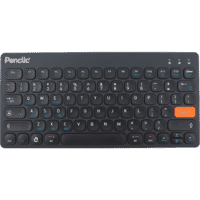
I am very satisfied with the KB3 keyboard. What appeals to me is that it is very flat, so I don't have to bend my wrists. It is flatter than the Rapoo keyboard I used for more than 8 years. In my opinion, this is an advantage. Everything feels very solid, nothing bends, and the keyboard doesn't shift.
The resistance of the keys is just right with a clear pressure point. The keyboard also doesn't have an unnecessary numeric block, which allows me to keep the mouse close to the keyboard. The distance between the keys is just right. I can't say anything about the capacity of the built-in battery yet. I use the keyboard with my desktop computer.
Although this is the best keyboard I have ever used, there are still small points that could be improved. In wireless mode, very occasionally, it doesn't wake up by pressing a key. In that case, I have to turn the keyboard off and on again, after which everything works again. This happens about once every two weeks, but it's not a problem for me. When charging, a red LED lights up which is quite bright and distracting. Fortunately, this LED does not light up when the keyboard is charged. The manual could have been a bit clearer.
All in all, I like this keyboard so much that I bought a second one.
| 4 | Marianne on her Kinesis Advantage2 |
I had read a lot about the Kinesis Advantage 2 before I proceeded to order this keyboard. The good expectations I had were actually exceeded. I find it an incredibly pleasant keyboard and can't really imagine anything better existing.
The concave keywells and palm rests ensure a comfortable hand position. One of the problems with a standard keyboard is that I constantly have to lift my hands and arms, stretch my fingers and shoulders, and bend my wrists to reach everything. That is no longer the case now. While typing used to be a painful affair, it is now almost pleasant. What is fantastic is the ability to further customise things to your needs. For example, I used the option to swap some keys and add macros. I got used to the slightly different layout very quickly.
I suffered from severe RSI for 9 years. But in combination with the Contour Rollermouse Red (I've had both for a month now), I am now almost certain that I can continue my work without having to accept chronic pain. That is an incredible relief.
I can therefore wholeheartedly recommend this keyboard to everyone. In my opinion, this should be the new standard in every office workplace.

| 5 | Richard on his Mistel MD600 RGB |
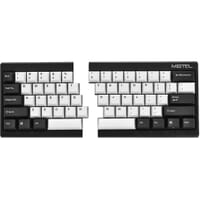
This keyboard is one of the most cool and useful keyboard I ever experimented, it split function is really nice for people that never experienced split keyboard, and when you tired or you don't like the split you can join the part, so it's reachable for any kind of typist.
Is also really powerful because you can re-programme the key, you got 4 different layout, so you can customize layout for different use (for example video games or graphical software...etc). This functionality give the possibility to people who have tiny hand like me to change the position of modifier key (ctrl, alt, fn ...etc), so you can avoid RSI. The quality is near perfection, I just regret an aluminium case. The default wire is high quality too, and the RGB is Brilliant.
What else to say ? nothing more, is some kind of super Pok3r keyboard like, with a split option ! I recommend this keyboard.
| 6 | Chris on his BakkerElkhuizen Ultraboard 950 |
- Days in use: more than 8 days
- Purpose: Hand, Wrist/forearm, Shoulder
- Acclimatisation period: It felt familiar immediately
- Key stroke:
Ordered this Ultraboard due to long-term working from home because of Corona. Very happy with it, types nicely, fast connection, long battery life, lightweight and installed within 1 minute.

| 7 | Dennis on his Keychron K6 aluminium |
Nice customisable keyboard
Nice keyboard that feels solid with a beautiful aluminium frame. The keycaps are made of ABS, so I decided to replace them with less wear-prone PBT keycaps. The keyboard is therefore very easy to customise as desired. Also nice that it can work wirelessly. It's difficult to order a mechanical keyboard in the Netherlands, so it's great that this website has some!

| 8 | Tommy on his Mistel MD770 |
- Days in use: more than 8 days
- Purpose: Hand, Wrist/forearm, Shoulder
- Acclimatisation period: It's getting better and better
- Key stroke:
Gives a surprising amount of freedom in position and a little bit of tenting with the included feet. It takes a lot of getting used to but is definitely worth it. The board feels sturdy. No vibration audible when typing. Mac compatibility mode works great and I still have to explore the macro functions. Excellent board for people who type all day. Gaming usually also gives you more space because you can slide half of your board aside.

| 9 | Heike on her R-Go Split |
- Days in use: more than 8 days
- Purpose: Hand, Wrist/forearm, Shoulder
- Acclimatisation period: It already works very comfortably
- Key stroke:
Not a bent keyboard with only one position, but 2 separate parts that you can place however you want. So variety is also possible. Thin, flat, low keys. Compact. Perfect for short arms and small hands :) Very satisfied!

| 10 | Pieter on his Kinesis Freestyle Edge mechanical split keyboard |
Fantastic keyboard, very good key stroke, clearly readable in the dark if you need it. Programming the keyboard is not difficult, but you do have to put some effort into it. It also works perfectly without programming, but then you miss out on a lot of options. Not cheap but still recommended.
I searched the entire internet for a better price, but if you include import taxes and the lift kit, the difference is negligible. Then I prefer to buy here from the local retailer.

 | Engage Jesse and get direct advice to find the best ergonomic keyboard for you. With 3-4 questions, you'll quickly arrive at 1 or 2 suitable options. |