Stel hier je vraag over dit product
TEX Shinobi 75% mechanical keyboard with pointing stick


Product description of TEX Shinobi 75% mechanical keyboard with pointing stick
Is this keyboard right for me?
| Width | 3130 mm |
| Depth | 235 mm |
| Height | 33 mm |
| Compatibility | Windows, macOS, Linux |
| Key layout | QWERTY (ANSI US int.) |
| Switches | Cherry MX1A silent red, black, brown |
| Connection | Cable |
An ode to the Shinobi mechanical keyboard
Pointing stick
My keyboard has a quirky feature: the pointing stick. Sometimes it seems to have a mind of its own, deciding to jump wildly around just when I'm typing seriously. As if it wants to say: "Let me have a dance among those letters too!"
Why the Shinobi mechanical keyboard?
Pointing stick cursor
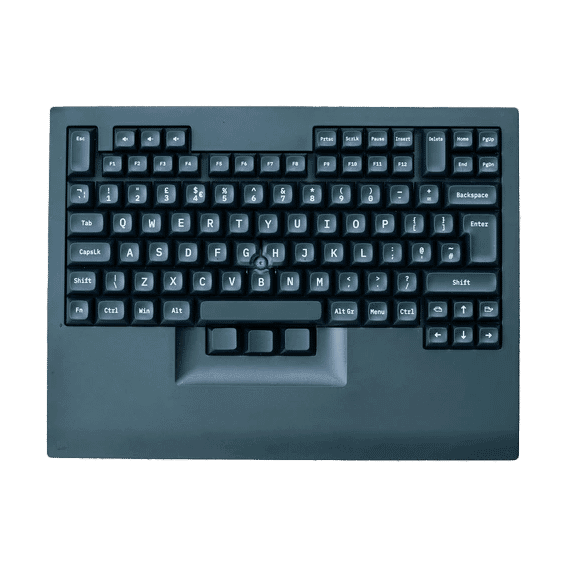
What makes the Shura keyboard unique is the pointing stick in the middle of the keyboard. This rubber button can be used as a mouse, allowing you to control the cursor on your screen. Using a pointing stick has several advantages.
Space-saving
Because a pointing stick is placed directly on the keyboard, it doesn't take up extra space on the desk. This can be useful for people working in a small workspace or who are often on the go. Additionally, with a pointing stick, you don't have to remove your hands from the keyboard to move the cursor, as is the case with a mouse. This can increase productivity as you can keep your hands in the home position while working. This can also be an ergonomic advantage.
In short, using a pointing stick can improve the efficiency and comfort of computer use, especially for people who do a lot of word processing or precise work and prefer not to constantly switch between keyboard and mouse.
Adjusting mouse sensitivity
Using the key combination M_Fn + 1 to M_Fn + 9, you can adjust the sensitivity of the pointing stick incrementally. Your cursor will then move either slower (1) or faster (9).
We advise you to try out different sensitivities to find what works best for you. The keyboard comes with various rubber caps that you can attach to the pointing stick. The M_Fn key is the middle key below the spacebar.
Mouse click
It's handy, of course, that you can control the cursor with the pointing stick, but you can't actually click with this point. For that, the three keys below the spacebar are designed. The left key functions as the left mouse button and the right key as the right mouse button.
The middle key is the M_Fn key. With this, as described above, you can adjust the sensitivity of your pointing stick. Additionally, when you hold down the M_Fn key, you can use the scroll function.
This is what makes the Shinobi keyboard so good
N-key rollover
To prevent incorrect key registration, the Shinobi keyboard features N-key rollover (also known as NKRO). This refers to the ability to detect and correctly register multiple keystrokes simultaneously. With NKRO, the keyboard can accurately register every key pressed, even if multiple keys are pressed at the same time. This is especially useful for gamers and fast typists, as it prevents keystrokes from being missed or incorrectly registered.
Sturdily built
With dimensions of 31.3 x 13.5 x 3.3 cm and a corresponding weight of 1000 grams, it's fair to say it's a sturdy keyboard. The casing is made of ABS plastic (Acrylonitrile Butadiene Styrene). This is a commonly used plastic for keyboards due to its strong and durable properties.
The keycaps are made of double-shot PBT, which means that the symbols and characters are not printed on the keycap, but are moulded into the plastic. This ensures durable keys that retain clear symbols, even after prolonged use.
Get the most out of your Shinobi mechanical keyboard
Programmable
The Shinobi keyboard is programmable using the tool on the TEX supplier's website. Here you can set up macros to work faster. Macros are combinations of keystrokes configured to perform a series of actions when pressed.
Macro examples
Automating repetitive tasks: If you regularly need to perform the same sequence of keystrokes, you can create a macro to automate this process. For example, entering a long series of numbers or characters.
Productivity: For business use, macros can be used to create shortcuts for frequently used actions in software programmes such as word processors, spreadsheets, or graphic design software.
Multimedia functions: Macros can be used to activate multimedia functions, such as playing music, adjusting the volume, or opening specific programmes.
Gaming: In the gaming world, macros are often used to simplify complex key combinations for game commands. For example, you can quickly perform a series of actions in a strategy game or activate a special combo in a fighting game.
Also not to be missed
Switch choice
The Shinobi keyboard is equipped with mechanical MX1A switches from the Cherry brand. Switches are the mechanisms under the keycaps. These ensure that keystrokes are registered by the keyboard. In the case of the Shinobi keyboard, you have a choice of 3 types of switches: silent red, black, and brown.
The silent red switch is a linear switch that you can press with equal pressure, without any counter-pressure. Unique to this switch, as the name suggests, is that it is virtually silent. This makes the keyboard one of the quietest mechanical keyboards we have ever heard.
The brown switch is also silent, but provides a small amount of tactile feedback when pressed. This is useful, for example, when you type a lot (touch typing). You can then clearly feel when a key has been pressed far enough to be registered.
The black switch has the same characteristics as the red switch, as they are both linear. The difference lies in the actuation force of the switch. Where red provides an actuation force of 45 grams, the black switch is slightly heavier at 60 grams. In theory, you can type/game faster with the black switch because the spring in the switch returns upwards with more force.
Pros and cons
- With pointing stick
- Prevents hand movements
- No separate mouse needed
- Programmable
- No keycaps for macOS included
- Concise manual compared to the keyboard's capabilities
Brief specifications
| Switches | Cherry MX1A silent red, black, brown |
| Ergonomic design | |
| Wireless use | No |
| Programmable | Yes |
| Dimensions | 31.3 x 23.5 x 3.3 cm |
| Weight | 1200 grams |
How happy will my body be with this?
| Arm | |
| Hand | |
| Finger | |
| Wrist |
Product features
- QWERTY US layout
- Cherry MX1A switches
- Keycap material: ABS double-shot
- Keyboard material: ABS plastic
- N-Key rollover
- Features a pointing stick cursor
- Connection: USB-C to USB-A cable
- Suitable for Windows, Mac OSX, and Linux
- 31.3 x 23.5 x 3.3 cm
- Weight: 1.2 kg
What's in the box?
- 1 x Shinobi keyboard
- 1 x Brief manual (English)
- 1 x USB-A to USB-C cable
- 3 x Extra keycaps
- 1 x Keycap puller
- 3 x Rubber cap for pointing stick
Frequently asked questions
Specifications
| Item number | ERGO-TEX-SR-002 | ERGO-TEX-SR-003 | ERGO-TEX-SR-005 |
| Brand | Tex |
| Warranty | 2 years |
| Type of guarantee | The Ergowerken free return guarantee service |
| Colour | Black |
| Keyboard type | Mechanical |
| Ergonomic design | |
| Keyboard layout | QWERTY (ANSI US int.) |
| Connection | Cable |
| Bluetooth | |
| Type of keys | Cherry MX1A |
| Numeric keypad | |
| Shortcut keys | |
| Programmable buttons | |
| Trackball/touchpad | |
| Type of power supply | Cable |
| Rechargeable | |
| Minimum system requirements | Mac OS X v10.5, Mac OS X v10.6, Mac OS X v10.7, Mac OS X v10.8, Mac OS X v10.9, Mac OS X v10.10, Mac OS X v10.11, Windows XP, Windows Vista, Windows 7, Windows 8, Windows 10 |
| Plug and play | |
| Dimensions length x width x height | 31.3 x 13.5 x 3.3 cm |
| Product weight | 1000 grams |
Reviews TEX Shinobi 75% mechanical keyboard with pointing stick