Offerte aanvragen
Jouw offerte op maat, binnen 24 uur in je mailbox. Voor als je interesse hebt in aantallen. Of goedkeuring nodig hebt voor je bestelling.

Je vraagt een offerte aan voor:
Stel hier je vraag over dit product
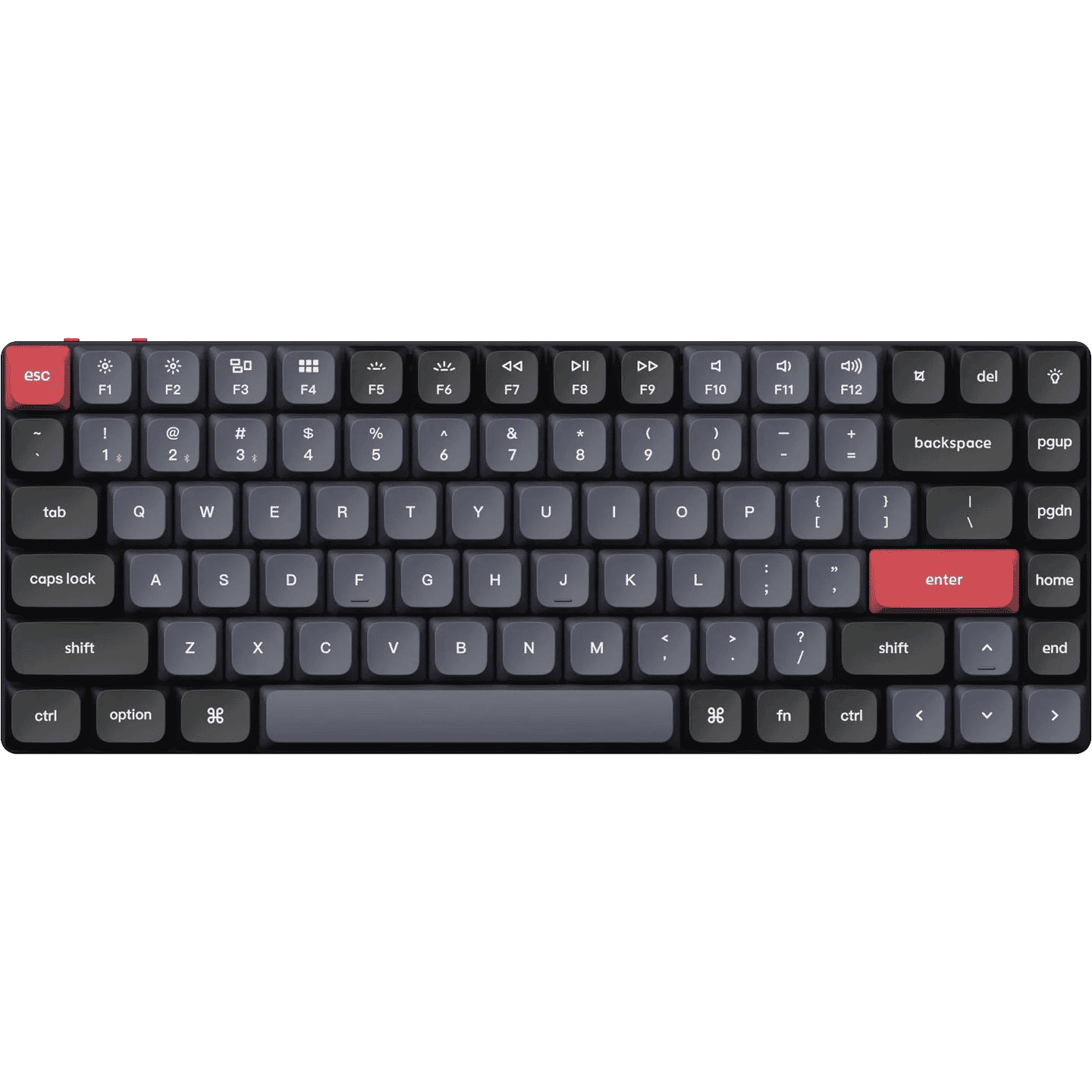
Keychron K3 Pro low profile wireless mechanical keyboard for Windows and Mac
Beschrijving Keychron K3 Pro low profile wireless mechanical keyboard for Windows and Mac
Does this keyboard suit me?

| Width | 306 mm |
| Depth | 116 mm |
| Height | 11 mm front | 15 mm rear | Without keycaps |
| Version | Windows and Mac |
| Key layout | QWERTY (ANSI US int.) |
| Switches | Gateron low-profile mechanical switches |
| Connectivity | Bluetooth 5.1 and USB |
Why the K3 Pro?
Flat and mechanical
The Keychron K3 Pro is a mechanical low profile keyboard, meaning it is a flat model with mechanical keys. These keys last longer compared to scissor or membrane keys. Additionally, a mechanical keyboard is easy to clean and the switches are easy to replace (with the Hot Swappable version), allowing you to customise your keyboard to your liking. The K3 Pro is equipped with Gateron Low profile MX switches.
External features
The K3 Pro has a 75% layout, meaning the numeric keypad on the right side is absent. This makes the K3 Pro compact, making the keyboard very ergonomic. You can keep your computer mouse close to you, which prevents shoulder complaints. As an update to the Keychron K3 (V2), the K3 Pro is equipped with PBT double shot keycaps. These are, unlike ABS keycaps, wear-resistant and do not leave fingerprints. Extra keycaps are included, allowing you to use the keyboard with macOS, Windows, and Linux.
The Gateron switches hidden under the keycaps are equipped with small LEDs, also known as backlight. These lights give your keyboard cool lighting effects, making its use just a bit more enjoyable. Especially for gamers among us, this is often an added value. The K3 Pro comes with 22 different RGB backlight patterns. Finally, there are foldable feet on the bottom of the keyboard, allowing you to use the K3 Pro at 3 different heights.
What makes the K3 Pro so good?
The keyboard can be used both wirelessly and wired. Charging is easy with the included USB-A to USB-C cable. The wired polling rate is 1000Hz, which means this keyboard is very suitable for gaming. Wirelessly, this polling rate is 90Hz.
You can use the K3 Pro wirelessly via a Bluetooth 5.1 connection. This allows you to connect to 3 devices simultaneously, for example, your PC, laptop, and tablet (handy for students and hybrid workers!). Switching between these devices is easy with a single press of a button.
Programmable with QMK/VIA software
The Keychron K3 Pro is the first low profile keyboard that can be programmed using QMK/VIA software. With this software, you can assign any function you want to each key, such as combination keys and macros. By compressing several actions into a single button press, you will be able to work faster. In the blog written by Keychron, you can read all about this software. You can download the software here, about halfway down the page.
What’s new?
The K3 Pro is essentially an improved version of the Keychron K3 (V2) keyboard. For example, it is now possible to set macros and assign any function you want to the keys. The battery lasts longer, but this does result in a slightly heavier weight for the K3 Pro. As mentioned earlier, the keycaps have also been improved. However, they are no longer shine-through.
Below is a summary of all the differences:
| K3 (V2) | K3 Pro | |
| VIA & QMK customizable | No | Yes |
| Maximum battery life | 70 hours | 100 hours |
| Keycap material | ABS | PBT double shot keycaps |
| Number of backlight patterns | 18 | 22 |
| Weight | 483 grams | 525 grams |
Also, don't miss this
Matching wrist rest
To relieve your wrists when using the keyboard, you can use a wrist rest. This allows you to rest your hands comfortably, preventing complaints. The wrist rest is made of walnut wood and is naturally brown in colour. You can add it to your shopping cart along with the K3 Pro at the top right of this page.
Easy to carry
The K3 Pro is compact and nice and flat, making it ideal for carrying. To prevent it from getting dirty or keycaps falling off, it's smart to transport it protected. You can easily do this with the travel pouch. You can also easily add this to your shopping cart, at the top right of this page.
Pros and cons
- Fully programmable keys
- Mechanical switches
- Can be used wired and wirelessly
- Can be used on 3
Specificaties
| Manufacturer's item number | K3P-H3 |
| Brand | Keychron |
| Warranty | 1 year |
| Type of guarantee | The Ergowerken free return guarantee service |
| Colour | Black/blue |
| Keyboard type | Low Profile |
| Ergonomic design | Yes |
| Keyboard layout | QWERTY (ANSI US int.) |
| Connection | Wireless (Bluetooth) and USB-C to USB-A cable (120 cm) connection |
| Bluetooth | Yes, 5.1 |
| Type of keys | Mechanical |
| Numeric keypad | No |
| Shortcut keys | Yes |
| Programmable buttons | Yes |
| Trackball/touchpad | No |
| Type of power supply | Battery or wired |
| Battery type | 1550 mAh rechargeable li-polymer battery |
| Rechargeable | Yes |
| Minimum system requirements | Mac OS X v10.5, Mac OS X v10.6, Mac OS X v10.7, Mac OS X v10.8, Mac OS X v10.9, Mac OS X v10.10, Mac OS X v10.11, Windows XP, Windows Vista, Windows 7, Windows 8, Windows 10 |
| Plug and play | Yes |
| Dimensions length x width x height | 306 x 116 x 15 mm (without keycaps) |
| Product weight | 525 grams |