Stel hier je vraag over dit product
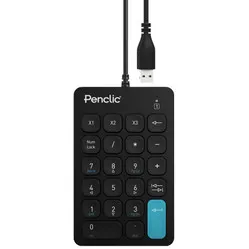
Penclic N3 numeric keypad black


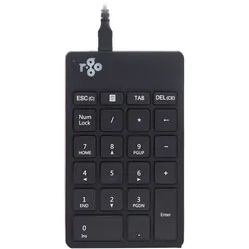
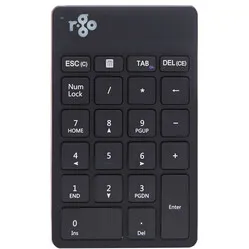
Product description of Penclic N3 numeric keypad black
Description of the Penclic Numpad N3 Office numeric keypad
Small but mighty
So small, yet so versatile. Do you have to process numbers all day? This Scandinavian keypad doesn't break a sweat. This cool customer not only helps you out with numbers, but you can program any key or key combination wherever you want.
Why the Penclic N3 numeric keypad?
Many compact ergonomic keyboards lack a numeric section. This is not a disaster for most people's daily use. However, there are also people who work a lot with numbers, and then the absence of a numeric section is indeed a drawback.
If your daily activities involve a lot of number input, then a numeric keypad is exactly what you need. Because it's not attached to your regular keyboard, you can place it wherever you want. We therefore advise placing the numeric section on the other side of your keyboard, depending on where your mouse is located. This gives you optimal benefit from your compact keyboard while still having the convenience of a numeric section.
Macros?
Indeed, macros! This numeric keypad is not only suitable for numerical work. It's also a godsend for demanding users who frequently need to use key combinations. With the downloadable Penclic software, you can program all sorts of shortcuts (on a Windows computer).
If you frequently use photo or video editing programmes, program, or simply often use frequently recurring shortcuts, then these programmable macros are a godsend for you. Fewer keystrokes, fewer awkward movements to make those key combinations, and therefore less strain on your fingers and hands.
How happy will my body be with this?
- Shoulder
- Arm
- Wrist
- Leg
Pros and Cons
- For compact keyboards
- Scandinavian design
- Programmable macros
- 22 keys
- Wired
Brief specifications
| Warranty | 2 years |
| Dimensions | 140 x 89 x 10 mm |
| Weight | 83 grams |
| Cable length | 150 cm |
| Plug&Play | Yes |
| view all specifications |
Product features
- Suitable for all operating systems
- Small, easy to carry
- Indispensable for numerical work
- Ready to use when you need it
- For left and right-handed users
- For all compact keyboards
- With 22 keys
- Macros programmable
What's in the box?
- 1 x Penclic Numpad N3 Office
- 1 x 1.5m cable
- 1 x Quick guide
Frequently Asked Questions
Specifications
| Item number | ERGO-NUM003B |
| Manufacturer's item number | N3 |
| Brand | Penclic |
| Warranty | 2 years |
| Type of guarantee | Ergowerken free warranty return service |
| Colour | Black |
| Keyboard type | Numeric keypad |
| Bluetooth | not applicable |
| USB port | |
| USB version | 2.0/3.0 |
| Number of keys | 22 keys |
| Type of keys | Flat keys with scissor mechanism |
| Minimum system requirements | Mac OS X v10.5, Mac OS X v10.6, Mac OS X v10.7, Mac OS X v10.8, Mac OS X v10.9 (Mavericks), Windows 7, Windows 8, Windows Vista, Windows XP |
| Type of power supply | Wire |
| Battery type | not applicable |
| Rechargeable | not applicable |
| Plug and play | |
| Dimensions length x width x height | Height: 10 mm, base: 87 x 162 mm |
| Product weight | 80 grams |
Reviews Penclic N3 numeric keypad black
Customers who write a review enter a prize draw for a voucher. We pick one winner and publish all reviews, including critical ones.