Notify me when is back in stock.
Enter your e-mail address here and we will send you an update as soon as this product is back in stock.
After submitting your e-mail address, you will receive an e-mail confirming your subscription.
This notification is no guarantee that you can claim items from the new stock. Want to be more certain of receiving the product? Then order and pay for it right away. Your order will be reserved and shipped as soon as the new stock arrives.
Privacy
Your e-mail address is stored in a closed database that we cannot access. After the stock update, your e-mail address is automatically deleted.

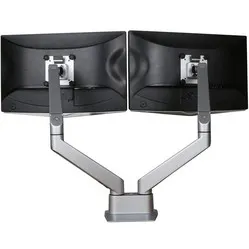
Ergopro dual monitor arm with gas spring silver-grey
0 reviews
Stel hier je vraag over dit product
Ergopro dual monitor arm with gas spring silver-grey


Product description of Ergopro dual monitor arm with gas spring silver-grey
1The main specifications of the Ergopro dual monitor arm with gas spring
Number of monitors 2
2
 2
2Monitor size 10 - 32 inch
 10 - 32 inch
VESA
 75/100
 75/100
Height
 175 - 515 mm
 175 - 515 mm
Rotate
 90 degrees
 90 degrees
Tilt
 +75/-25 degrees
 +75/-25 degrees
Swivel
 360 degrees
 360 degrees
Depth
 590 mm
 590 mm
Load capacity 2 - 12 kg
 2 - 12 kg
Clamp or grommet
 Clamp/ grommet
 Clamp/ grommet
Desk thickness 10 - 50 mm
 10 - 50 mm
How happy will my body be with this?
- Neck
- Shoulders
- Back
Pros and cons
- Good for back, neck, and shoulders
- Easily adjustable height
- More space on your desk
- Both screens individually adjustable
- We are looking for one
Brief specifications
| Warranty | 2 years |
| Ergonomic design | |
| Height from desk | max. 515 mm |
| Depth | 590 mm |
| Cable management | |
| view all specifications |
Product features
- Ergonomic design
- Desk and grommet clamp 0-50 mm
- Load capacity 2-12 kg
- VESA Quick release for easy mounting
- Suitable for 2 screens
- Only a screwdriver needed for mounting
What's in the box?
- Dual monitor arm
- 2x Quick-release VESA plate
- Desk clamp (0-50 mm)
- Grommet clamp (0-50 mm)
- Manual
Downloads
Frequently asked questions
"How do I attach the monitor arm to my desk?"
There are two ways. The most common way is to attach the monitor arm to the edge of your desk using the desk clamp. The clamp can accommodate a desk up to a maximum of 50 mm thick. Option two is mounting using a grommet clamp. For this, a hole must be drilled in the desk, through which you then feed a bolt. On the underside of the desk, you can then clamp the arm with the supplied nut/clamp. This mounting method can also be applied to desks up to 50 mm thick.
"Can I easily adjust the monitor's height?"
Yes, absolutely. The characteristic of monitor arms with a gas spring is that you can easily adjust them. You simply grasp the monitor and move it to the desired position. The gas spring then holds it in place for you.
"Are other colours available?"
Yes, the Ergopro monitor arm with gas spring is available in silver-grey and white.
"I've mounted my monitor, but the arm keeps dropping. Am I doing something wrong?"
With a gas spring arm, you always need to adjust the gas spring to the correct weight. So, if your monitor is quite heavy, the gas spring needs to provide more counter-pressure. The monitor arm is correctly adjusted when it no longer drops and stays exactly where you want it. If the counter-pressure is too great, the screen will automatically move up to its maximum position.
Specifications
| Item number | ERGO-MADAMD |
| Warranty | 2 years |
| Type of guarantee | The Ergowerken free return guarantee service |
| Colour | silver grey |
| Number of screens | Suitable for 2 monitors |
| Gas-sprung arm | Yes, both arms are equipped with a gas spring. |
| Maximum screen size | 32-inch |
| Maximum load capacity | 2 to 12 kg per arm |
| Tilting | Yes, maximum 45˚ downwards and maximum 75˚ upwards. |
| Rotate | Yes, up to 90˚ |
| Swinging | Yes, up to 360˚ |
| Lowest setting | 175 millimetres |
| Highest position | 515 millimetres |
| Depth | maximum 590 mm from the rear of the desktop |
| VESA minimum | 75 x 75 millimetres |
| VESA maximum | 100 x 100 millimetres |
| Method of installation | Using a desk clamp or feed-through clamp |
| Suitable for desk thicknesses of | 10 to 50 millimetres |
| Assembly materials included | |
| Required tools | Phillips screwdriver for mounting the monitor to the VESA adapter |
| Cable management |
Reviews Ergopro dual monitor arm with gas spring silver-grey
Customers who write a review enter a prize draw for a voucher. We pick one winner and publish all reviews, including critical ones.