Offerte aanvragen
Jouw offerte op maat, binnen 24 uur in je mailbox. Voor als je interesse hebt in aantallen. Of goedkeuring nodig hebt voor je bestelling.

Je vraagt een offerte aan voor:
Stel hier je vraag over dit product
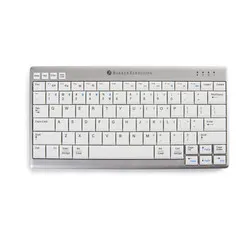
BakkerElkhuizen UltraBoard 950 compact Bluetooth keyboard


Beschrijving BakkerElkhuizen UltraBoard 950 compact Bluetooth keyboard
Is this keyboard right for me?

| Width | 285 mm |
| Depth | 147 mm |
| Height | 19 mm |
| Version | Windows and Mac |
| Key layout | QWERTY (ANSI US int.) |
| Key type | Scissor mechanism |
| Connection | Wireless via Bluetooth |
Ultra many connections
High expectations
Yes, that's what you get when you come up with a superhero name for a new product. But then, every superhero has their weaknesses. It's up to you to discover and utilise its potential. Then it could just turn out to be an ultra beautiful experience.
Why the BakkerElkhuizen Ultraboard keyboard?
With the 950, BakkerElkhuizen has developed a mobile gem. The board is light, compact, thin (2 cm) and can be connected via Bluetooth. The big advantage of the Bluetooth connection in this keyboard is that you can connect 5 devices to the board.
The Ultraboard is versatile in use. Its compact size promotes a healthy posture and relaxes the shoulder, but also makes it mobile and suitable for taking anywhere. Whether you do administrative work or are often on the road as a salesperson, the 950 board is your companion.
The compact keyboard has an integrated battery. Nice and easy, so you no longer have to change batteries. You can also charge the battery with the included 125 cm long USB cable.
What makes an ergonomic keyboard so good?
A compact keyboard ensures that your posture becomes more centred. You can place the mouse closer to your body and thus work within shoulder width. Your shoulders, in particular, benefit from this. Many compact boards, such as the 950, are also very flat. This makes it easier to keep your wrists in a nice straight line.
Get the most out of this product
5 Bluetooth connections. That sounds exaggerated, but think about it. Suppose you are a field sales representative and have to be out and about a lot. You work on a laptop on the go, show your product or service to customers on your tablet, and regularly check your email on your phone. That's already 3 on-the-go devices you can connect to your Ultraboard.
Perhaps you also have a private phone and occasionally give presentations on a desktop computer in the office. As you can see, you've already found 5 devices for the keyboard without much effort.
How to pair the Ultraboard with up to 5 devices
device 1
- press FN + 1 for a while. The Bluetooth light will flash briefly when released
- Press the round pair button on the back of the keyboard so that the Bluetooth light flashes repeatedly
- Now connect one of your devices to the keyboard
- The device is now registered under FN + 1
device 2
- press FN + 2 for a while. The Bluetooth light will flash briefly when released
- Press the round pair button on the back of the keyboard so that the Bluetooth light flashes repeatedly
- Now connect one of your devices to the keyboard
- The device is now registered under FN + 2
Continue these steps with FN + 3, FN + 4 and FN + 5. You can then switch between devices as follows.
Switching between devices
- Switch from device 2 to 1: --> press FN + 1
- The green LED light will flash 3 times
- You can now continue typing on device 1
How happy will my body be with this?
- Shoulder
- Hand
- Wrist
- Arm
Pros and cons
- Compact size
- Up to 5 Bluetooth connections
- Suitable for Windows and Mac
- Flat design
- Wireless via Bluetooth only
Brief specifications
| Warranty | 3 years |
| Product weight | 430 grams |
| Colour | Silver-white |
| Ergonomic design | |
| Plug & Play | |
| view all specifications |
Product features
- Ergonomic design
- Nice flat keys with scissor mechanism
- Good keypress feedback
- Bluetooth connection
- Integrated numeric keypad via Fn key
- Compact design increases comfort
- Up to 5 Bluetooth connections possible simultaneously
- Lightweight, thin and compact
What's in the box?
- 1 x compact QWERTY keyboard
- 1 x protective cover
- 1 x USB charging cable
- 1 x manual
Downloads
Frequently asked questions
Specificaties
| Item number | ERGO-BEU950WUS |
| Manufacturer's item number | BNEU950WUS |
| Brand | BakkerElkhuizen |
| Warranty | 3 years |
| Type of guarantee | Ergowerken free warranty return service |
| Colour | silver grey |
| Keyboard type | Compact |
| Ergonomic design | Yes |
| Keyboard layout | QWERTY (ANSI US int.) |
| Connection | Wireless via Bluetooth |
| Bluetooth | Yes |
| USB version | 2.0 |
| Type of keys | Flat keys with scissor mechanism |
| Numeric keypad | Integrated |
| Shortcut keys | Yes |
| Programmable buttons | No |
| Trackball/touchpad | No |
| Type of power supply | Battery |
| Battery type | Li-ion Polymer | +3.7 V | 450 mAh | 1.67 Wh |
| Rechargeable | Yes |
| Minimum system requirements | Mac OS X v10.5 and above / Windows XP and above / Android / iOS / Linux |
| Plug and play | Yes |
| Dimensions length x width x height | 147 x 285 x 19 millimetres |
| Product weight | 430 grams |
Reviews BakkerElkhuizen UltraBoard 950 compact Bluetooth keyboard