Stel hier je vraag over dit product
NM-D135DSILVER monitor arm 10-27''


Product description of NM-D135DSILVER monitor arm 10-27''
Key specifications of the Newstar NM-D135DSILVER monitor arm
 2
2 10 - 27 inch
 75/100
 0 - 400 mm
 360 degrees
 90 degrees
 180 degrees
 40 - 430 mm
 8 kg
8 kg Clamp and grommet
 10 - 88 mm
Newstar Neomount NM-D135DSILVER monitor arm 10-27"
Description
Choosing is hard
Nobody likes making choices, and unfortunately the D135D makes it a little harder still. "Which screen is going to be my main screen? Left or right? Or shall I give them attention in turn? Nothing to feel guilty about there either."
Why the Newstar Neomount monitor arm?
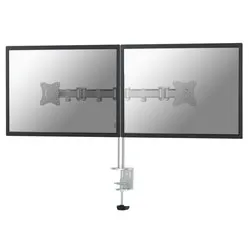
You can mount 2 screens on the NM-D135D Neomount monitor arm from Newstar. Handy if you have a lot of information to process or work in several programmes at the same time. Your screens are at the right height and at your ideal distance in no time. Then you tilt the monitors a little further so that no light reflects annoyingly into your eyes.
Once you have found the right setup, you can really get down to work. Your posture and your view improve, and you sit noticeably more comfortably. Bring on that boost in productivity.
The Neomount has an arm you can adjust between 4 and 43 cm in depth. The centre of the monitors can reach a height of 40 centimetres. Monitors weighing up to 8 kilograms can be fitted on both arms. That makes screens up to 27" no problem at all.
The flexibility of this arm is a big advantage thanks to its length. The monitors close by, far away, to the left or to the right: it is not a problem. The adjustability with rotating (360 degrees), swivelling (180 degrees) and tilting (90 degrees) is very welcome too. There are almost no limits to finding the ideal setup. Sharing your screens with colleagues is easy as well. Certainly because the arms can be pushed away and turned independently of each other.
The difference for your posture is worth mentioning too. Thanks to the D135DSILVER your screens are at the right height and you automatically adopt a better posture. Your back, neck and shoulders will be noticeably grateful. And everyone benefits from this. Whether you spend full days working as a graphic designer or just do a bit of paperwork for your painting business one evening.
The benefits of the Neomount D135D go further than just more relaxation in the neck, shoulders and back, by the way. Especially with 2 monitors, the difference between an arm and separate monitors on the desk is considerable. They take up quite a bit of space and can limit you as a result. By lifting them off the desk you immediately have masses of room.
What makes a monitor arm so good
A monitor arm stands for more control, more comfort and above all more productivity. You can create the setup that is ideal for you. Your sitting posture improves, and so does your view of the screen. Your body relaxes sooner and keeps going for longer through a working day. Your back, shoulders and neck in particular benefit from that. It is not only your health that improves. The look of your desk takes a leap forward as well.
Installing the NM-D135DSILVER
The only thing you need to provide yourself during assembly is a screwdriver. All the other hardware is simply included. 2 Allen keys for tightening the arm onto the pole and for setting the sensitivity of the monitor tilt are supplied. Along with all the other mounting hardware you need, of course. It makes fitting with the desk clamp a very simple job that anyone can manage.
You can go through the manual in advance by downloading it under the heading 'downloads' on this page. And would you rather use the grommet instead of the clamp? Then bear in mind that you need a drill.
Get the most out of it
For the demanding user the D135D is the ideal monitor arm. Do you transfer information from one programme to another? Then you simply put them side by side. Programme 1 on one screen and programme 2 on the other. No more clicking needed. It really does save you time.
It is also ideal in retail settings. While you look up and process information in your system and in various folders, you can show your customer the options most suitable for him or her on the other screen. Thanks to the flexibility of the arms you can swing the screens in every direction. Ideal.
This product is good for
back - shoulder - neck
Raising the monitor to the right height is good for your sitting posture. It improves straight away, which has an effect on your back, neck and shoulders in particular. You can sit back in a relaxed way.
Pros and cons
- Takes 2 monitors
- Rotates, tilts and swivels
- Can be fitted with a desk clamp or a grommet
- No gas spring for height adjustment
Specifications at a glance
| Number of screens | 2 |
| Warranty | 5 years |
| Tilt | Max. 90 degrees |
| Rotate | Max. 360 degrees |
| Swivel | Max. 180 degrees |
| view all specifications |
Product features
- Suitable for mounting 2 monitors
- Suitable for flexible workstations
- 3 hinged sections for flexibility
- Silver aluminium arms
- Can be fitted with a clamp or a grommet
- Only a screwdriver needed for assembly
What is in the box?
- Silver aluminium monitor arm
- Mounting hardware
- Clamp and grommet
Downloads
Frequently asked questions
Specifications
| Item number | ERGO-NSNMD135DS |
| Manufacturer's item number | NM-D135DSILVER |
| Brand | NewStar |
| Warranty | 5 years |
| Type of guarantee | Ergowerken free warranty return service |
| Colour | Silver |
| Number of screens | 2 |
| Gas-sprung arm | |
| Minimum screen size | 10 inches (25.6 cm) |
| Maximum screen size | 27 inches (69.12 cm) |
| Maximum load capacity | 16 kilograms |
| Tilting | Yes, up to 90° |
| Rotate | Yes, up to 360° |
| Swinging | Yes, up to 180° |
| Lowest setting | 0 millimetres |
| Highest position | 400 millimetres |
| Depth | 40 - 430 millimetres |
| VESA minimum | 75 x 75 millimetres |
| VESA maximum | 100 x 100 millimetres |
| Method of installation | By means of a desk clamp and feed-through |
| Suitable for desk thicknesses of | 10 - 88 millimetres |
| Assembly materials included | |
| Required tools | A Phillips screwdriver and, if you wish to use the feed-through mounting, a drill is required. |
| Cable management |
Reviews NM-D135DSILVER monitor arm 10-27''
Customers who write a review enter a prize draw for a voucher. We pick one winner and publish all reviews, including critical ones.