Offerte aanvragen
Jouw offerte op maat, binnen 24 uur in je mailbox. Voor als je interesse hebt in aantallen. Of goedkeuring nodig hebt voor je bestelling.

Je vraagt een offerte aan voor:
Stel hier je vraag over dit product
Contour Design Rollermouse GO trackpad wireless + dock


Beschrijving Contour Design Rollermouse GO trackpad wireless + dock
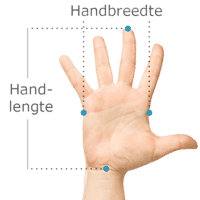
Does this mouse fit my hand?
Do you want to find the ideal mouse? Then be sure to measure your hand. The following image clarifies how to measure your hand. This mouse is suitable for hands with the following dimensions: Suitable for all hands
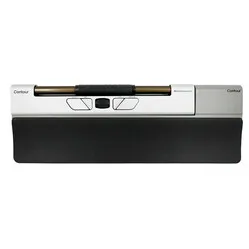
An ode to Contour Rollermouse GO
"Where has my Rollermouse gone again?"
Well, did you ever expect to ask that question? With the Red, you knock out buffaloes, the Free3 is also used as a bodyboard by Contour's CEO, and with the Pro3, you can cross the Meuse. But the GO: you can lose that one.
Why the Contour Rollermouse GO?
Already a well-known one
The Rollermouse is now a well-known product. Not without reason, by the way. It fantastically centres your working posture, makes the transition from mouse to keyboard smooth, and can be operated with 2 hands. For some, however, it is a little on the large side. Contour is therefore now introducing the GO, and what timing in this period of alternating working from home and in the office.
A friend for your shoulder
You place the GO between yourself and your keyboard. This centres your working posture and keeps both arms close to you. You will almost immediately feel with this posture that your shoulder is under much less tension than when you operate a mouse next to your keyboard. An additional advantage is that you can work with 2 hands, which allows you to distribute the strain of your mouse work even more.
You control your cursor using the soft and easy-to-operate rolling bar. By sliding it sideways, your cursor also moves sideways; by rolling it, you can move the cursor up and down. If you combine rolling and sliding, the cursor moves diagonally. You get used to it very quickly, and it works very pleasantly. Below the bar are the buttons you expect on a mouse, such as the left and right mouse buttons and copy and paste.
Significantly smaller
The GO is significantly smaller than its big brother, the Red. Where the Red is 41 cm long, 10 cm deep, and 2.3 cm high, the GO measures 30.5 cm long, 6.5 cm wide, and 2.3 cm high. It is also more than half lighter: 820 vs 360 grams.
Designed to be mobile-friendly
Its size speaks for itself, but the GO has more features that make it mobile-friendly. For example, it comes with a foldable Alcantara cover with magnets, allowing you to pack the GO neatly. It has an integrated battery that is fully charged in 4 hours. As soon as you turn on the GO, the LEDs on the right side show how full the battery is. Below 20%, an LED will flash.
You can connect the Rollermouse GO to your device via Bluetooth, USB receiver, or the included 2-metre cable. It is designed to automatically search for a connection with one of the two wireless methods. First, it searches for the USB receiver. If that is not plugged in, it will check if a Bluetooth connection is possible. If that fails, it will go into pairing mode, so you can find and connect the GO from your device.
Almost as complete as its big brother
Seriously, it is. The GO has a rock-solid aluminium casing and features the excellent roller bar that the Red also has. The buttons can be programmed with the Contour software, and you can change all sorts of settings very quickly. With the help of some button combinations, the click resistance of the bar can be changed and even turned off (more on that below).
You can also turn the sound of the scroll wheel and the click of the bar on and off. With the sound on, you get feedback on what you're doing; with the sound off, you have complete silence. The button on the right side is also the DPI button. You can adjust the cursor's sensitivity with it. The LEDs next to the button indicate its current setting.
Included dock
To make your RollerMouse Go complete, you can choose the RollerMouse Go with Dock. With the help of the Dock(ing station), you transform your RollerMouse GO into a full-fledged RollerMouse. The integrated wrist rest prevents complaints, allowing you to continue working comfortably. The dock is made of sturdy plastic and vegan leather. You can easily click the RollerMouse into its designated space. The dock weighs only 250 grams and has dimensions of 390 x 135 x 22mm, making it easy to take with you. Don't need a dock? Then choose the variant without a dock.
What makes a Rollermouse so good?
The common problems with a normal mouse lie in two things: its placement relative to your keyboard and relative to you. The mouse often bumps against the keyboard, preventing you from working precisely with it. If you then place it further away, more pressure is created on the arm and shoulder, which can lead to complaints.
The Rollermouse sits directly in front of you and does not move. All the functions you need can be performed with minimal effort. This way, complaints are counteracted and prevented.
Get the most out of your Contour Rollermouse GO
Download the software
A Rollermouse is not complete without the driver that Contour has developed for it. This can be downloaded for both Mac and Windows. It basically has a number of standard functions. There you adjust the cursor and scroll speed. In the second tab of the driver, it gets really fun, because there you can customise all 5 buttons on your GO. Click on the button on your screen and you will get a whole series of options, you can even set combinations with your keyboard.
Do I want click resistance?
Yes! At least... Yes! Actually, you want to start with no click at all, and you might never want one. The click resistance on the roller bar can be increased and decreased so that, on the one hand, you don't accidentally click the bar all the time, and on the other hand, you don't have to frantically bash it to get a click.
However, we recommend turning off the click at the beginning (the manual shows you how). You'll be busy enough navigating the cursor to the right spot: a link, a button, a line of text. When you click the bar, it can easily happen that you slide or roll it a bit while pressing. As a result, the cursor is no longer in the desired position when you click.
What's the best thing to do? Navigate with one hand and press the physical ‘left click’ button to tick something or select it. It works easier, prevents frustration, and speeds up your learning curve.
Don't miss this either
The versatile cover
The Alcantara protective cover supplied with the GO is multifunctional. Firstly, it makes the Rollermouse travel-proof. You can also lay it in front of you as a soft surface for your palms while mousing. When folded in half, it can also be used as a slightly elevated wrist rest.
Frequently Asked Questions
Pros and cons
- Promotes shoulder relaxation
- Can be operated with 2 hands
- 5 programmable buttons
- Can be used wired and wirelessly (2.4 GHz and Bluetooth)
- Ideal for taking with you
- Adhesive caps as keyboard risers work less well than the variant supplied with the larger Rollermouse
Brief specifications
| Warranty | 2 years |
| Ergonomic design | |
| Usage | left- and/or right-handed |
| Number of buttons | 5 |
| Plug & play | Yes |
How happy will my body be with this?
| Shoulder | |
| Arm | |
| Hand | |
| Wrist |
Product features
- The most compact Rollermouse
- Includes protective Alcantara cover
- 5 programmable buttons
- Highly accurate roller bar for cursor movement
- Connectable wired, via USB receiver or Bluetooth
- Integrated rechargeable battery
- Promotes a centred, relaxed working posture
- 330 grams light and 30.5 x 6.5 x 2.3 cm small
- 10 DPI settings (600-4000 DPI)
- Suitable for Windows and Mac
What's in the box?
- 1 x Rollermouse GO
- 1 x Manual
- 1 x Alcantara protective cover
- 4 x small keyboard raising caps
- 4 x large keyboard raising caps
- 1 x USB receiver & extender
- 1 x cable adapter + charging cable (2 metres)
Downloads
Specificaties
| Manufacturer's item number | CTR-CDRMGO10213 |
| Brand | Contour Design |
| Warranty | 2 years |
| Type of guarantee | The Ergowerken free return guarantee service |
| Colour | Grey / black |
| Assembly materials included | not applicable |
| Product weight | 250 grams |
Reviews Contour Design Rollermouse GO trackpad wireless + dock