Offerte aanvragen
Jouw offerte op maat, binnen 24 uur in je mailbox. Voor als je interesse hebt in aantallen. Of goedkeuring nodig hebt voor je bestelling.

Je vraagt een offerte aan voor:
Stel hier je vraag over dit product
R-Go Break break software - Windows - 3-year licence


Beschrijving R-Go Break break software - Windows - 3-year licence
An ode to the R-Go Break pause software
Hey! It's red again
How easy is it when your mouse, keyboard, or numeric pad tells you when you can go full throttle, when you need to be a little careful, and when you're really pushing too hard? Of course, you won't get a fine if you work through a red light for a while, but be kind to your body and take a break as soon as possible when you see a red light.
Why the Break software?
Your personal break assistant
Of course, you know you should regularly take a break when you're working at the computer. And there are days when you take those breaks without any issues. But there are also days when you're so engrossed in your work that it simply doesn't happen. It's precisely on those days that you'll be glad to have the Break pause software. Thanks to Break, with its traffic light system and subtle reminders on your screen, you'll still be able to get your much-needed rest on busy days.
Traffic light on mouse, keyboard, and numpad
R-Go has now launched three product groups on which you can use Break software. Their Break mice, Break keyboards, and Break Numpads all work with the Break software. You can use 1 product, or all 3. You can find all Break products here.
What makes pause software so good?
It's not always easy to pull yourself away from your work and take a break. With pause software, you get that much-needed 'Oh yeah' moment, allowing you to take a moment for yourself. That moment can be anything: a toilet break, a glass of water, or a somersault.
Get the most out of your Break pause software
Personalise your breaks and reminders
You can customise the Break software to suit your preferences. Do you want to see and hear reminders? Then you can set a sound for each break and a notification on your screen for longer breaks. Do you prefer a less intrusive setting for Break? Then you can turn all that off and just keep an eye on the light on your mouse, keyboard, or numpad.
You can set your working time until the short and long breaks, but also determine the actual short and long breaks themselves. For example, set the following:
| Time until short break | 10 minutes |
| Duration of short break | 30 seconds |
| Time until long break | 30 minutes |
| Duration of long break | 2.5 minutes |
If you already find that useful, you'll absolutely love the 'fit coach' module. For each long break, you can set which body part you want to exercise. Think of a leg exercise in the morning and a neck and shoulder exercise in the afternoon. In the fit coach module, you can also set how many exercises you want to do per long break.
Fit coach (not an influencer)
No, the fit coach won't give you a six-pack in 3 weeks or offer a discounted protein shake. The fit coach module within Break is simply a collection of great exercises you can do during your breaks. The Fit Coach presents you with dozens of exercises that will keep you feeling fresh throughout the day. You can choose from exercises for:
- Neck and shoulder
- Balance
- Leg
- Relaxation and posture
You then incorporate the fit coach into the break moments that the Break software helps you with. You can also always use the 'start exercise now' button to be presented with a random exercise.
Don't miss this either
3 years active
Are you going to use the Break software? The licence you purchase will then be active for 3 years! During that period, you are assured of a programme that is constantly being developed.
For Windows only
Unfortunately, we have to disappoint Apple enthusiasts: for now, the Break software can only be used on a Windows device.
How do I get the Break software after purchase?
As soon as you have purchased the Break software, we will send you a licence code as quickly as possible. Once you have downloaded the Break software, you can activate your licence using the code.
Pros and cons
- Software helps you with breaks
- Includes useful exercises
- Set your own break and working time until the break
- Switch off the software if necessary
- For Windows only
How happy will my body be with this?
| Legs | |
| Arms | |
| Neck | |
| Shoulder |
Product features
- Pause software
- Reminders can be personalised
- Green is GO, orange is a short break, and red is a long break
- Fit coach with dozens of exercises
- Break is the support for breaks on busy days
- Can only be used on Windows
- Licence active for 3 years
- Feature
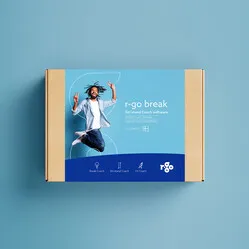
What's in the box?
- Break software
- No box, licence by email

Reviews R-Go Break break software - Windows - 3-year licence