





Erg handig en prima werkend toetsenbord
"Toetsenbord werkt beter dan mijn oude. De toetsen zijn wat groter en de aanslag is erg licht. Het was/is nog wel even wennen maar dat gaat wel lukken. Het toetsenbord was ook snel en keurig afgeleverd."



| Width | 286 mm |
| Depth | 140 mm |
| Height | 10 mm |
| Version | Windows, Mac and Linux |
| Key layout | QWERTY (ANSI US int.) |
| Key type | Scissor keys |
| Connection | Cable with USB connection |
Imagine a compact and flat keyboard so thin it gets lost between your sofa cushions. You go looking for it, lift the cushions, and to your surprise, the keyboard lies there with an innocent smile, as if saying: "Well, I may be flat and compact, but I can still hit all the right keys for you. Who needs thick keys when you can type like a pro? Size doesn't matter, it's all about the keystrokes!"
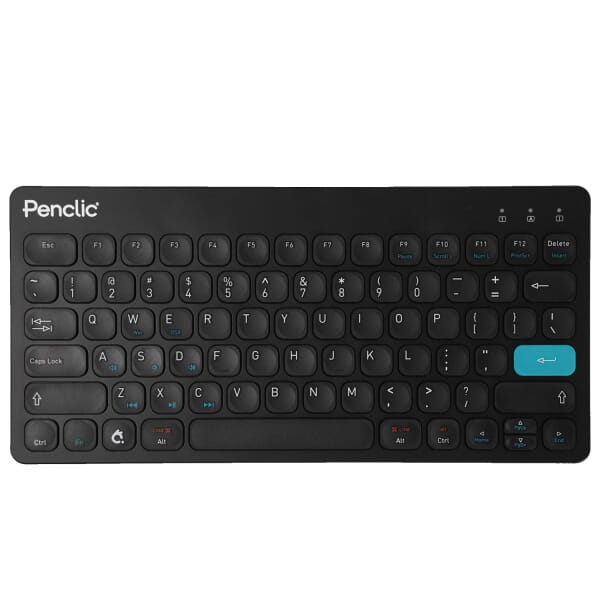
The Penclic C3 is designed to be as low and narrow as possible. However, no compromise has been made here between comfort and the size of the board; the keys are the same size and spaced as far apart as on any other 'normal' keyboard. However, the Penclic does not have a numpad, allowing you to place your mouse closer to the keyboard. This keeps your elbows closer to your body, which ensures a better working posture. This helps prevent shoulder complaints, for example.
In addition, the C3 has flat and easy-to-press keys thanks to its scissor mechanism. The keyboard's low profile keeps your wrists as flat as possible. This prevents and alleviates RSI complaints.
You connect the C3 to your desktop or laptop using the fixed cable. This cable is one and a half metres long and features a USB-A output. Do you want to connect it to a device with only a USB-C input? Then you can use this adapter.
As mentioned earlier, this compact keyboard lacks a numeric section. Fortunately, the N3 numpad has the same design as the C3, allowing them to connect seamlessly. Both the adapter and the numpad can be added to your order at the top right of this page.
If you spend a lot of time in front of a computer, you're probably familiar with the strain this can cause on your wrists, shoulders, back, and neck. An ergonomic keyboard can be a great help here. Take the Penclic, for example, which has a flat design and keys that are easy to press. Furthermore, you can place the mouse close to the keyboard. All of this is intended to reduce tension on your muscles, which can prevent or reduce injuries.
There are 3 USB ports on the back of the C3. One of the advantages of having multiple USB ports on your keyboard is the improved accessibility it offers. With these extra ports, you can easily connect your mouse, charge your phone, or insert an SD card to read files, for example. This means you don't have to crawl under your desk every time to connect a cable to your desktop computer. The convenience of having these extra ports within reach can significantly improve the efficiency of your workspace.
| Brand | Penclic |
| Key type | Scissor mechanisms |
| Connection | Wired |
| Dimensions | Dimensions: 286 mm x 140 mm x 10 mm |
| Operating systems | Windows, MAC and Linux |
| Wrist | |
| Shoulder | |
| Hand | |
| Arm |
True Penclic connoisseurs would have noticed immediately; the new C3 looks extremely similar to the Penclic KB3. However, there are a few small differences. For example, the C3 is a tiny bit larger. Partly due to the aluminium base, this also makes it a bit heavier. However, this provides more sturdiness, making the keyboard feel solid. All differences are shown in the table below.
| Penclic KB3 | Penclic C3 | |
| Connection | Bluetooth 3.0 or wired | Wired (1.5m) |
| Dimensions | 286 mm x 135.5 mm x 10.25 mm | 286 mm x 140 mm x 10 mm |
| Weight | 340g | 370g |
| Material | ABS polymer casing, base and keys | ABS polymer casing and keys, aluminium base |
| USB ports | None | 3 |
| Item number | ERGO-PCC3OBK |
| Manufacturer's item number | 3200100C3-OB |
| Brand | Penclic |
| Warranty | 2 years |
| Type of guarantee | The Ergowerken free return guarantee service |
| Colour | Black |
| Keyboard type | Compact |
| Ergonomic design | |
| Keyboard layout | QWERTY (ANSI US int.) |
| Connection | Cable (1.5 m) |
| Bluetooth | |
| USB version | 3.0 |
| Type of keys | Scissors keys |
| Numeric keypad | |
| Shortcut keys | |
| Programmable buttons | |
| Trackball/touchpad | |
| Type of power supply | Cable |
| Battery type | not applicable |
| Rechargeable | not applicable |
| Minimum system requirements | Mac with OS X 10.1 or later Windows XP or later Android Linux/BSD flavours *Not compatible with some special function keys on Mac |
| Plug and play | |
| Dimensions length x width x height | 286 millimetres by 140 millimetres by 10 millimetres |
| Product weight | 370 grams |
Customers who write a review enter a prize draw for a voucher. We pick one winner and publish all reviews, including critical ones.