Offerte aanvragen
Jouw offerte op maat, binnen 24 uur in je mailbox. Voor als je interesse hebt in aantallen. Of goedkeuring nodig hebt voor je bestelling.

Je vraagt een offerte aan voor:
Stel hier je vraag over dit product
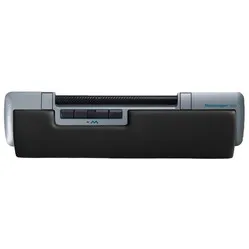
Mousetrapper® Delta trackpad grey


Beschrijving Mousetrapper® Delta trackpad grey
Ode to the Mousetrapper Delta
A slip-up?
Mousetrapper without a mat? Not sliding, but Rolling? Did the designer make a slip-up with competitor Contour? Or is it a well-thought-out answer to the products from Danish Contour?
Why the Mousetrapper Delta?
Rolling and sliding
Mousetrapper themselves said it at the introduction: “Some like to slide. Others to roll.”. That seems to immediately clarify why they developed the product: to offer an alternative to users devoted to Contour. But to say it's an outright copy, no. With this new central mouse, Mousetrapper has still managed to safeguard its own identity.
Good for your posture
The Mousetrapper Delta is based on the well-known principle. Placing the mouse centrally in front of your body allows you to operate both the keyboard and the mouse within shoulder width. This gives you a more relaxed working posture where you don't have to reach for the mouse. Your shoulders, upper arms, and elbows, in particular, will thank you for this.
In addition to the improved posture, the central placement also allows you to work with two hands simultaneously, and the integrated wrist rest immediately provides more comfortable wrist support.
What makes the Mousetrapper Delta so good?
Smooth 'Control Bar'
For the Control Bar, as Mousetrapper calls the roller bar, they reviewed quite a few materials to see what rolled most smoothly. The choice ultimately fell on carbon fibre. This is coated with a rubber-like layer that provides optimal grip and feels soft at the same time. The result: a super pleasant-to-operate roller bar where you feel hardly any resistance during use.
Wide design
The product is wide, truly wide. From left to right, it measures a full 50 cm. This gave Mousetrapper the opportunity to make the Control Bar easily accessible. It is 25.5 cm, so it doesn't really matter where you place your hands. It's always within reach.
Out of the way
The placement of the bar has also been well thought out. It is recessed into the housing and open at the bottom. This means the bar never gets in the way while typing, and dirt cannot accumulate at the bottom. Something the competitor has also noticed, given their most recent product release.
Plenty of buttons
The Mousetrapper has 6 buttons. At least, if you don't count pressing the control bar and the scroll wheel. You can also press the control bar to activate the left mouse button.
Free software for the buttons
Mousetrapper has developed a powerful driver with MTKeys, allowing you to customise the 6 available buttons and the scroll wheel as desired. This enables you to optimise your workflow and complete frequently used key combinations such as CTRL-C and CTRL-V with a single button press. You can read more about this software under the MTKeys heading.
Removable wrist rest
The wrist rest is attached to the Mousetrapper Delta with magnets, making it easy to remove, replace, and clean. The wrist rest is covered with artificial leather, making it easy to clean without damaging the product. In addition to the standard wrist rest, you can also equip it with an extended version. This is 2.5 cm longer and a bit more comfortable if you have large hands.
Extra USB ports
You can never have enough of them. That's why you'll also find them on the Mousetrapper Delta. On the underside, it has two extra USB(A) connections, so you can easily charge your phone or connect an additional device. The USB ports provide a voltage of 3.3V, so don't expect a fast charger. A small point of criticism here: a small USB stick or USB receiver cannot be easily removed due to the cramped space around the ports.
Get the most out of your Mousetrapper Delta
MTKeys
With the help of the MTKeys software briefly mentioned above, you can fully customise the Mousetrapper Delta. Now, programming buttons is no longer unique. What is unique is the onboard memory. This means you actually program the buttons on the device and not on the computer.
This has several advantages, namely:
- If you work on multiple PCs, you only need to program the mouse once
- MTKeys does not need to be installed on the computer
- You can program the Mousetrapper via the Mousetrapper website
The fact that the software does not need to be installed on the computer is particularly an advantage when your IT department doesn't allow you to install just anything.
Back to programming the buttons. MTKeys allows you to change the standard functions of the keys. For example, you can place the 'next' or 'back' function behind a button. This can save you a lot of mouse movements. Because while surfing the internet, you go to the previous page with a single press of a button. You are no longer endlessly dragging.
In addition to programming buttons, you can adjust the sensitivity of the control bar. The sensor reads 4000 dots per inch (dpi). This allows you to make the cursor fly across your screen quite well. Fortunately, with MTKeys, you can adjust this entirely to your personal preference.
If you think "Neat!" then MTKeys has even more in store for you. You can also adjust or turn off the click resistance of the control bar, adjust the scroll speed and direction, and it's even possible to turn a click sound on or off when pressing the control bar.
Don't miss this either
Different versions
The Mousetrapper Delta is available with a black or grey casing. The wrist rest is always covered with black artificial leather. This rest is available in a standard and extended variant. Extended means the wrist rest is 25 mm deeper. This is particularly comfortable if you have somewhat larger hands.
Handy accessories
In the box, you will also find a set of rectangular risers. You can attach these to your Mousetrapper, and they serve as keyboard raisers. Especially if you use a thinner keyboard, using these is recommended. This ensures that everything is optimally aligned.
Pros and Cons
- Programmable buttons
- Smooth operation via roller bar
- Soft wrist rest
- Helps with shoulder complaints
- Connecting the cable can be a bit tricky
Brief specifications
| Brand | Mousetrapper |
| Ergonomic design | |
| Buttons | 6 programmable buttons |
| DPI | 4000 dpi |
| Connection | USB-A 2.0 |
How happy will my body be with this?
| Shoulder | |
| Arm | |
| Hand | |
| Wrist |
Product features
- Smooth wide roller bar
- Magnetic wrist rest
- 6 programmable buttons and scroll wheel
- Made from 100% recycled plastic
- Ideal for shoulder and upper arm complaints
- Integrated USB hub
- Detachable USB cable
- 4000 dpi sensitivity
What's in the box?
- 1 x Mousetrapper Delta
- 1 x Wrist rest
- 2 x Keyboard risers
- 1 x USB connection cable

The buttons of the Mousetrapper Delta
The Mousetrapper Delta is equipped with 6 buttons and a scroll wheel with click function, as well as a control bar, which you can also click. All these buttons can be programmed using MTKeys. Below you can see the standard settings of the Mousetrapper Delta.
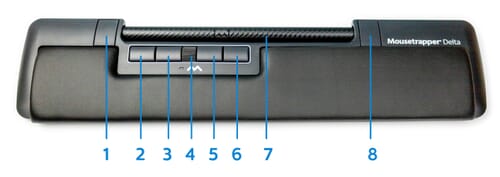
- Zoom in
- Copy
- Left mouse button
- Autoscroll
- Right mouse button
- Paste
- Control bar + left mouse button
- Zoom out
Frequently Asked Questions
Specificaties
| Item number | ERGO-MTDEL-BK |
| Manufacturer's item number | MT153 |
| Brand | Mousetrapper |
| Warranty | 2 years |
| Type of guarantee | The Ergowerken free return guarantee service |
| Colour | Grey |
| Ergonomic design | Yes |
| Management | Roller bar |
| Left- or right-handed | Suitable for left- and right-handed use |
| Hand length | All arm lengths |
| Hand width | All hand widths |
| Operation | Buttons and roller bar |
| Connection | Wired via USB A |
| Included receiver | Not applicable |
| Bluetooth | Not applicable |
| USB port | USB-A |
| USB version | 2.0 |
| Number of buttons | 6 buttons and scroll wheel |
| On/off button | Not applicable |
| Adjustable buttons | Yes, via MTKeys software |
| Scroll wheel | Yes |
| Trackball | Not applicable |
| Adjustable sensitivity | Via MTKeys software |
| Sensitivity | 4000 dots per inch |
| Type of power supply | Wired |
| Battery type | Not applicable |
| Rechargeable | Not applicable |
| Minimum system requirements | Mac OS X and above or Windows 7 and above |
| Plug and play | Yes |
| Dimensions length x width x height | 27 x 500 x 120 millimetres |
| Product weight | 830 grams |
Reviews Mousetrapper® Delta trackpad grey