Offerte aanvragen
Jouw offerte op maat, binnen 24 uur in je mailbox. Voor als je interesse hebt in aantallen. Of goedkeuring nodig hebt voor je bestelling.
Je vraagt een offerte aan voor:
Stel hier je vraag over dit product
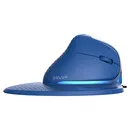
Delux Seeker with display wireless right-handed blue


Beschrijving Delux Seeker with display wireless right-handed blue
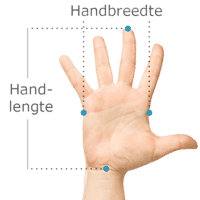
Does this mouse fit my hand?
Do you want to find the ideal mouse? Then be sure to measure your hand. The following image clarifies how to measure your hand. This mouse is suitable for hands with the following dimensions: Hand length: smaller than 190 mmHand width: narrower than 90 mm
An ode to the Delux Seeker
The world's first vertical mouse with an OLED screen
Beware. Once you get used to this mouse, you won't want anything else. The Delux Seeker is so versatile that we can't really think of anything this mouse doesn't have. Starting with a display on top. But wait! There's so. Much. More.
Why the Delux Seeker?
For all tasks
With this gem, Delux has made a very good move in the market. The Seeker features a regular scroll wheel between the normal left and right mouse buttons and can be used for vertical scrolling as you are used to. What makes the Seeker unique is the scroll wheel above the thumb, which allows you to scroll horizontally in programs such as Excel or Photoshop.
The Seeker has 6 buttons, including the regular left and right mouse buttons. These are also very quiet. The two buttons under the thumb allow you to easily go forward and back, for example when using the internet. A minor drawback is that the 'forward' button is placed a little too far, making it not equally accessible for everyone. On top of the mouse is a DPI button, which can be used to adjust the mouse's sensitivity (800, 1200, 1600, 2400 or 4000). On the bottom of the mouse is a button that allows you to switch between the different modes (BT5.0, 2.4G wireless connection or wired connection).
Attractive
The packaging includes a wrist rest for the mouse. This can be easily attached to the mouse using a magnetic connection. The advantage of a wrist rest is that it can prevent wrist complaints because you are less inclined to move from your wrist. A disadvantage of the wrist rest is that precise tasks, such as editing photos, are a bit more difficult because you can move the mouse a little less smoothly.
In addition to the wrist rest, the rear cover of the mouse is also easily interchangeable via a magnetic connection. By default, the cover has a honeycomb pattern, which creates a backlight effect due to the lighting integrated into the mouse. To save battery, there is a sensor in the back of the mouse. This registers when a hand is placed on the mouse and thus switches off the backlight. If you don't want any backlight at all, you can choose to replace the honeycomb cover with a solid cover.
What makes the Delux Seeker so good?
Connect to 4 devices simultaneously
We've already written a lot, but we're not done yet! The Seeker features a Multiple Device Connection, which means the mouse can be used not only for PC, but also for tablet and even phone. You can easily switch between up to 4(!) devices using the button on the bottom of the mouse. A possible distribution is shown below.
| Connection | Bottom light | Device | |
| #1 | Wired | None | PC |
| #2 | 2.4G wireless | 2.4G | Laptop |
| #3 | Bluetooth 5.0 | BT1 | Phone |
| #4 | Bluetooth 5.0 | BT2 | Tablet |
When you press the button on the bottom, the box labelled 2.4G will light up red. This means the mouse is in 2.4G mode, and in this case, is active on the laptop. If you press it again, the mouse switches to BT1 mode and is active on the phone. If you press it again, the mouse is in BT2 mode, and after another press, no light is on. The mouse can then be used with the cable, which is 160cm long. Finally, the current mode of the mouse can also be seen on the OLED screen on top.
Horizontal scrolling
What was the shortcut for horizontal scrolling again? Control + scroll? No, that's zooming. Command + scroll then, maybe? Nope, only works in Photoshop. Oh wait, this mouse has another scroll wheel!
Delux has placed a second scroll wheel on the left side of the Seeker, just above the thumb. By moving it up, your screen (e.g., in Excel) easily slides to the right. If you scroll the wheel down, the screen moves back to the left. The reason the scroll wheel moves up/down and not left/right is to prevent thumb complaints. Well done, Delux!
Get the most out of your Delux Seeker with the driver
Adjustments
As if that weren't enough, the Seeker also has various adjustable options. A driver can be downloaded from the Delux website, allowing you to customise all mouse settings. You can find the driver manual under the downloads section.
Delux has developed a surprisingly intuitive and clear driver for the Seeker. With this driver, you can adjust all sorts of things, from aesthetic adjustments like RGB lighting to creating macros for productive purposes. For wireless models, the driver also indicates the battery level.
Buttons and lighting
Adjusting the different light modes is fun, but you can also turn off the lighting if you find it annoying. All button functions can be customised with the 'button settings'. If you're not going to use the standard 'forward' and 'back' navigation buttons near the thumb, but you edit a lot of data in Excel? Then change them to 'cut' and 'paste'.
'Macro management' is quite extensive, as the driver can register all keyboard strokes in addition to mouse movements and clicks. So you can even build macros that combine these three.
Other settings
The other settings cover the mouse's sensitivity (DPI) and the USB report rate/polling rate, which indicates the speed at which the computer translates data from the mouse to the screen. A higher report rate can be particularly useful for gaming. Delux has also considered the usefulness of the DPI settings. For example, you
Specificaties
| Item number | ERGO-DESXWIDG |
| Manufacturer's item number | M618XSD |
| Brand | Deluxe |
| Warranty | 2 years |
| Type of guarantee | The Ergowerken free return guarantee service |
| Colour | Blue |
| Ergonomic design | Yes |
| Management | Wireless, wired or Bluetooth |
| Left- or right-handed | Right-handed |
| Hand length | Less than 190 mm, measured from the tip of the middle finger to the edge of the wrist |
| Hand width | Smaller than 90 mm, measured on the palm, 1 cm below the four fingers |
| Operation | Buttons and scroll wheels |
| Connection | Wireless or with cable (160 cm) |
| Included receiver | Yes |
| Bluetooth | Yes |
| USB port | Yes |
| USB version | 2.4 GHz |
| Number of buttons | 6 |
| On/off button | Yes |
| Adjustable buttons | Yes |
| Scroll wheel | 2 |
| Trackball | No |
| Adjustable sensitivity | Yes |
| Sensitivity | 800 / 1200 / 1600 / 2400 / 4000 DPI |
| Type of power supply | Wired and battery-powered |
| Battery type | not applicable |
| Rechargeable | Yes |
| Minimum system requirements | Mac OS X v10.5, Mac OS X v10.6, Mac OS X v10.7, Mac OS X v10.8, Mac OS X v10.9, Mac OS X v10.10, Mac OS X v10.11, Windows XP, Windows Vista, Windows 7, Windows 8, Windows 10 |
| Plug and play | Yes |
| Dimensions length x width x height | 166 x 97 x 82 mm |
| Product weight | 131 grams |
Reviews Delux Seeker with display wireless right-handed blue