







Stel hier je vraag over dit product
Kensington Pro Fit Wireless Ergonomic Keyboard and Ergonomic Mouse Combination


Product description of Kensington Pro Fit Wireless Ergonomic Keyboard and Ergonomic Mouse Combination
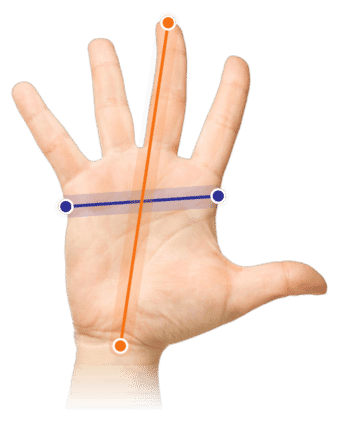
Which size fits your hand?
Measure your hand as shown in the image and choose your size using the table below:
| Size | Width | Length |
|---|---|---|
| One size | < 85 mm | < 185 mm |
Pros and cons
- Keys are favourably angled relative to hands.
- Integrated wrist rest on the keyboard.
- Tilted ergonomic mouse.
- Reverse tilt is comfortable for the wrists.
- Only available as a set with a right-handed mouse.
- Wrist rest feels a bit cheap.
Brief specifications
| Warranty | 2 years |
| Ergonomic design | |
| Delivery time | 3 to 4 weeks |
| Colour | Black |
| Connection | Wireless with Bluetooth and USB |
How beneficial is this for my body?
| Hand | |
| Wrist | |
| Elbow | |
| Shoulder |
Product features
- Silent keys and mouse clicks
- Split keys with reverse tilt option
- Both keyboard and mouse are wireless
- Keyboard keys are spill-proof
- Keyboard has a built-in wrist rest
- Tilted right-handed mouse
What's in the box?
- 1 x Keyboard
- 1 x Right-handed mouse
- 1 x USB receiver
- 1 x Manual
- 1 x AA battery (mouse)
- 2 x AAA batteries (keyboard)
Frequently asked questions
USB connection: Turn on your PC and insert the batteries into the mouse and keyboard. Then set the switches on both products (see underside) to 2.4G and plug the USB receiver into the PC. The mouse should work immediately. For the keyboard, you will receive a prompt where you need to choose from 3 different options. Select ANSI (US and other countries) here.
Bluetooth connection: Turn on your PC and insert the batteries into the mouse and keyboard. Then set the switches on both products (see underside) to BT. Go to your PC's settings to the option where you can add Bluetooth devices. Then press the buttons on the underside of the mouse and keyboard for 3 seconds. They should now appear among the Bluetooth devices on your screen. Click connect and you can use your mouse. The keyboard will give you a prompt: namely, which type you want to use. Select the ANSI (US and other countries) option here.
- ISO (European)
- ISO/Macintosh keyboard
- ANSI (US and other countries)
- Standard keyboard with 101 or 102 keys and some other keyboards
- JIS (Japanese)
- Japanese standard keyboard with input method keys
Specifications
| Item number | ERGO-KEKEY02 |
| Brand | Kensington |
| Warranty | The Ergowerken free warranty return service |
| Type of guarantee | The Ergowerken free return guarantee service |
| Colour | Black |
| Keyboard type | Compact and split |
| Ergonomic design | |
| Keyboard layout | QWERTY (ANSI US int.) |
| Connection | Wireless with Bluetooth and USB |
| Bluetooth | 4.0 |
| USB version | 2.4 GHz |
| Numeric keypad | |
| Shortcut keys | |
| Programmable buttons | |
| Trackball/touchpad | |
| Type of power supply | Battery |
| Battery type | AAA for keyboard, AA for mouse |
| Rechargeable | |
| Minimum system requirements | Windows 7 or higher, macOS 10.14 or higher |
| Plug and play | |
| Dimensions length x width x height | 463 x 216 x 36 millimetres |
| Product weight | Keyboard: 744 grams | Mouse: 115 grams |
Reviews Kensington Pro Fit Wireless Ergonomic Keyboard and Ergonomic Mouse Combination
Customers who write a review enter a prize draw for a voucher. We pick one winner and publish all reviews, including critical ones.