







Stel hier je vraag over dit product
Kinesis Freestyle Pro split mechanical keyboard


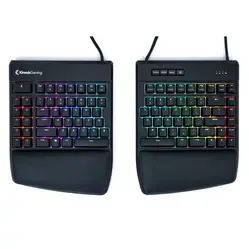
Product description of Kinesis Freestyle Pro split mechanical keyboard
Is this keyboard right for me?

| Width | 393 mm |
| Depth | 184 mm |
| Height | 32 mm |
| Version | Windows and MAC |
| Key layout | QWERTY (ANSI US int.) |
| Key type | Mechanical (Cherry MX Brown/Silent Red) |
| Connection | Wired (USB) |
An ode to the Kinesis Freestyle Pro
Pro, because that is its name
Honestly, we already considered the Freestyle 2 a real pro. Admittedly, the Freestyle Pro is a fair bit more Pro than the Freestyle 2. After putting it through its paces for a while, we are now pro Freestyle Pro too.
Why the Freestyle Pro split keyboard?
With the mechanical Freestyle Pro keyboard you will undoubtedly feel like a true professional. A small selection of the many features this keyboard offers that can be of value to your workspace:
- Split flat design
- Mechanical keys
- Choice of 2 different switches (Brown/Red)
- Long cable between the 2 split halves for maximum space
- Quick-to-reach second key layer with 'Fn'
- 8 office hotkeys ready to use
- MAC keycaps supplied as standard
- Switch between Windows, Mac and Dvorak layout
- 9 fully programmable layers with SmartSet
Split design
A split design can bring a lot of relaxation to your posture. The 2 halves can be moved apart and placed in line with your arms. This means you do not have to bend your wrists at awkward angles to reach all the keys with every finger. You can also place the keyboard nicely close to your body without feeling that your hands cannot reach it. If you are more broadly built, for example, you place the separate halves a little further outwards.
Thanks to the 0-degree design the Pro is the same height throughout. Many keyboards slope up slightly, which puts extra tension on your wrists. With the flat design of this keyboard you will not experience that.
Mechanical Brown or Silent Red switch
The Kinesis Pro has mechanical switches that ensure a keystroke is registered before the key hits the 'bottom' of the board. Hitting that bottom is exactly where tension on the fingers and hand arises, and you can now avoid this. It takes a few days of practice, but you will soon type a good deal more comfortably.
The Brown switch is known as an 'office switch'. For a mechanical switch, they make relatively little noise. They will always make more noise than scissor or membrane keys, so bear that in mind. Around the point at which it registers a key, the Brown switch gives slight resistance. This helps you know how far you need to press the key to get a letter on your screen.
With the Silent Red switch you have the same resistance throughout the entire keystroke. This makes it just slightly lighter to press than the Brown switch. Because of the even resistance, it does take a little more practice to type with it in a relaxed way. Are you a keen PC gamer? Then there is a good chance you already have experience with the Red switch.
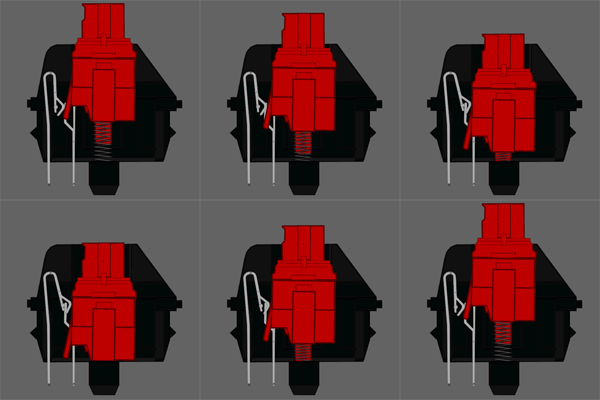 Silent Red switch
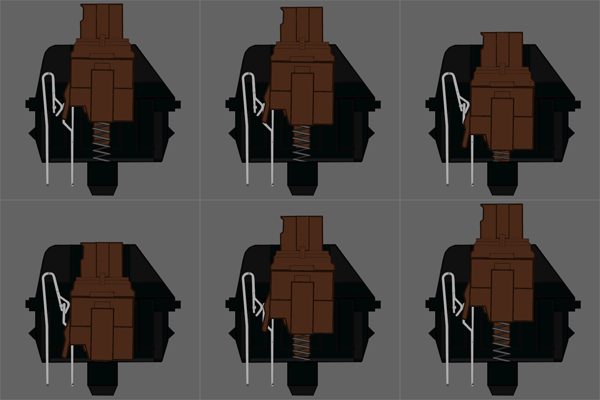 Brown switch
Adjustable-length cable
The Pro has a cable of no less than 50.8 cm, part of which can be tucked away. In a compartment made specially for it you can store about 20 centimetres of cable. This lets you adjust the distance between the 2 split halves from 30 to around 50 cm.
8 office hotkeys
The pre-programmed shortcut keys on the left-hand side of the Pro contain frequently used functions. Think of cut, paste, undo and select. You do not have to press that right mouse button repeatedly or make key combinations.
Mac user, you have not been forgotten
At the top of the right-hand half of the Pro you will find 4 buttons. One of them is the 'layout' button. With this layout button you can easily and quickly switch between the 3 standard layouts. If the left LED is lit, you are on the Windows layout. With 2 LEDs active you have DVORAK. The right blue LED indicates that the Mac layout is active. Using the 4 Mac keycaps supplied, you can quickly transform your keyboard into a full Mac board. You click the Windows keycaps out with the keycap puller and simply push the Mac keycaps into place.
What makes a split mechanical keyboard so good?
First of all, a split design gives the user more freedom. Whatever your build, you can always find a position that lets you type comfortably. The 2 separate halves can be placed against each other, but also up to 50 cm apart. The mechanical keys give you optimal comfort while typing and minimise the tension on your fingers and hands.
Get the most out of it
Integrated second 'FN' layer
On many Tenkeyless keyboards such as the Freestyle Pro you will come across the 'Fn' (function) key. Pressing this key activates a second layer. You often see these as blue or, for example, red print on a keyboard. On the Pro there are multimedia keys under F1 to F6 as standard. This is fairly common and you often find it. What is unique, however, is the ability to place an extra function under every key on the board using Fn. You can do this with the built-in SmartSet program. You can read more about SmartSet below and in the manual.
9 programmable layers with SmartSet
The 'SmartSet Programming Engine' is an addition you may expect from a keyboard in this price range and of this calibre. Simply put: the Pro has a piece of integrated memory on which it can store key changes (remapping) and even key combinations (macros).
Thanks to the integrated memory, you always have your favourite layout ready wherever you work. Think, for example, of the combination CTRL + X to cut and CTRL + V to paste. Those are only simple macros, by the way. In theory you could create a layout with combinations for different applications and programs, making you a good deal faster than before.
How happy will my body be with this?
- Shoulders
- Hand
- Wrist
- Arm
Pros and cons
- Split design
- Mechanical switch
- Developed for maximum comfort
- Endless programming with SmartSet
- Tell us!
Brief specifications
| Warranty | 2 years |
| Ergonomic design | |
| Weight | 1180 grams |
| Plug & Play | |
| Keyboard type | Split mechanical |
| view all specifications |
Product features
- Effective against RSI complaints
- Split mechanical keyboard
- 8 office hotkeys including copy/paste/cut
- 0-degree flat design for the benefit of the wrist
- Extensive programming with SmartSet programming engine
- Programming without software or driver
- 50.8 cm braided cable between split halves
- QWERTY (US layout)
- Cherry MX Brown or Silent Red mechanical switch
- Maximum keyboard height: 32 mm
- Keyboard length: 393 mm
- Tenkeyless layout
What is in the box?
- Mechanical keyboard
- Quickstart manual
- 4 MAC keycaps
- Keycap puller
Frequently asked questions
Specifications
| Item number | ERGO-KEYKINPRO (Brown) | ERGO-KEYKINPROR (Red) |
| Manufacturer's item number | KB900-BRN (brown) | KB900-RDQ (silent red) |
| Brand | Kinesis |
| Warranty | 2 years |
| Type of guarantee | The Ergowerken free return guarantee service |
| Colour | Black |
| Keyboard type | Split mechanical |
| Ergonomic design | 32 millimetres |
| Keyboard layout | QWERTY (ANSI US int.) |
| Connection | Cable | 180 cm |
| Bluetooth | |
| Type of keys | Cherry MX Brown or Silent Red |
| Numeric keypad | |
| Shortcut keys | Multimedia keys and 9 shortcut keys |
| Programmable buttons | Yes, up to 100 macros per layout |
| Trackball/touchpad | |
| Type of power supply | USB cable |
| Battery type | not applicable |
| Rechargeable | not applicable |
| Minimum system requirements | Windows 7-10, Mac OS X, Linux, Android & Chrome |
| Plug and play | |
| Dimensions length x width x height | 393 x 184 x 32 millimetres |
| Product weight | 1180 grams |
Reviews Kinesis Freestyle Pro split mechanical keyboard
Customers who write a review enter a prize draw for a voucher. We pick one winner and publish all reviews, including critical ones.
