







Tips for getting rid of your mouse arm quickly
Table of Contents
1. What is mouse arm and how does it develop?
Mouse arm is a collective term for symptoms in the wrist, forearm, elbow or shoulder caused by prolonged and repetitive use of a computer mouse. The official term is RSI (Repetitive Strain Injury), but it is commonly referred to as mouse arm or keyboard arm.
The symptoms range from a nagging sensation and stiffness to pain and tingling. In more severe cases, your arm may even feel numb. That sounds serious, but in most cases, the sooner you take action, the sooner you’ll be rid of the symptoms.
Why is the mouse so taxing?
A standard computer mouse forces your hand into a twisted, flat position. Your forearm rests on the desk whilst your wrist is slightly bent. If you do this for hours on end, your muscles and tendons become overloaded, even if it doesn’t feel that bad at the time.
What’s more, with traditional mouse use, the arm makes the same small movements over and over. That repetition is exactly what causes RSI.
Who is most at risk?
Anyone who spends a lot of time sitting at a computer every day can develop mouse arm. But the risk is higher if you take few breaks, adopt an incorrect working posture, or have been using the same mouse for a long time in a workplace that is not ergonomically designed.
Have you been experiencing these symptoms for more than a few weeks? If so, it is advisable to consult a GP or physiotherapist, in addition to making adjustments to your workspace.
2. What can you improve yourself straight away?
Before you reach for new products, there are a number of things you can adjust today — at no extra cost. Better posture and a more mindful approach to work are often the quickest way to reduce symptoms.
Take more frequent breaks
It sounds simple, but it’s the most underestimated measure. Stopping using the mouse every 30 to 45 minutes gives your muscles and tendons a chance to recover. Use a timer or an app to remind yourself to do this.
Move the mouse closer to your body
Many people position their mouse too far from their body, causing the arm to be stretched unnecessarily. Move the mouse closer to you so that your elbow forms an angle of about 90 degrees. Your shoulder will relax immediately.
Relax your wrist whilst using the mouse
Move the mouse using your shoulder and forearm; avoid making small movements with your wrist. Many people move the mouse with small wrist movements whilst their wrist rests on the desk. This puts strain on your wrist. Lift your wrist slightly and move your whole arm.
Use keyboard shortcuts more often
The less you use the mouse, the less strain on your arm. Learn the keyboard shortcuts for frequently used actions, such as copying, pasting, saving and switching tabs. It takes a bit of getting used to, but your arm will thank you for it.
3. What aids can help with mouse arm?
If adjustments to your posture and working methods aren’t enough, there are a number of aids that can significantly reduce the strain on your arm. The principle is simple: ensure your arm is working in a more natural position.
Switch to an ergonomic mouse
A standard flat mouse forces your hand into an unnatural, twisted position. An anti-RSI mouse, such as a vertical mouse or a trackball, places your hand in a more relaxed position. Your forearm no longer needs to twist, which greatly reduces the strain on your wrist and elbow.
There are various types of ergonomic mice that can help with mouse arm: from vertical mice to central roller mice. Which type suits you best depends on how you work and where you experience the most discomfort.
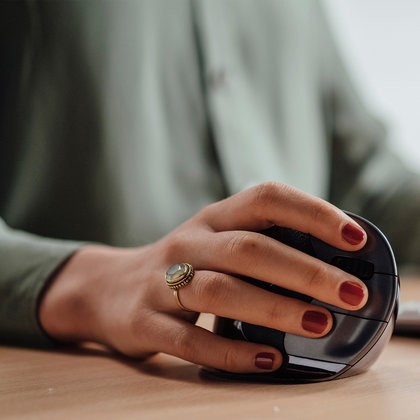
Ergonomic mice
Reduce the strain on your wrist and arm with a mouse that suits your working posture. From vertical mice to trackballs and central roller mice.
View ergonomic miceUse an ergonomic armrest
An armrest supports your forearm whilst you work, meaning your muscles don’t have to tense up as much to keep your arm in position. That might sound like a small difference, but over an 8-hour working day, it really adds up. A good armrest attaches to your office chair or desk and is adjustable in height and position.
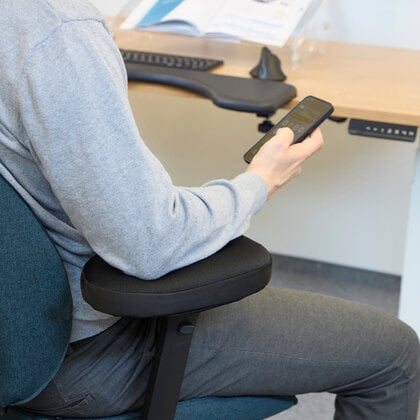
Ergonomic armrests
Support your forearm whilst working and reduce muscle tension in your arm and shoulder throughout the working day.
View ergonomic armrestsConsider a wrist rest
A wrist rest placed next to your mouse mat can help keep your wrist in a neutral position during breaks. Make sure you don’t use the rest whilst actively using the mouse, as this can actually be counterproductive. The rest is intended for moments when your wrist is resting.
4. How do you prevent mouse arm from returning?
When the symptoms subside, it’s tempting to go back to your old ways. But mouse arm tends to return if you don’t address the root causes. Prevention lies in small habits that you incorporate into your daily work routine.
Set up your workspace ergonomically
An ergonomic workstation is more than just a good mouse. Make sure your chair is properly adjusted, your monitor is at the right height, and your keyboard and mouse are at a comfortable distance. All these elements affect the strain on your arm.
Change position regularly
Working in the same position for long periods is the main cause of RSI symptoms. A sit-stand desk can help you vary your position more throughout the day. But small things help too. Think of standing up occasionally whilst on the phone, or using your mouse with your other hand for a while.
Do short stretching exercises every day
Stretch your arm out regularly and slowly rotate your wrist in both directions. Spread your fingers and then clench them into a fist. This only needs to take a minute or two and keeps your muscles supple. A physiotherapist can advise you on specific exercises if the symptoms are persistent.
Check your workspace periodically
Your body and working methods change. As a result, your ideal workstation setup also changes slightly. Take a moment every few months to assess whether your workstation is still working well for you. Small adjustments at an early stage prevent more serious symptoms later on.
5. Frequently asked questions about mouse arm
- What exactly is mouse arm?
Mouse arm is a strain injury in the wrist, forearm, elbow or shoulder caused by prolonged and repetitive use of a computer mouse. Symptoms range from pain and stiffness to tingling and a heavy feeling in the arm. The official term is RSI (Repetitive Strain Injury).
- How long does it take for mouse arm to go away?
That depends on how long the symptoms have been present and how you manage them. Mild symptoms can improve within a few weeks if you adjust your workstation and get plenty of rest. For persistent or long-term symptoms, it is advisable to consult a physiotherapist.
- Does a vertical mouse help with mouse arm?
A vertical mouse can help with mouse arm as your hand is in a more relaxed, handshake-like position. This means your forearm doesn’t have to twist as much, which can reduce the strain on your wrist and elbow. Browse our full range of ergonomic mice to see which type best suits your symptoms.
- Is a wrist rest good for mouse arm?
A wrist rest can help keep your wrist in a neutral position during rest periods. Do not use it actively whilst operating the mouse, as this can actually put extra pressure on the wrist. Always combine a wrist rest with other measures, such as an ergonomic mouse and sufficient breaks.
- Can I continue working with mouse arm?
In many cases, you can continue working, but it is important to reduce the strain. Adjust your working posture, take more breaks and consider using an ergonomic mouse. If you experience severe pain, rest is essential and it is advisable to visit your GP or a physiotherapist.
6. In conclusion
Mouse arm is a nuisance, but in most cases it can be effectively managed. The key lies in combining small adjustments: a better working posture, taking regular breaks, and, where necessary, using an ergonomic aid that reduces the strain on your arm.
Start with the simple steps:
- Move the mouse closer to your body
- Take more frequent breaks
- Move more from your shoulder
Then add an ergonomic aid if the symptoms persist. That combination makes all the difference.
Would you like to further optimise the ergonomics of your workspace? Then it’s also worth considering an ergonomic armrest, an ergonomic keyboard or an ergonomic mouse that better suits your working style.