







Mousetrapper and Contour: a comparison
Table of Contents
1. Comparison of the Mousetrapper and Rollermouse (Contour)2. Introduction to the Contour Rollermouse
3. Introduction to the Mousetrapper
4. Mousetrapper versus Rollermouse
5. Conclusion (is there a winner?)
1. Comparison of Mousetrapper and Rollermouse (Contour)
Contour (Rollermouse) and Mousetrapper, two rivals in the field of ergonomic mice. Both are also old hands in the field of ergonomics, having first seen the light of day in the 1990s. Whilst Contour started out with the somewhat traditional Perfit mouse
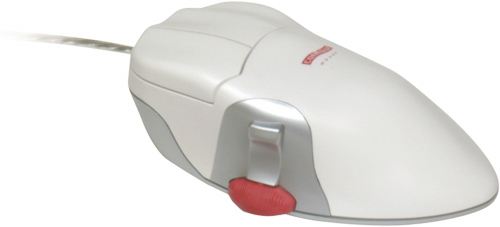 Contour’s Perfit Mouse
and only launched their Rollermouse in 2001, Mousetrapper has had a single concept from the outset, which they have continued to develop. It’s interesting to note that their first model actually still used a traditional mouse, which also explains the brand’s name (mouse trap).
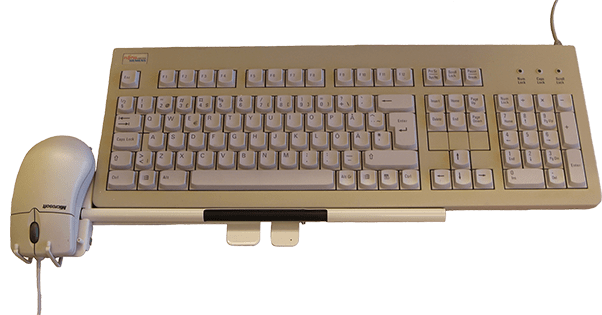 The first Mousetrapper in 1994
The idea behind their models is more or less the same. The centrally positioned mouse replaces the traditional mouse that you have to slide across the desk. Because it sits directly in front of you, between you and your keyboard, your arms and shoulders feel more relaxed. In addition, the product can be operated with both hands at the same time, allowing you to distribute the strain evenly. Oh, and both brands are market leaders, according to Contour and Mousetrapper.
What I find interesting is that they don’t seem to mention each other anywhere on their websites. Among major, comparable brands, it has become a trend in recent years to conduct an independent comparative ‘test’, in which the party commissioning the research naturally emerges as the winner. Since neither brand does this – and certainly doesn’t engage in mudslinging (hats off to them) – I’ll dive in for you. We’ll first take a brief look at both brands separately before I draw some comparisons regarding build quality, model variety, prices, specifications and the time it takes to get used to them.
2. Introduction to the Contour Rollermouse
Contour took a slight detour before arriving at their own trackpad, the Rollermouse. In 1995, they launched the Perfit Mouse, a slightly raised mouse with the scroll wheel positioned near the thumb. In 2001, they launched their first Rollermouse. By 2003, 100,000 units of this relatively expensive mouse had already been sold. A successful product, then.
Within a few years, Contour therefore launched new products to bring some diversity to the range. The Pro for office work, the Free for the mobile (laptop) worker and the Red for the demanding user. Various wireless versions have since been added to the range. Only the ‘entry-level’ Pro3 is not yet available in a wireless version.
3. Introduction of the Mousetrapper
It is fascinating to trace the development of the Mousetrapper. In 1994, it was a small metal rod with two levers that actually operated a clamped computer mouse. Now it is a fully-fledged product with numerous extra buttons that allow you to do so much more than with a traditional mouse. The biggest change, however, is the switch from a bar, as on the Rollermouse, to a mat, allowing for more contact with the fingers.
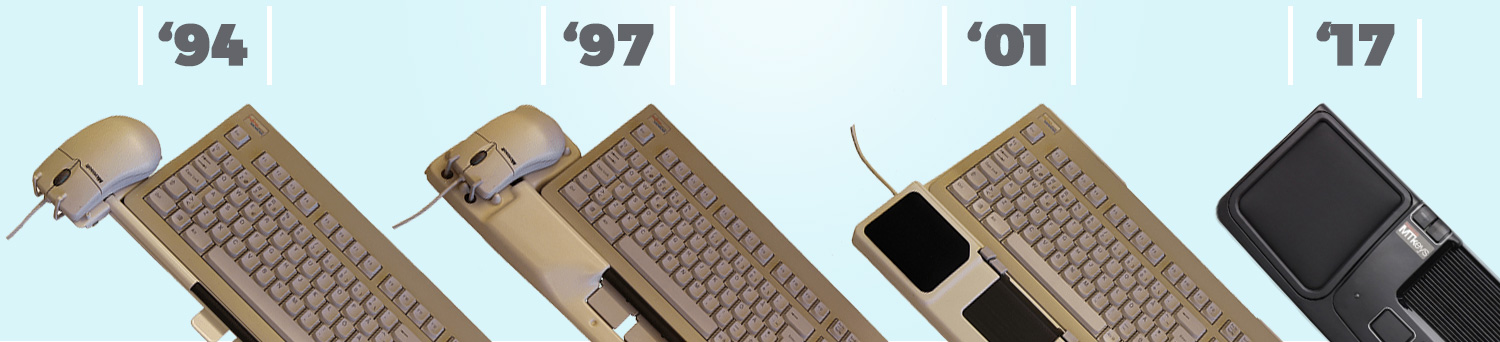 The development of Mousetrapper from 1994 to 2017
An interesting fact is that the first fully-fledged Mousetrapper was launched in the same year that Contour released their very first Rollermouse.
4. Mousetrapper versus Rollermouse
This clickbait title sounds a bit like you’re about to witness a battle similar to Celebrity Deathmatch on MTV back in the day. It’s not quite that dramatic, and it won’t be a bloody contest with a clear-cut winner either. However, you will see that there are (fortunately) differences between the two brands that can help you make an informed choice.
Build quality
Housing
The first impression of both brands is good. That said, the Rollermouse feels a bit sturdier in terms of build quality, as the casing of each model is partly made of aluminium. The Red takes the crown; you could knock a burglar unconscious with it. Despite that, it is still a lightweight product at 840 grams. The Mousetrapper models are mainly made of plastic and therefore feel slightly more fragile. Don’t consider that a deal-breaker, though, as most mice are made of plastic.

Buttons
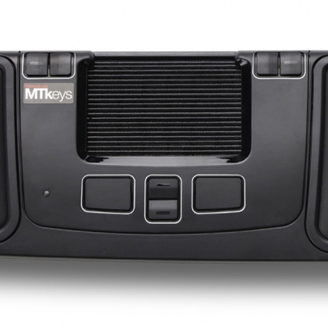 The buttons on the Mousetrapper Prime
 The buttons on the Rollermouse Red
What makes the Mousetrapper superior to the Rollermouse are the buttons. They feel slightly more robust, provide satisfying feedback when clicked and make no noise. The large buttons on, for example, the Rollermouse Free3 and Red sound very hollow and plasticky, which does not enhance the perception of quality. Especially not after you’ve just raved about the sturdy aluminium casing.

palm/wrist rests
Both the Mousetrappers and Rollermice have palm/wrist supports. With Mousetrapper, these are either Lycra (Lite & Advance), soft-touch (Flexible) or faux leather (Prime) pads; with the Rollermice, they are all faux leather. They are filled with polyurethane foam. The faux leather certainly has the edge when it comes to appearance and a sense of luxury. The Lycra on the Mousetrapper, on the other hand, will feel less sticky during the hot summer months. However, both solutions provide sufficient support whilst using the mouse and/or typing.
Trackpad operation
Cursor
The scroll bars on Rollermouse products all feel solid and inspire confidence when using them. The bar rolls and slides smoothly through the housing, and the spring for the left-click mechanism underneath provides a pleasant amount of resistance. The open design of the bar makes it easy to remove dirt and any food debris (for those with a sweet tooth). All you need to do is hold the Rollermouse upside down.
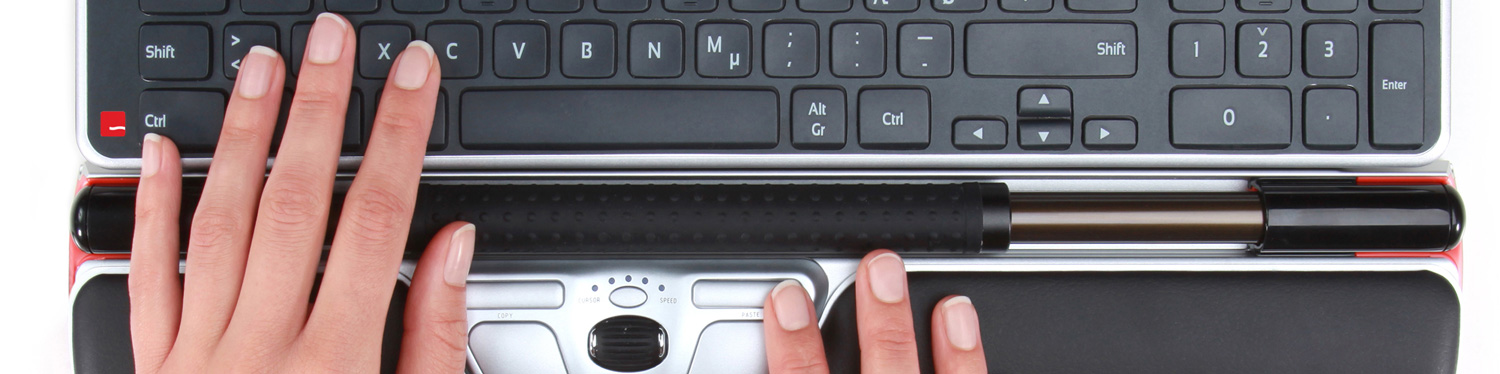 The Rollermouse bar used to move the cursor
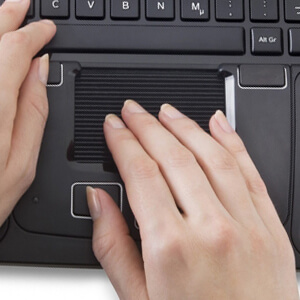 The Mousetrapper mat used to move the cursor
The Mousetrapper has a mat that, just like the Rollermouse, rolls vertically and slides horizontally within the casing. Beneath the mat is a switch that you can really hear and feel clicking when you press it. Although the mat offers a bit more feel and precision (I’ll come back to this), it also looks and feels a bit more fragile than the Rollermouse’s bar. A compromise that has likely been made to allow the mat to glide smoothly through the housing. You can also safely eat your sandwich on top of the Mousetrapper. Thanks to the slots in the underside, dirt can be removed more easily.
In comparison, I think the Rollermouse takes a little more getting used to when controlling the cursor. The trackball needs no more than a light tap to start moving. You usually operate it with one or two fingertips, which, unlike a conventional mouse, requires quite delicate movements. Thanks to its square mat, the Mousetrapper allows you to navigate using two, three or even four fingers at once. It gives you a greater sense of control, which is particularly advantageous at the start.
Buttons
The buttons on both the Rollermouse and Mousetrapper products are centrally positioned and can be operated with either hand. However, there is a significant difference in their placement, particularly due to the positioning of the bar (Rollermouse) and the mat (Mousetrapper) used to move the cursor.
The buttons on the Rollermouse RedWith the Rollermouse, you can see that there is a clear rationale behind the placement of the buttons. They are positioned as centrally as possible both horizontally and vertically. The left and right mouse buttons stand out in terms of size. Above those two buttons are even smaller buttons with functions such as ‘cut’ and ‘paste’. Personally, I’m a fan of this layout, as you often navigate the mouse using the trackpad in the middle. The transition from trackpad to buttons is therefore seamless, and you can operate them all with either your left or right hand.
The buttons on the Mousetrapper PrimeOn the Mousetrapper, the vertical layout is a bit trickier because the mat is already there. You’ll see a button layout that will look very familiar (laptops). The left and right mouse buttons are located beneath the mat, with the scroll buttons in between. There is no scroll wheel to be seen on the Mousetrappers. I actually quite like this, as a scroll wheel tends to lead to a lot more repetitive movements. The most important buttons are situated directly beneath the mat and can be found by touch. At the top left and right of the Mousetrapper Advance and Prime, you’ll find additional buttons that also perform functions such as copy and paste. The odd one out in terms of design is the Flexible, where the buttons are positioned around the mouse pad.
Support for hands and wrists
Both Contour and Mousetrapper have comfort in mind. All products feature soft pads on which you can rest your palms or wrists. Your palms are supported whilst using the mouse, and your wrists whilst typing. The way in which the soft supports are positioned varies.
With the Rollermouse products, they are usually positioned from the front and extend to the bar. The Mousetrappers have a sort of plastic frame that runs around the supports. The way the supports are positioned has the advantage that they can be easily replaced. Whereas the Rollermice, such as the Red and Free, are slightly raised, the Mousetrappers are generally at the same height as your desktop.
You could say that the Rollermouse bridges the height difference with the desktop slightly better than the Mousetrappers. The supports are also a bit more refined. This one is for Contour.
Learning curve
A frequently asked question regarding products such as the Rollermouse and Mousetrapper concerns getting used to them. How quickly do you get used to such a trackpad, and when will you really start to benefit from it? It’s important to note that this varies from person to person. For instance, in the reviews for the Rollermouse Red, you’ll find one from someone who got used to it after two days, but also one from someone who definitely needed two weeks. There will be a similar difference with the Mousetrappers.
Where the Mousetrapper does have an advantage over the Rollermice is its laptop layout. Almost everyone has worked with a laptop at some point and will be familiar with the centred placement of the pad and the buttons. That’s not the only area where the Mousetrapper has the edge, though. The fact that the pad can be touched and operated with a few fingers at once is also a plus. You can be a bit ‘rougher’ with it.
 The familiar laptop touchpadThe Mousetrapper’s pad used to move the cursor
A Rollermouse requires finer motor skills. You want to be able to find the trackpad by feel and move the cursor to the right spot using one or two fingers. Not that you need the precision of a surgeon. Nor have I heard of any Rollermouse being thrown out of a window in frustration. Switching from a standard mouse to a Rollermouse will simply require a little more practice than making the same switch to a Mousetrapper.
The drivers (pieces of software) that you can download from the Mousetrapper or Contour websites will help you get used to it more quickly anyway. With the Rollermice, for example, I choose to disable the click under the trackball, as I activate it too quickly. I prefer to control the cursor using only the trackball and press the left mouse button with a separate button. The Mousetrapper Advance and Prime don’t even come with buttons to activate the left mouse click as standard. So I quickly sorted that out with the driver, because you simply want to have a button like that. When doing precision work, with both the Mousetrapper and the Rollermouse, you’ll quickly move the cursor a centimetre when you press the bar or the mat.
Product diversity
The idea behind the various products from both brands is essentially the same, although there are definitely noticeable differences. Although the emphasis is on a compact design, both brands have launched a number of models that differ in terms of use and application.
For example, Contour has the Pro3 in its range, which has a very practical design. It has large buttons and part of the trackpad is covered so you don’t accidentally bump into it whilst typing. The Free3 is flat and therefore fits best on a laptop. The absolute top-of-the-range model, the RED, feels the best in terms of quality and features the finest trackball for cursor control. A thick, rubber-coated textured surface exudes ‘grip’.
Mousetrapper also offers a practical model in the Lite. No fuss, a simple design with the functions you mainly need. If you want just a bit more, you can step up to the Advance with 6 programmable buttons or even the Prime with 8! For the (mobile) laptop user, the compact Flexible is the best choice. It is actually even more suitable than Contour’s Free3, as it is much smaller (95 x 300 x 19 mm compared to 121 x 489 x 23 mm).
Prices
In terms of price, neither brand is really any cheaper than the other. They both target the higher end of the market. The lowest prices for both brands are above €250 including VAT and go well over €300. The barrier to entry for using a Rollermouse or Mousetrapper is therefore quite high. Fortunately, certain companies such as Ergowerken (“hey, that’s us!”) offer a trial period during which you can test the product for free and return it if necessary. So you can take your time to see whether a central mouse is right for you.
5. Conclusion (is there a winner?)
Based on the table below, you could in principle pick a winner. I just think that’s too simplistic. Not every ‘win’ in the areas discussed carries the same weight. You probably have different ideas about that than I do. In any case, you now have a good indication of the various key aspects of both brands. Hopefully, this will make it a bit easier for you to make a choice. Is there a winner for you? View our range of Contour Design and Mousetrapper products here.
| Mousetrapper | Rollermouse (Contour) | |
| Build quality | ||
| Housing | ||
| Buttons | ||
| Palm/wrist rests | ||
| Controls | ||
| Cursor | ||
| Buttons | ||
| Support | ||
| Learning curve | ||
| Diversity | ||
| Prices |