













Mouse arm: information and tips
Table of Contents
Repetitive strain injury: a troublesome condition
6 prevention tips
4 treatment tips
A good workplace is important
Repetitive strain injury: a troublesome condition
What is mouse arm?
How is it different from RSI
Mouse arm is a more specific condition within the broader category known as RSI. You can read more about this in the RSI post we wrote earlier. Mouse arm refers to symptoms in the hand, wrist, arm and shoulder caused by excessive use of a computer mouse.
The most common symptoms of mouse arm are stiff muscles, muscle pain, cramps, loss of strength, tingling, muscle fatigue and reduced coordination. These symptoms can develop in a number of stages, ranging from mild muscle pain to being unable to hold a pen. Mouse arm is therefore a condition that should be taken seriously.
Stage 1 – You experience a mild, nagging pain. A stiff muscle, fatigue? It’s hard to say for sure. It’ll probably go away by tomorrow. Often, that’s exactly what happens. However, things can also take a turn for the worse. Stage 2 sets in.
Stage 2 – The pain has been present for several days and shows no sign of going away. In fact, it is getting worse, little by little. You are now also experiencing swelling, your muscle coordination is no longer smooth, and you feel somewhat restricted. Both at work and at home.
Phase 3 – This is when you start taking sick leave. You can no longer function because of the pain. Simple tasks such as writing something down or lifting a cup of coffee are no longer possible. The symptoms have taken hold of you, and simply waiting for recovery is no longer enough.
Cause of the symptoms
From a physical perspective, the cause of mouse arm lies in two factors: static strain and dynamic strain. Both forms of strain have an impact on the body.
Static strain is a constant posture that keeps the muscles under tension for a long period. Holding the mouse for a long time, for example, is a form of static strain and a major cause of symptoms.
Dynamic strain involves repetitive, often simple movements. Examples include lifting the mouse or constantly clicking the buttons. This type of strain also places significant pressure on the muscles, leading to symptoms.
As you have already read in our post on RSI, there are often several underlying factors contributing to the cause of symptoms. Naturally, these also play a part in mouse arm.
6 prevention tips
6 tips to prevent mouse arm
With the right measures, you can prevent mouse arm. Of course, there’s always a risk of developing RSI-related symptoms, but with the right approach, you can delay them for a long time. Here are 6 tips that will certainly help you go a long way:- Mind your posture – Your posture is crucial for a healthy, energetic and productive working day. You’ll feel fitter, have more self-confidence and be less prone to fatigue. Perhaps the most important reason for maintaining good posture is that it helps you stay symptom-free for longer.
- Vary your tasks – Don’t work with the mouse for 2–3 hours straight. Of course, that’s difficult, especially if you rely on the mouse for your work. Think of web designers, call centre staff and administrative staff. Try to find tasks that don’t require a mouse, and split them up. That way, you can switch things up every day and still work in a varied manner.
- Take regular short breaks – Don’t get me wrong. I’m not asking you to look out of the window for 15 minutes every two hours. You can actually put those breaks to good use. Walk over to a colleague to discuss something instead of sending an email, get a drink or pop to the loo. That way, you’ll get the most out of your mini-breaks.
- Put the mouse down more often – Many of the mouse’s functions can also be performed using your keyboard. You can use both hands for this, taking the strain off one hand. Navigating through menus, cutting and pasting text, adjusting the volume on your speakers – it’s all possible. There are handy websites listing keyboard shortcuts for Windows and Mac.
- Discuss high workloads – A tricky one on the list, I know. There are plenty of reasons why you might not want to talk to your manager or boss about workloads you can no longer cope with. Naturally, you want to keep your job. However, consider the unpleasant consequences of taking sick leave. You’ll be off work for a long time, and your boss will be without their regular employee for a long time. So it’s important to let them know in good time that you can’t keep going much longer.
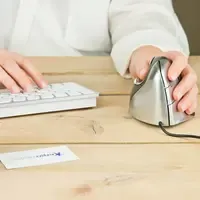
- Choose the right mouse – An ergonomic mouse takes into account the natural position of your arm and provides significantly more support and comfort during long periods of work. An ergonomic mouse doesn’t have to be expensive at all, and is a good investment both as a preventative measure and if you’re already experiencing symptoms. Chat with our mouse specialist Jesse to find the right mouse for you.
4 treatment tips
4 tips to help relieve mouse arm-related symptoms
Once the symptoms have appeared, it is important to act quickly. Treating the symptoms lightly could make the road to recovery very, very, veeeery long. I have selected 4 treatment tips that should help you get rid of your symptoms more quickly.
- Rest – Treat mouse arm just like any other injury. The easiest comparison is with a sports injury. What do you do if you’ve pulled a muscle? Exactly, you rest. You sit down a bit more often and try not to do whatever caused the problem. You do the same with mouse arm. Have you been using your mouse too much? It’s a simple calculation.
- Think about your posture – Your posture is also crucial if you’ve already developed symptoms. There’s a good chance that poor posture has contributed to the development of your symptoms. Since you can start working on good posture straight away, this tip is absolutely essential.
Use ergonomic aids – There are plenty of aids that can help you get rid of your symptoms. An ergonomic mouse, ergonomic keyboard, wrist rest, armrest, or office chair – these are all products that (provided you have the right ones) you can use to reduce your symptoms.
Tip: Want to find your ideal mouse or keyboard quickly?- Get help from a specialist – Mouse arm can cause so many symptoms that you may no longer know which adjustments to your lifestyle and working habits could help. A specialist will likely know. They can help you get back to working symptom-free more quickly. A specialist could be a physiotherapist or an ergonomist.
A good workspace is important
Know who is responsible for ensuring a good workplace
Who is actually responsible for ensuring a good workplace and for preventing or reducing health complaints? In case you didn’t know, it is the employer. It is the employer’s responsibility to ensure that their employees’ health is not adversely affected by their work. They are also partly responsible for helping to reduce any health complaints that arise. An employee is therefore entitled to an ergonomic workplace that prevents them from developing health complaints.