







Stel hier je vraag over dit product
Delux Ergonomic Flatwave wireless


Product description of Delux Ergonomic Flatwave wireless
Is this keyboard right for me?
| Width | 420 mm |
| Depth | 130/220 mm without/with wrist rest |
| Height | 15-20 mm |
| Compatibility | Windows, Mac, iOS and Android |
| Key layout | QWERTY (ANSI US int.) |
| Switches | Scissor |
| Connection | Bluetooth 3.0/5.0 and 2.4 GHz (USB receiver) |
Ode to the Delux Flatwave
Curved design
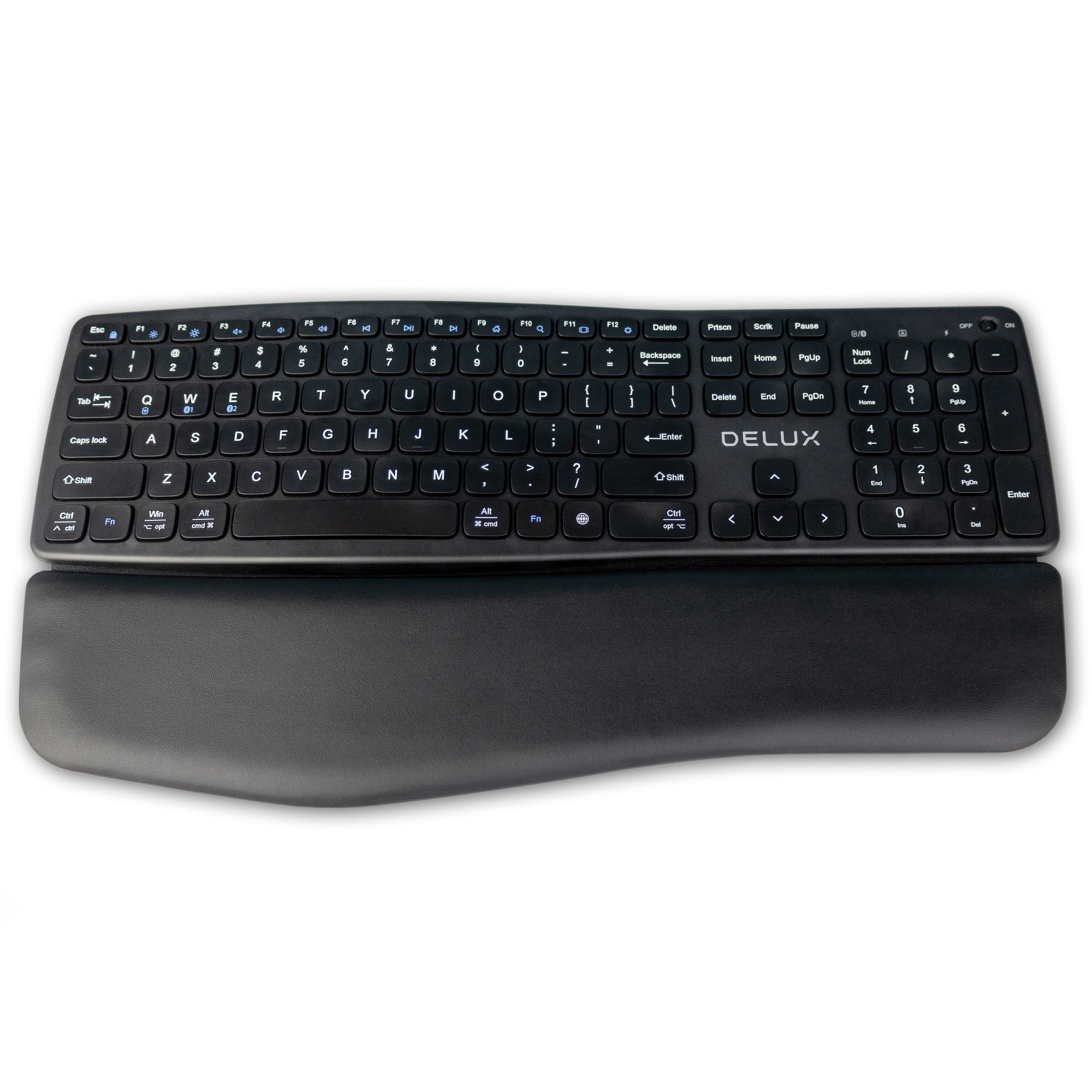
Nice and flat with a curve in the middle of the keys, so that the keys sit comfortably under the fingers. With the included wrist rest, your palms also rest comfortably while typing – what a curved design.
Why the Delux Flatwave?
Nice and flat
Many keyboards are just a little higher than desirable. Not the Delux Flatwave, which has been kept as flat as possible everywhere. Yet it is still comfortable because they have incorporated a curve in the middle of the board. This bump makes the keys sit a little more comfortably under the fingers, and you make fewer mistakes.
The keyboard is equipped with scissor-switch keys. The advantage of these is that they are super flat. Besides being flat, they also offer a pleasantly light typing experience and are also nice and quiet, so you don't bother anyone in your immediate vicinity.
A little support!
This ergonomic keyboard from Delux comes standard with a detachable wrist rest. This is pleasantly soft and finished with a leather-look upholstery. This provides your palms with excellent support while typing.
In addition to extra comfort, the wrist rest also ensures that the keyboard's low height is bridged. This ensures a comfortable wrist posture while typing.
Wireless in two ways
You connect the keyboard using the included USB dongle or via a Bluetooth 3.0 or 5.0 connection. You can also make these connections simultaneously, so you can connect up to 3 devices to your keyboard at once. You can then switch between your devices using the FN Key + Q (USB), FN + W (Bluetooth 3.0) and FN + E (Bluetooth 5.0).
What makes the Delux Flatwave so good?
Because the board is super flat and equipped with a perfectly fitting wrist rest, it ensures an optimal posture while typing. Its curve also allows you to position your hands a little more comfortably.
Get the most out of your Delux Flatwave
Suitable for Windows and Mac
This keyboard features a dual legend. This is the printing you see on the keys. You'll find a Windows and Alt button, but the Command and Option keys for Mac users are also present.
It's useful to know that when you connect the keyboard to an Apple computer via Bluetooth, it is set to the MAC layout by default. If you connect it to Windows, it works according to the Windows layout. One small note here is that when you connect it to an Apple computer with the USB dongle, it does not recognise the Mac layout. So, on a Mac, it works optimally via Bluetooth.
Don't miss this either
Rechargeable battery
The keyboard is equipped with a Li-ion battery with a capacity of 210 mAh. You can charge it using the included USB cable. There is an LED on the board that glows red when it is charging. When the LED lights up green, it has finished charging, and you can get back to work. You can continue working while it is charging.
FN for extra functionality
The keyboard also has a number of multimedia keys. With these keys, you can quickly change your screen brightness or control your music player. You can also quickly open your settings by pressing FN+F12. Don't want to keep pressing FN? Then you can enable FN-lock with FN+ESC. The extra functions that are then available are printed in blue on the keys.
Pros and Cons
- Flat design
- 2.4 GHz & Bluetooth (dual-mode)
- Connect up to 3 devices
- Rechargeable battery
- Detachable wrist rest
- Not the best choice for shoulder complaints
Brief specifications
| Keyboard type | Flat |
| Ergonomic design | |
| Connection | Bluetooth and wireless via USB |
| Bluetooth | 3.0 / 5.0 |
| Weight | 638 grams |
How happy will my body be with this?
| Wrist | |
| Arm | |
| Shoulder | |
| Hand |
Product features
- Flat with curve
- Detachable wrist rest
- Rechargeable battery
- Wireless via Bluetooth and USB dongle
- For Windows and Mac
- Full-size keyboard
- Multimedia hotkeys
What's in the box?
- 1 x Keyboard
- 1 x Manual
- 1 x USB charging cable
- 1 x Detachable wrist rest
Frequently asked questions
Specifications
| Item number | ERGO-DEGM908 |
| Manufacturer's item number | GM908 |
| Brand | Deluxe |
| Warranty | 2 years |
| Type of guarantee | The Ergowerken free return guarantee service |
| Colour | Black |
| Keyboard type | Full size with flat keys |
| Ergonomic design | |
| Keyboard layout | QWERTY (ANSI US int.) |
| Connection | Wireless via USB and Bluetooth |
| Bluetooth | 3.0 and 5.0 |
| USB version | USB-A |
| Type of keys | Scissor mechanism |
| Numeric keypad | |
| Shortcut keys | |
| Programmable buttons | |
| Trackball/touchpad | |
| Type of power supply | Rechargeable battery |
| Battery type | Li-ion 210 mAh |
| Rechargeable | |
| Minimum system requirements | Mac or Windows |
| Plug and play | |
| Dimensions length x width x height | 420 x 220 x 20 |
| Product weight | Keyboard: 477 grams | Wrist rest: 191 grams (638 grams total) |